Website design prompts
Website design prompts are written instructions that tell an AI agent what a site should look like and do: the business, the order of sections, the typefaces, two or three colours, one motion idea and which facts to ask for. This page gives five working prompts, each tied to a free MIT template whose result you can open before you paste anything.
Most advice on web design prompts is a list of adjectives. The agent fills every decision nobody made with the most common choice, and the site looks like every other generated one. These prompts carry decisions already made in a real page, so you can open each template and see what they produce.
Use them as shapes, not scripts: swap the business, keep the structure of the prompt and point your agent at the folder. For the full routine in one tool, read the guide to building with Claude Code; the folder prompts below also run in Codex and Cursor, and one is written for the AI builders.
At a glance, October 2026. There are 12 templates on this page, all free under MIT and made by 8B, an AI website builder. Each one is listed by the decision its prompt fixes: type, colour, motion, structure or data. All 12 are single scrolls: ten have 12 sections, one has 13 and one has 10. Five of the prompts are written out in full below. The prompts run from about 70 to 135 words, long enough to name the colours and the sections, short enough to read in one go.
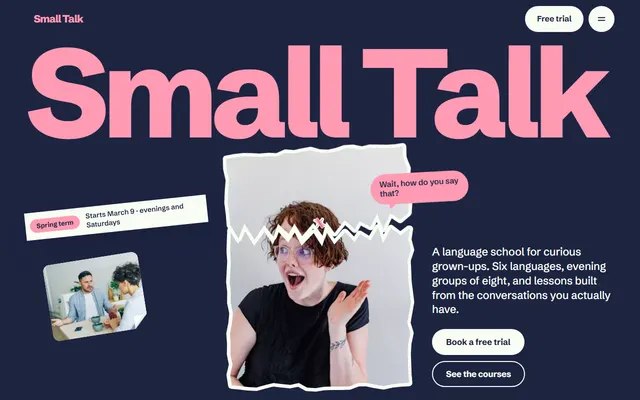
Language school. Its prompt opens with an interview, so levels, fees, term dates and teachers come from the owner and nothing is invented.
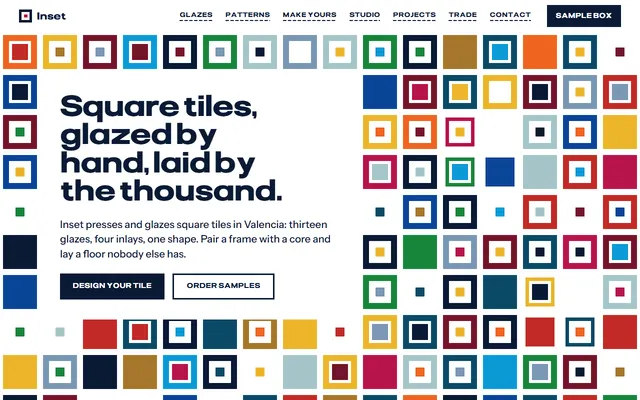
Tile maker. The prompt names the data attributes that carry its prices, so a changed price is changed in the stored value as well as the visible text.
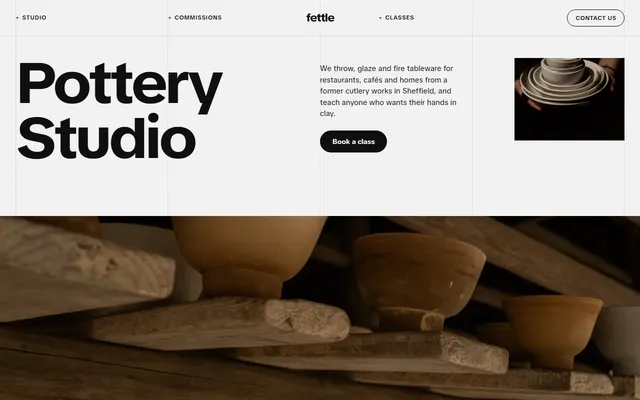
Pottery studio. The prompt fixes five grid lines and keeps an opening where the photo splits into four strips along them.
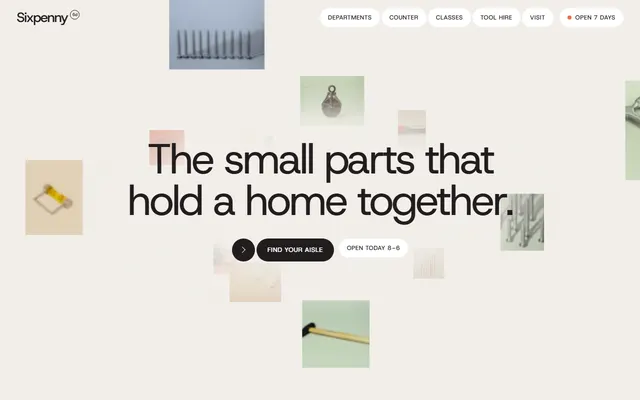
Hardware store. The prompt fixes warm off-white and ink, one typeface and both faces of each hire tag, the buy-new price and the weekend price, and bans new animations.
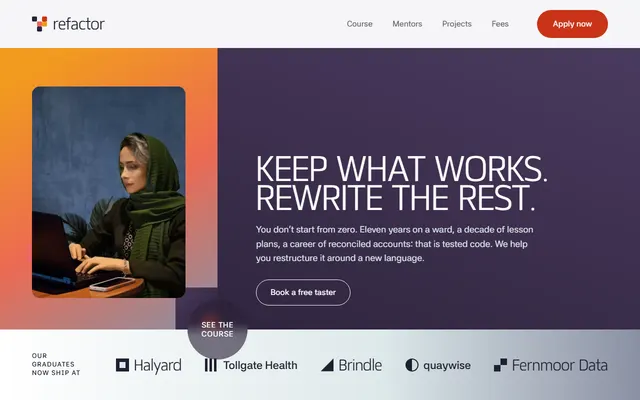
Coding school. The prompt fixes six career rows scrubbed on scroll, so the agent keeps the count and asks for real outcomes.
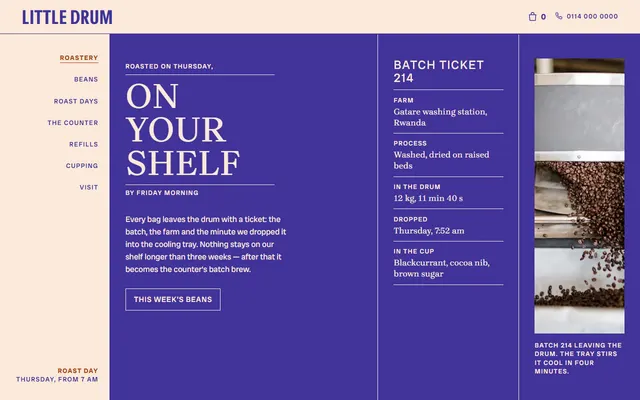
Coffee roaster. Its prompt fixes a cream, indigo and rust palette, three typefaces and one motion idea: a round frame that turns beside the coffee list.
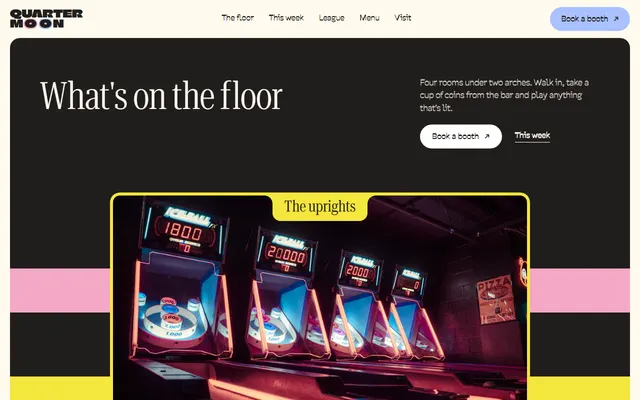
Arcade bar. The prompt fixes cream and charcoal with pink, blue and yellow photo frames, and a stack of four photo cards that shrink as the next covers them.
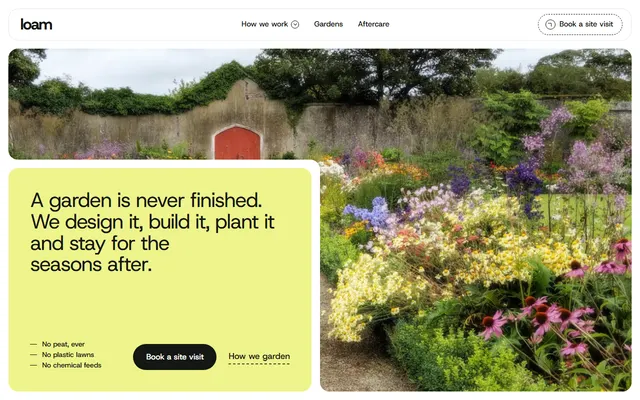
Landscaping firm. The prompt fixes four service beds and a lime and forest green palette, and asks for real gardens, quotes and numbers.
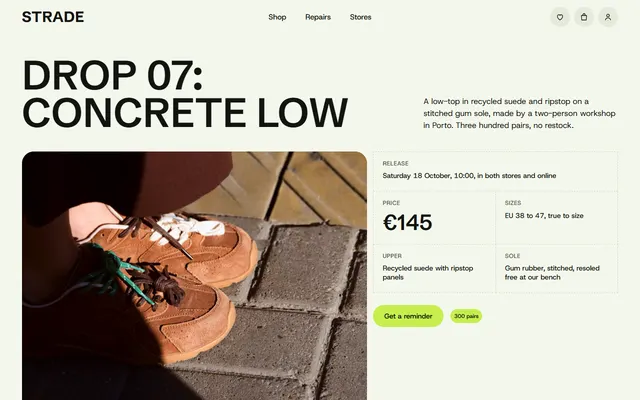
Sneaker store. The prompt rewrites one section only, a lookbook that pins and travels sideways, and tells the agent to leave the rest alone.
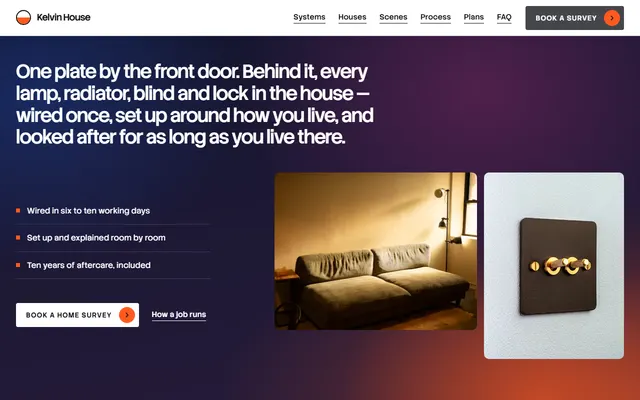
Smart-home installer. The phone-check prompt matters most here, because its systems stage pins from 1024 px wide and behaves differently below that.
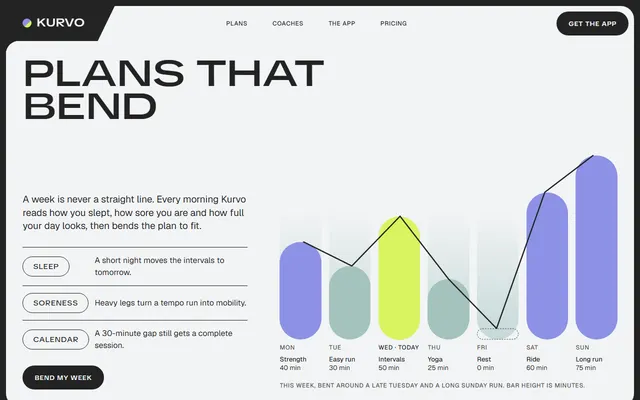
Fitness app. Its prompt names charcoal, mint, lilac and one lime accent, with one motion idea: a headline opening from condensed to extended letters.
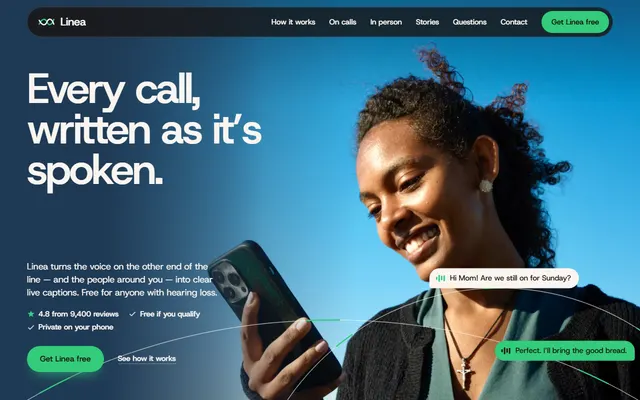
Mobile app landing. The prompt keeps the warm paper, espresso and navy palette with one green accent and the phone steps in order, with each text-length number in step with its line.
What makes a website design prompt work
A design prompt works when it swaps adjectives for decisions. "Modern, clean, premium" tells the agent nothing, so it falls back on the usual gradient and the usual three cards. A prompt that names a typeface, two colours, one motion idea and the order of sections leaves little to guess. Six items do most of the work.
- Business and first action. Who visits and what they should do first: book, call, order, download.
- Type. The typefaces by name. The language school page runs on one family in several weights, and a prompt can say exactly that.
- Colour. Two or three hex values and where each sits. The roastery page gets by on cream, indigo and rust alone.
- One motion idea. One sentence is enough. On the pottery studio page the opening photo splits into four strips along the grid lines, and nothing else competes with it.
- Section order and counts. A prompt that says "keep four service beds" stops the agent from adding a fifth to the landscaping page.
- What to ask for. Real facts come from the owner. The prompt says so and forbids invented numbers.
These are the decisions a generated site skips, and a separate page lists the usual tells it shows instead.
Website design prompts for adapting a template in Claude Code or Codex
When an agent works in a folder, it can open the file, edit it and check its own work. That is where a good Claude Code prompt for website design pays off, and the same text works in Codex. Put index.html and AGENTS.md in an empty folder, start the agent there and paste a prompt like this one, written for a coffee roastery.
Read AGENTS.md in this folder, then edit index.html only.
Job: turn this page into the site for <my coffee roastery: town, address, hours, roast day, five coffees with origin and price, drinks, postage terms>.
Keep: the palette (cream #fce9da, indigo #41339a, rust #a2481b), the three typefaces, the round frame that turns beside the coffee list, the four roast-day steps, every section id and every class AGENTS.md lists.
Change first: the name in every letter case, then coffees, prices, address, photos.
If a fact is missing, stop and ask me. Leave a visible TODO instead of inventing a price, an hour or a review.
At the end, check the page at 1280 px and 375 px wide (in a browser if you have one) and list anything that overflows.Three things carry it: what to keep, the order of changes, and a stop rule for missing facts.
For a shop with services and hire prices, such as the hardware store page, add one more line: no new libraries and no new animations. Its department panels already pin and wipe over each other, and extra effects fight them.
Landing page prompts for Lovable, v0 and Bolt
Lovable, v0 and Bolt write their own code. They do not take a template's HTML as it is, so do not tell them to edit the file. Give them the decisions in words, and attach a screenshot of the template's live demo as the picture of the result. Each template page on this site has a demo you can open and capture. A landing page prompt for these tools should say what to copy (the decisions) and what not to copy (the words). In v0, the Open in v0 button starts from the template's real files, but what you keep is still v0's own project.
Build a landing page for <my app: what it does, who it is for, two plans with prices>. The attached screenshot is the visual reference: copy its decisions, not its words.
Decisions to follow:
- One long page: first screen, how the plan adapts, coaches, stories, plans, questions, download.
- A charcoal #232323 frame with off-white panels, mint #c5d8d8 and lilac #8d91e6 as panel colours, and lime #d8f45f as the one loud accent.
- Geist and TikTok Sans, loaded from Google Fonts.
- One motion idea: on load the headline opens from condensed to extended letters while a row of seven weekly bars grows to its values. Everything else stays still.
- A phone drawn in HTML and CSS, not a stock mockup.
Tag every invented number with [EDIT]. No purple gradients, no emoji, no centred hero with two buttons.The same method works for a venue: name its flat colours, its type and one motion idea, as in the arcade bar page, whose four photo cards stack and shrink as the next one covers them. Expect a close match in structure and colour, not an identical page. If a decision matters, give it a sentence of its own.
Website design prompts for one section and for the phone check
Changing one section is safer than asking for a redesign. The prompt names the section, says what stays and asks for a diff. Here it is for the lookbook of the streetwear shop template, a section that pins and moves sideways.
Change only the lookbook section in index.html. Today the section pins and a row of looks travels sideways while the page scrolls. Keep that behaviour, the 3:4 portrait cards and the dashed rules under each price.
New content: <six looks, each with a photo, a name and three priced pieces>.
Do not touch the navigation, the drop section or the footer. The script measures the row, so do not hard-code a scroll distance; check that the last look still stops fully on screen.
Show me a diff of the section only.After any edit, run a phone check as a separate prompt. Pinned scroll stories are the usual casualty: the installer page pins its systems stage only from 1024 px wide, so the phone version is a different layout and needs its own look.
Open index.html in a browser (a headless one is fine) at 375 px wide, then at 1280 px. Check, in this order: horizontal scroll, text cut off or overlapping, buttons smaller than 44 px, the phone menu opening and closing if the page has one, pinned sections that leave blank space, forms that cannot be used with a thumb.
Report each problem with the section id and the width where it shows. Fix only overflow and overlap. Do not change colours, copy or motion, and do not add a media query that hides a section.ChatGPT and Claude prompts for website content: ask first, write after
Design prompts fail when the content is made up. A page full of invented fees and teachers reads as generic however good the type is. The coding school page is a clear case: its six career rows only work with real before and after jobs, so the prompt has to ask for them. A reliable way to get content from a chat assistant is to turn the prompt into an interview.
Before you write any copy, interview me. I run <my school: name, city, languages>. Ask one question at a time and wait. Cover levels and fees, lesson times, term dates, teachers, how a trial is booked, the refund rule.
Keep my answers in a list called FACTS. When it is complete, edit index.html using only those facts. Anything I did not give you stays as a visible [EDIT] marker.This prompt runs unchanged in ChatGPT, Claude or an agent. In a chat, paste the finished list and the file together. For tidy tokens such as colours and type sizes, give the agent a DESIGN.md too; the DESIGN.md files for the templates list them in one place.
Using website design prompts in Claude Code, Cursor and Codex
- Get a template file and its
AGENTS.mdinto an empty folder. The ZIP on each template page holds both. - In Claude Code, add a
CLAUDE.mdwith the single line@AGENTS.mdso the instructions load, then paste the prompt. - Codex reads
AGENTS.mdby itself. In Cursor, name the file in the prompt: "Read AGENTS.md first". - Ask for one change at a time and open the page after each. Never ask for a modern redesign: it undoes the decisions the prompt protects.
If you would rather not work in files at all, the 8B builder is the no-code route.
Limits of website design prompts
A prompt does not make decisions you did not make. If the colours are vague, the agent picks them. A prompt also cannot replace real photos, real prices or a real address, and demo content in a template is invented. Replace all of it before you publish.
The tile maker page keeps its prices in data attributes, which is why the prompt names them: otherwise the agent changes the visible number and misses the stored one.
Forms in these templates send nothing until you connect Formspree, Netlify Forms or your own backend. Say so in the prompt.
Website design prompt questions
What is a good prompt for website design?
One that names decisions: the business and its first action, the typefaces, two or three hex colours, the order of sections, one motion idea and what to ask you for. It also says what to keep and what to leave alone.
Can I use ChatGPT prompts for website design and the same text in Claude?
Yes. A prompt that lists decisions works in ChatGPT, Claude and other chat assistants. In a chat you paste the file and copy the answer back; in Claude Code or Codex the agent edits the file in your folder. Gemini works too: in AI Studio's Build mode the prompt has to carry every decision in words.
Can I use these prompts in Lovable or v0?
Yes, as text. Lovable, v0 and Bolt generate their own code and do not take the template HTML as it is. Paste the decisions, attach a screenshot of the demo, and expect a close match, not a copy.
Do I need a template to write a good prompt?
No. A prompt works from an empty folder too. A template gives the agent a working file to keep and gives you a real result to point at.
How long should a design prompt be?
Long enough to cover the six decisions, short enough to read once. The prompts on this page run from about 70 to 135 words, and one change per message is easier to review than a long list.
Are these website design prompts free?
Yes. Copy them as they are or rewrite them. The templates they refer to are free under the MIT license. Keep the Design: 8B footer link unless the site owner asks to remove it.
How do I stop an AI-built site from looking generic?
Make the decisions yourself and put them in the prompt: a named typeface, a small palette, one motion idea and real copy from the owner. The page on how to avoid an AI generated look lists the usual tells and how the templates avoid them.