Free app landing page template
Repository: github.com/8bsite/app-landing-page-template · Live demo: 8bsite.github.io/app-landing-page-template/ · MIT license
About this template
Linea is an app landing page template for a mobile app with a free plan, shown as a live-captioning app for phone calls. It fits a messaging or accessibility app, and any SaaS product whose features can be shown one by one on a phone screen.
A one-page site for a free app that turns phone calls and the conversations around you into live captions. Warm paper and espresso bands with one green accent stack over each other as you scroll; spoken words cross from a waveform into readable caption bubbles, a phone builds its transcript feature by feature, and a row of places slides sideways along two curved voice lines.
Good for:
Free for personal and client work under the MIT license. In collections: one page website templates, github website templates, website templates with animation, parallax website templates.
How to use the app landing page template
With an AI coding agent
Download the files into your project (Windows PowerShell: curl.exe):
curl -LO https://raw.githubusercontent.com/8bsite/app-landing-page-template/main/index.html
curl -LO https://raw.githubusercontent.com/8bsite/app-landing-page-template/main/AGENTS.md
curl -LO https://raw.githubusercontent.com/8bsite/app-landing-page-template/main/LICENSE
curl -LO https://raw.githubusercontent.com/8bsite/app-landing-page-template/main/CREDITS.mdThen give the agent this prompt:
Read AGENTS.md, then edit index.html. Use this template as the base for a landing page for <your app or SaaS product: what it does, who it is for, pricing or free plan, where to sign up or download>. Keep the layout, the motion and the single-file format; replace the brand name, copy, photos, the phone screen, reviews, links and contacts, and recolour it through the CSS variables if needed.Give the agent the file, not a link. AGENTS.md says what to keep and what to replace. Step by step: templates for Claude Code.
In a terminal
npx degit 8bsite/app-landing-page-template my-siteNo code
Download the ZIP, edit index.html and drag its folder onto Netlify Drop, or click Use this template and turn on GitHub Pages.
App landing page design and motion
Palette
#faf5f0 warm paper background#eee5dc deeper paper bands and review cards#1b1411 espresso text and dark bands#1f3954 navy hero and calls band#33cc7a green buttons, your captions, curved lines#66574f muted body text#bacde0 pale blue text on navy#b8aba3 muted text on espressoFonts
- Host Grotesk: the only family: large, tightly tracked semibold headings and regular body text
Each section is a sheet with large rounded top corners laid over the last, in paper, navy and espresso. Captions are chat bubbles with a tiny waveform: paper for the other voice, green for yours. The phone is built in HTML, not a screenshot, and buttons are green pills.
Motion runs on scroll; the list of sections below says what moves in each.
What is on the page
- NavigationTop bar: logo, section links, Get-the-app button; phone menu overlay
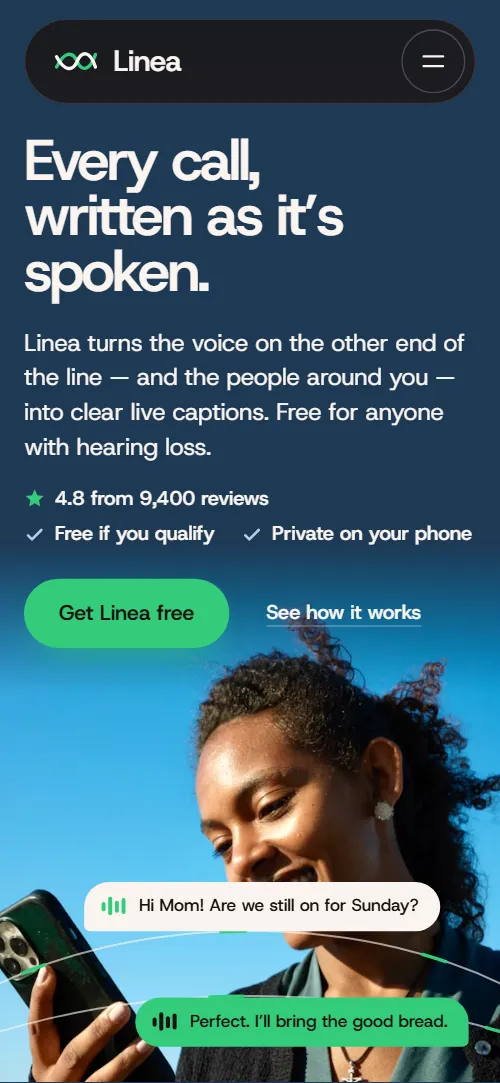
- Every call, written as it’s spoken.First screen: headline over a full-bleed photo, lead, proof line, button; caption chips ride curved lines across the photo
Smooth scrolling runs page-wide and headings slide up line by line. Leaving the hero, the photo zooms while copy and caption chips lift at different speeds.
- Nothing lost between a voice and a word.Two-panel stage: speech on one side, readable captions on the other (demo: They speak / You read)
Pinned, three spoken lines drawn as bars slide into the You read panel and become caption bubbles while the waveform swells.
- Calls that feel easy again.Feature list beside a sticky phone whose screen builds one step per feature
Each feature brightens as it reaches mid-screen and the sticky phone adds that step's messages; on exit the phone shrinks and tilts.
- Captions, set your way.A wall-sized sample sentence over a list of eight settings with drawn controls
The sample card grows out of the phone screen; then, tied to scroll, its sentence thickens and the card flips from light to dark.
- Captions for the room, too.Horizontal track of five places with photos and caption pairs, two curved lines run through all of them
Pinned, five places slide sideways as you scroll, two curved lines draw along, and each card's caption pair rises in.
- Recommended by clinicians. Loved by the people who use it.Expert quote with portrait beside two columns of short reviews
Review columns rise at two different speeds, or cards slide in from alternate sides on phones, while the portrait zooms out.
- Three steps, then just talk.Three numbered step cards that stack on top of each other
The three step cards stick and stack as you scroll; each new card shrinks and dims the one beneath.
- Questions, answered plainly.Questions and answers (native <details>)
- Your next call can be the easy one.Closing call to action over a photo that opens from a small window to the full band
The photo opens from a small window to the full band, and green bars over the heading clear word by word.
- Talk to a person, any way you like.Support hours, a photo, three ways to reach the team and a contact form (placeholders)
- Live captions for every call and conversation.Tagline, link columns, giant wordmark, copyright with the Design: 8B credit and a legal note
Tied to scroll, the giant Linea wordmark rises into place while the logo's two strokes draw themselves.
What is inside
- Files
index.html(134 KB, CSS and JavaScript inside),AGENTS.md,CREDITS.md,LICENSE- Motion
- GSAP 3.13.0 (ScrollTrigger, SplitText); Lenis 1.3.27 smooth scroll, loaded from jsDelivr. With reduced motion on, the page shows a complete static version.
- Fonts
- Host Grotesk from Google Fonts (SIL Open Font License)
- Photos
- 9 from Unsplash (Unsplash License), loaded from Unsplash's servers and each credited in CREDITS.md
- Browsers
- Chrome and Edge 111+, Safari 16.2+, Firefox 113+ (it uses color-mix(), container query units, cascade layers, small/dynamic viewport units).
- Replace before publishing
- Social preview image, favicon, phone number, email address and contact form (sends nothing yet), plus the invented demo facts (prices, dates, addresses). AGENTS.md lists them.
- License
- MIT
Good to know
- One page, no CMS: texts and prices are edited in the HTML, and there is no checkout or payment built in.
- "Get Linea free" buttons in the nav, the phone menu and the hero lead to
#startnow; point them to your sign-up page or app store URL. - "Download the app" in calls and "Get the app" in the footer lead to
#startnow; point them to your App Store / Google Play or download URL. - "Get Linea free" in call-to-action lead to
#hero (back to the top)now; point them to your sign-up page or app store URL. - "Book a captioned call" in contact lead to
#contact-formnow; point them to your booking or calendar URL, or keep it pointing at the form. - Privacy, Terms and Emergency calling in the footer lead to
#heronow; point them to your own legal pages. - The form sends nothing until you connect a form service such as Formspree or Netlify Forms, or your backend.
- The third hero caption chip shows only from 1440 px wide; below that there is no free area of the photo for it.
- On phones the docked phone in calls is compact (no controls row, small caption text); the same sentence is shown large in caption-styles.
- The voice-to-text and in-person stages and the stacked steps need JavaScript and motion allowed; with reduced motion or no scripts they fall back to plain layouts (joined panels, a grid of places, a column of steps).
- The demo facts are invented. Photos load from Unsplash, the motion libraries from jsDelivr.
Questions about this app landing page template
Is the phone a screenshot?
No. It is built in HTML and CSS: caller, status, number, five message bubbles and a tab bar. Each message appears with its feature as you scroll, so you edit the text in place.
Where do the download buttons lead?
Only within the page, to the closing call to action or the top; there are no store badges yet. The contact form sends nothing until connected to a form service such as Formspree or Netlify Forms.