Free coffee roaster website template
Edit it by hand: it is one index.html with no build step, so you can open it in any text editor, change the words and photos, and upload it to any static host. Not a coder? Describe your business in one sentence to 8B's AI website builder and it designs a new site for you, with more pages when you need them. Designing is free; publishing with hosting is $9 a month, billed yearly. It also works inside Claude and ChatGPT.
MIT license · Made by 8B, an AI website builder · Plain text: little-drum.md, data: little-drum.json
About this coffee roaster website template
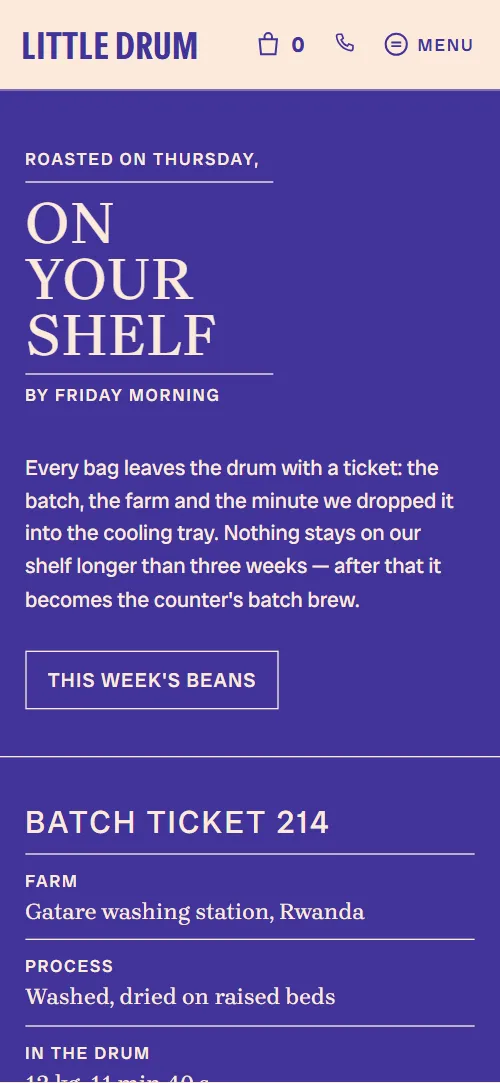
Coffee roaster website template: one free HTML file for a micro-roastery with a counter, built like a printed roast-day ticket. Cream paper, indigo ink, rust accents and round stamps frame five bean listings, a drinks board, tin refills, monthly tastings and visit details. AGENTS.md is included, so Claude Code, Cursor or Codex can adapt it.
At a glance, October 2026. One 88 KB index.html with its CSS and JavaScript inside, 12 sections, 12 Unsplash photos credited in CREDITS.md, Brygada 1918, Instrument Sans and Radio Canada Big from Google Fonts, GSAP 3.13.0 (ScrollTrigger); Lenis 1.3.4 smooth scroll loaded from jsDelivr.
A roastery with a counter needs one page that sells bags and fills seats. This page runs from this week's coffees to a drinks board, a tin refill offer and four tasting dates, so it works as a coffee shop website for a roaster with a shop, or as a cafe website for a place selling its own beans. It is a coffee roaster website template for Claude Code and Cursor. Bakers and tea blenders can reuse the structure.
Vibe coding with Claude Code goes fastest when the agent gets the owner's facts first: coffees with origin, process and price, roast day and times, drink prices, refill terms, tasting dates, hours and address. The demo's farms, owners, batch numbers and figures such as 4,120 bags saved are invented, so the agent must ask rather than guess. It then replaces the name wherever it appears and keeps the selectors AGENTS.md lists. Bolt users can skip the download: its one-click Bolt card hands over the repository.
This is the right base for a small roastery or a cafe that sells its own beans and wants a warm, printed look. Among coffee shop websites it is one page with no real shop: Add to bag buttons jump to the visit section until a checkout is linked. A place that pours beer and hosts events fits the taproom-and-events template better. Owners who do not code can try 8B, an AI website builder, instead.
Good for:
Turn the coffee roaster website template into your site with an AI agent
With an AI coding agent
Files (PowerShell: curl.exe):
curl -LO https://raw.githubusercontent.com/8bsite/coffee-roaster-website-template/main/index.html
curl -LO https://raw.githubusercontent.com/8bsite/coffee-roaster-website-template/main/AGENTS.md
curl -LO https://raw.githubusercontent.com/8bsite/coffee-roaster-website-template/main/LICENSE
curl -LO https://raw.githubusercontent.com/8bsite/coffee-roaster-website-template/main/CREDITS.mdPrompt for the agent:
Read AGENTS.md, then edit index.html. Make this the site for <my roastery or coffee shop: name, town, address, hours, roast day, coffees with origin, process, notes and prices, drinks and prices, refill or tin offer, tasting dates, owners, postage terms>. Replace first the name, the five coffees, the farms, the drinks board and the Sheffield address, then the photos. Keep the ids, the selectors AGENTS.md lists, one photo per coffee and four ticket cells for four steps. Ask me for missing facts; never invent prices, hours, reviews or contacts.In a terminal
npx degit 8bsite/coffee-roaster-website-template my-siteCoffee roaster website design prompt for any AI tool
Use this prompt to build a roastery or cafe site from scratch in Claude Code, Codex, Cursor, Lovable, v0 or Bolt, or to brief a designer. It is this template's design written as decisions; with the template itself, the short prompt above is enough.
Build a one-page website for a micro-roastery with a counter, designed like a printed roast-day ticket stamped by hand. Sections in order: a left rail of links on desktop, an opening of three panels with the headline and ticket lines, five coffees beside a round sticky photo frame, four roast-day steps, three farms, a drinks board of seven drinks, a tin refill offer, monthly tastings, the two owners, questions, visit details, footer. Type: Brygada 1918 weight 500 for uppercase headings and names; Radio Canada Big 400 for body and 500 for labels and buttons; Instrument Sans condensed bold only for the wordmark and the words inside round stamps. Colours: #fce9da cream paper, #41339a indigo ink for text and the dark sections, #a2481b rust for kickers, outlined buttons and two sections. Cells divided by 1.5px rules, square corners; no shadows, no gradients, no rounded cards, no purple, no centred hero with two buttons. Motion idea: things stamped, stacked and turned as the ticket fills in; respect prefers-reduced-motion by switching it off. Copy: short, warm, exact. Ask me for coffees with origin, process and price, roast day, drink prices, refill terms, tasting dates, hours and address; never invent farms, owners or figures; leave placeholders and list them. One primary action, Add to bag, repeated on each coffee and in the visit section. Mobile: Menu button under 1024 px, tap targets at least 44px. Checks: no console errors, works at 390 px, keyboard focus visible.Coffee roaster website design and motion
Palette
#fce9da cream paper ground of the page, plus the text and rules on the indigo and rust sections and the fill of the light buttons on hover#41339a indigo ink: text and hairlines on cream, the ground of the three first-screen panels, the drinks board and the visit section, and the fill of the bag and Menu icons on hover#a2481b rust: small kicker labels, outlined buttons, refill figures, the ground of the roast-days and cupping sections, the current coffee name and the current rail linkFonts
- Brygada 1918: serif at weight 500: uppercase display headings and coffee, farm and owner names, plus drink names, ticket values, FAQ questions, tasting dates and the text running round the stamps
- Radio Canada Big: body text at 400, uppercase tracked labels and buttons at 500, and prices and step titles at 700
- Instrument Sans: condensed bold (stretch 75%) used only for the wordmark, the ticket heading and the words inside the stamps
Indigo hairlines split nearly every section into ruled cells, and on desktop a fixed left rail holds seven links. Each heading is a three-line lockup: a small kicker, a large serif line and a small caption, with rules between the lines. Grounds alternate cream, indigo and rust. Round forms recur: the turning bean frame, the tin and its lid, the tasting photo and seven ring stamps with a word in the middle.
Display type is tight serif capitals set against a narrow condensed face for the wordmark and stamps. Buttons are square outlines that fill from the bottom on hover, while the bag and Menu icons fill with a circle rising from below. Ticket rules and round stamps carry the print-shop feel.
Every value of this coffee roaster website design, with the type scale, spacing and the motion rules, is in its DESIGN.md file (Google's format), ready for a coding agent or Stitch.
What is on the coffee roaster website page
- NavigationWordmark, a bag icon with a count, a phone link and a Menu button that opens a rail of seven links
- Roasted on Thursday, on your shelf by Friday morningThree panels side by side: the headline with a button, a batch ticket and a photo of a batch leaving the drum
Smooth scrolling runs page-wide; on load the three indigo panels fill from the bottom one after another (from the left on phones) and the headline and ticket lines rise into place.
- On the shelf This week 250 g bags, roasted ThursdayFive coffees on the shelf with prices, notes and a turning round photo frame
A round frame stays beside the list while you scroll and turns one full circle, and the next coffee's photo opens inside it from a circle as its row nears the middle of the screen.
- Thursday is Roast day Four steps, one ticket per batchFour steps of roast day beside a sticky batch ticket that gets stamped
As each of the four steps passes the reading line, a ring stamp presses onto the matching ticket cell from over twice its size and turned, and the cell dips slightly.
- Bought direct Three farms The same growers, year after yearA photo and three partner farms with place, year and a line each
Each of the three farm rows wipes in from the left as it arrives.
- At the Counter Espresso, filter and cakeA drinks board of seven rows that fans open, and a photo of the counter
The seven drink rows start stacked on the first row and fan down to their places while each row's text opens from the top.
- Bring the Tin back Refills on every opening dayThe tin refill offer with three terms and a lid that rolls off the tin
The Refill lid starts over the tin and rolls along the baseline to the right edge, turning by the distance it travels.
- First Saturday Cupping Ten till half elevenA round photo with a Free stamp and four monthly tasting dates
The Free stamp drops in from a larger size, turned, once, when it reaches the lower part of the screen.
- Two people One drum Kelham Island since 2019A photo of the two owners that assembles from slats, with a short bio each
The owners' photo is cut into slats, four on screens 700 px wide or more and three below, offset up and down, and they slide together as the photo rises.
- Asked at The counter Five things people askFive questions and answers (native details)
Each question wipes in from the left on arrival; opening one turns its plus into a minus.
- Come to The counter Kelham Island, SheffieldAddress, hours, phone, email, directions and a square photo behind the counter
The shop-window photo starts as a small round shape turned on its side and turns upright as it rises, opening into a full square while the image zooms out.
- FooterCopyright, email, two social links and back to the top
Before you publish the coffee roaster website site
- Replace social preview image, favicon, phone number, email address, map and social media links and the invented demo facts (prices, dates, addresses). AGENTS.md lists them.
- This week's beans button in the first screen lead to
#beansnow; point them to keep it, or link your online shop. - Add to bag buttons on the five coffees lead to
#visit; the bag icon in the top bar shows 0 and links to #beansnow; point them to a checkout or shop link per coffee (Shopify, Stripe, Square); the bag count is plain text. - Get a tin button in the refills section lead to
#visitnow; point them to your tin product page, or keep it on the visit section. - Book a seat links on the four cupping dates lead to
mailto: counter address with a subject for each datenow; point them to a booking page per date, or keep the email links with your own address. - Get directions button in the visit section lead to
a Google Maps search for Sheffieldnow; point them to the map link of your shop. - Wholesale enquiries link in the visit section lead to
mailto: counter address with the subject Wholesalenow; point them to your wholesale email or form. - Phone link in the top bar and the visit section lead to
tel: the placeholder numbernow; point them to your number. - Instagram and Facebook links in the footer lead to
the home pages of instagram.com and facebook.comnow; point them to your own profiles. - Add to bag buttons and the bag count do not work as a shop: they link to the visit section until you connect a checkout.
- The beans and roast-days scenes sync photos and stamps to scroll position; on short laptop screens the sticky ticket and the round bean frame take most of the height.
- The slatted owners' photo is built at run time, so it is the plain photo until the script runs and in reduced motion.
- gsap, ScrollTrigger and Lenis load from a CDN near the end of the body, and the motion scripts after them wait for those files.
Questions about this coffee roaster website template
Can it work as a cafe website template or a coffee shop website template?
Yes, if the cafe also sells beans or has a roasting story. Most cafe websites stop at a menu and hours; this one adds priced bags, a refill scheme and tastings. A cafe that does not roast should rewrite or remove the roast days and farms sections and the Roast days rail link.
Can I sell beans online with it?
Not as shipped. The Add to bag buttons link to the visit section, and the 0 beside the bag icon is plain text, not a cart. Point each button at a Shopify, Stripe or Square checkout link. The Book a seat links on the tasting dates are email links with a subject per date.
How do I give it to an AI agent?
Put index.html, AGENTS.md, LICENSE and CREDITS.md in one folder, open it in Claude Code, Cursor or Codex, and paste the prompt from this page with its angle brackets filled. Starting from scratch? Use the coffee roaster website design prompt below in Lovable, v0 or Bolt. Do not hand over only a URL: a fetched page arrives as a summary.
What must I keep when I edit it?
Keep every id, the data-8b-section, data-8b-motion and data-8b-part attributes, and the selectors AGENTS.md lists. The coffee list needs one photo per coffee and the roast ticket one cell per step, or that animation reports an error and stops. Remove data-8b-placeholder once a real value is in, before you switch on GitHub Pages in your copy.
Can I get a site like this without editing code?
Yes, with a different tool than this file. 8B's AI website builder designs a new site from a sentence, in its own design; designing and restyling are free. Publishing with hosting and SSL, full HTML export and AI edits in chat are on Pro at $9 a month billed yearly. It also runs inside Claude and ChatGPT.
What happens with reduced motion or JavaScript off?
With reduced motion on, the load-in, stamps pressing onto the ticket and smooth scrolling are off and the page reads in full, though the round bean frame then shows only the last photo. With JavaScript off, the Menu button does nothing below 1024 px, so the seven-link rail stays hidden, but the FAQ still opens.