Replit website templates
Replit website templates that open in one click: each free HTML design below has an Open in Replit button that starts Replit Agent in Build mode with the design prompt filled in and the live demo's address as the visual reference. Each is also a single index.html with an AGENTS.md of editing rules, so you can import the GitHub repository or ZIP instead and keep the file itself.
Here is what the button does. It opens Replit Agent in Build mode with that design's prompt filled in, including the address of its live demo as the visual reference. You read it, add your facts and submit it yourself. On the electrician's card, for example, Agent opens with that design's prompt and the address of its demo: room-by-room jobs, landlord certificates and a price list.
Replit can start a project from a GitHub repository, so a plain HTML template is a sensible first import: the repository's files land in the workspace, you preview the page, and Agent edits text and colours inside a design already decided. Left to decide alone, an agent tends to reach for the most common choices, which is where the generic, generated look comes from. Every Replit website example below starts from a finished page.
The two paths differ. An import keeps our file: the same page with your words. A prompt makes Agent write its own code in the look of the template, which suits a product that will grow a backend. Terminal agents work differently, as the steps for Claude Code show.
At a glance, October 2026. This page lists 16 templates, all free under the MIT license and made by 8B, an AI website builder. Grouped by who would deploy one from Replit as it is: five trades and building firms (hardware shop, electrician, garden designer, renovation, construction), four office services (two accountants, IT support, a print shop), three care and community sites (day nursery, vet clinic, volunteer network) and four product pages (a weekly-note SaaS, a caption app, two electric moped makers). All 16 carry a contact or booking form, eleven use a single typeface, and each has 10 to 13 sections.
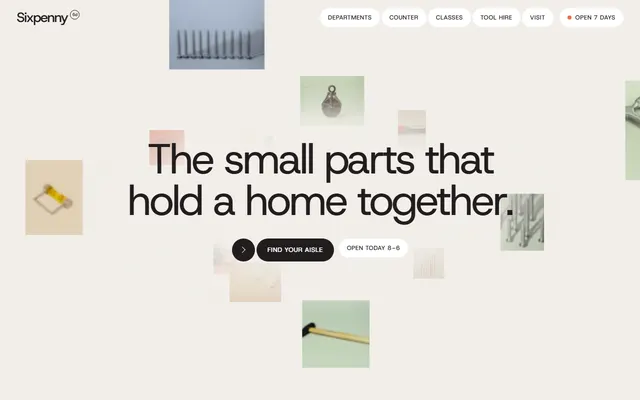
Neighbourhood hardware shop: a drifting cloud of product tiles opens it, then dark department panels wipe up while pinned. Replace stock counts and opening hours first.
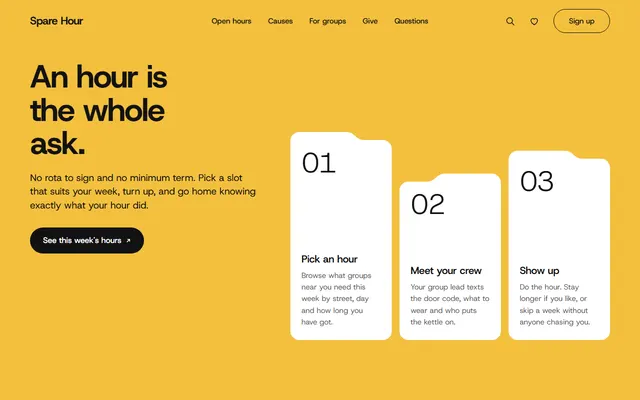
Volunteer network: yellow opening, folder-tab cards in saturated colours, handwriting only for three signatures. Give now shows a preview message; real sign-ups need a form service or a database.
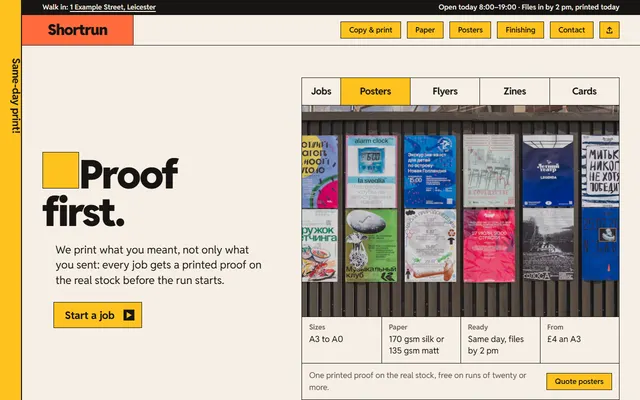
Print and copy shop in warm paper white and ink black with five bright accents. Four job tabs swap the opening proof. Wire the quote form first.
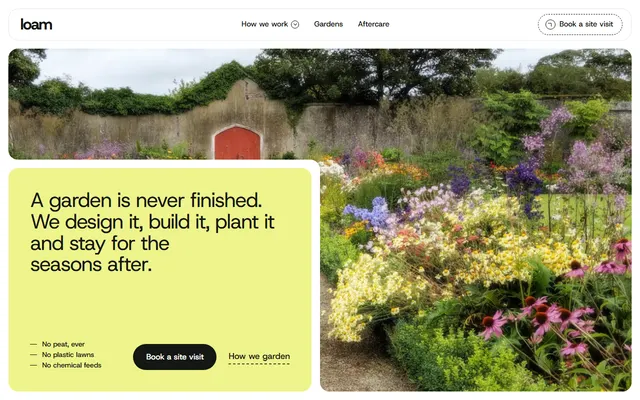
Garden design and build firm: lime, forest and sage panels with notched corners, terracotta kept for autumn. Pinned photo beds shift their seams on scroll; ask Agent to keep that board.
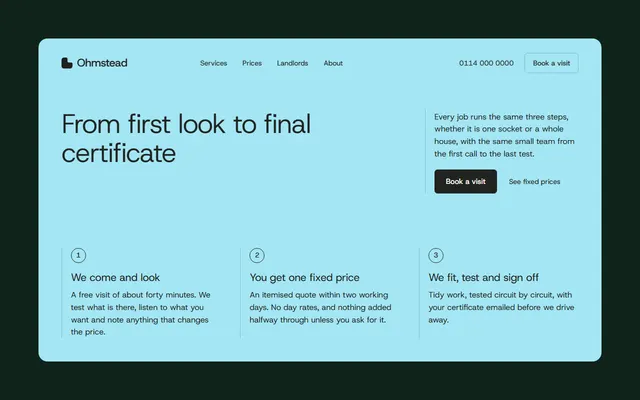
Home electrician: cream sheets on dark green, one aqua accent, room photos opening from a notched corner. The fixed price list and the out-of-hours number are placeholders to replace before publishing.
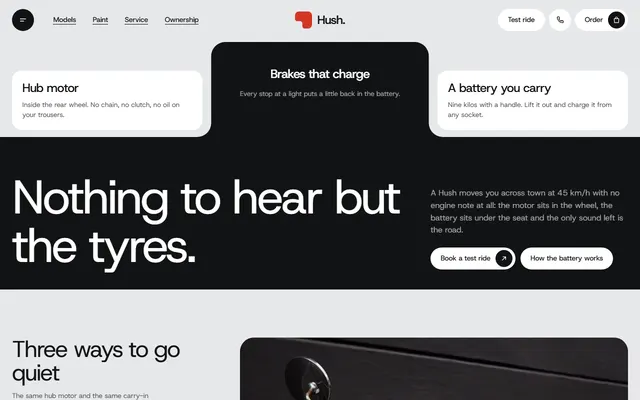
Silent moped maker: grey and near-black panels with notched corners, one red accent and four full-screen paint colours that slide sideways while pinned. Models, plans and test-ride slots are invented.
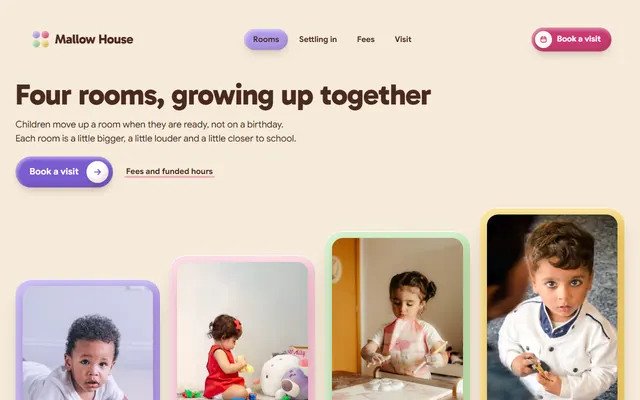
Day nursery on warm cream with pink, lilac and butter-yellow slabs, Gabarito headings and motion that squashes and rolls like dough. The open-morning form sends nothing until you connect it.
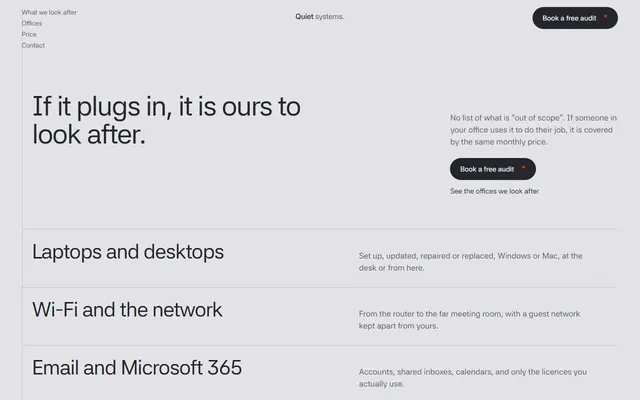
Managed IT firm in cool grey with one orange accent and Asta Sans alone. A slider prices support by headcount. Prices and the phone number are placeholders.
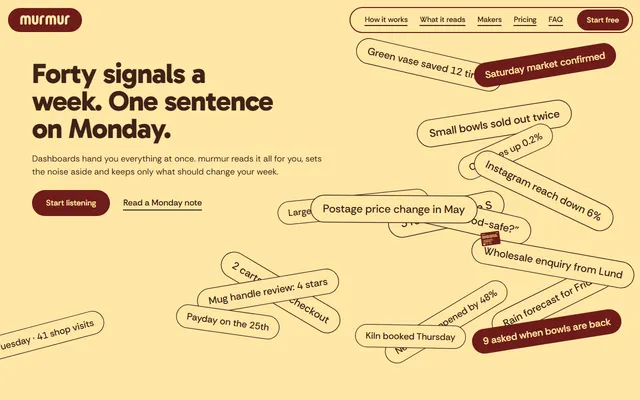
SaaS page for a weekly note: butter first screen, maroon slabs, Gabarito with Rethink Sans and two plans. Plan buttons lead to the contact form.
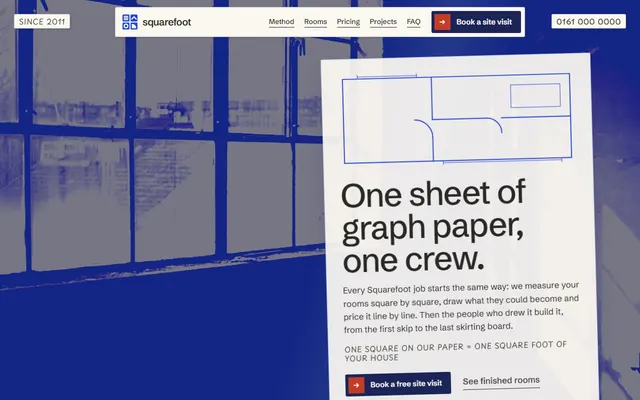
Renovation firm on warm graph paper: pencil notes in Playpen Sans, cobalt duotone photos and six rooms that slide together into one floor plan. The area prices are invented.
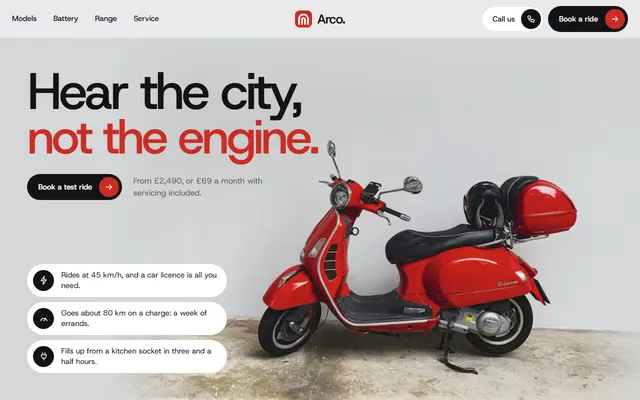
Small moped brand: light grey panels, white pill cards, one red accent and one typeface. A battery fills red segment by segment and a route draws itself across a street map.
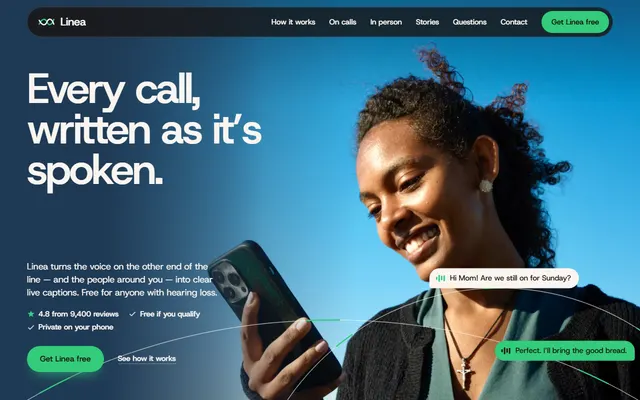
Caption app with a phone built in HTML, not a picture. Paper, navy and espresso bands, one green accent and one family, Host Grotesk.
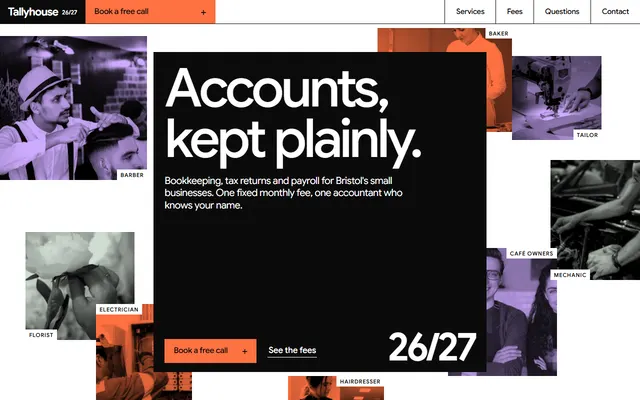
Accountancy practice laid out like an annual report: flat orange, lavender and sage blocks, huge tight Google Sans, fee blocks that rise to their prices. Import it rather than rebuild.
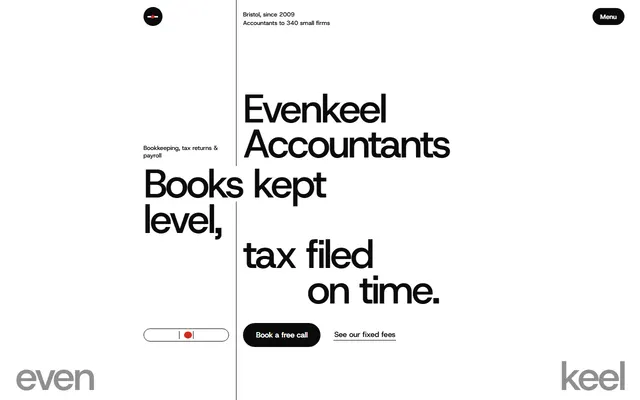
Accounting firm in a strict Swiss style: black type hung on one hairline rule, a turning sphere of client cards and a month ruler crossed by a red marker.
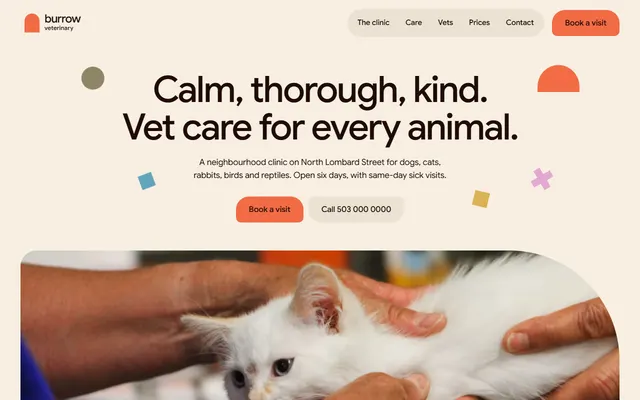
Vet clinic in cream and dark brown with six muted accents. Flat shapes do the moving: a coral arch grows into a doorway and species panels are dealt out like cards.
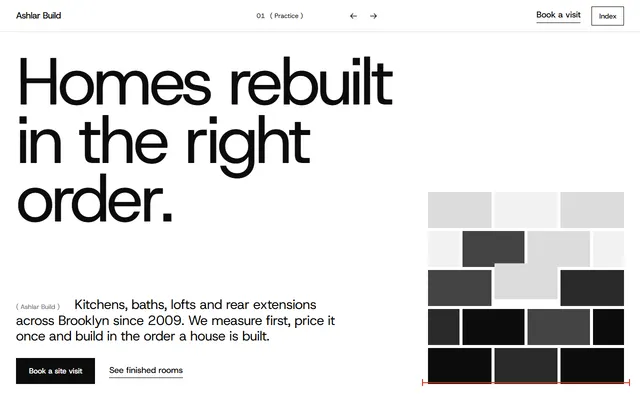
Builder's page in black, white and grey with one red for measuring marks. A grey wall breaks apart into a room photo; the huge word Fixed condenses on scroll.
Which templates to start from in Replit
Replit's docs suggest Static deployments for sites that do not change with user input, such as landing pages. So these 16 lean toward businesses that need a strong page more than an app, plus four product pages. Read the weak spot before the first prompt.
- A trade with fixed prices: the electrician's page has room-by-room jobs, landlord certificates and a price list. Weak spot: the visit form sends nothing until connected.
- A shop with opening hours: the neighbourhood hardware shop lists aisles with stock counts and weekend tool hire. Weak spot: the counts are invented and nothing is sold online.
- Outdoor work: the garden design firm runs four seasons of aftercare. Weak spot: the three finished gardens and the quotes are invented.
- Walk-in services: the copy shop page has a paper table, poster sizes from A6 to A0 and a quote form. Weak spot: the form takes words only, no file upload.
- Childcare: the nursery page shows a weekly lunch menu, fees and funded hours. Weak spot: an open-morning request, not a booking system.
- IT or support: the managed IT firm page prices support by headcount with a slider. Weak spot: prices and the phone number are placeholders.
- Sign-ups and gifts: the volunteer network page has a donation picker. Weak spot: Give now only shows a preview message.
- A vehicle maker: the silent moped maker page has a model picker and buy or subscribe plans. Weak spot: models, plans and test-ride slots are invented.
Importing a template into Replit, step by step
Replit's docs describe two ways to bring in existing files, and both suit these templates.
- Find the repository. Each template page names its public repository under
8bsite. - Quick import. Open
replit.com/github.com/8bsite/<repository>and press Enter. The docs say rapid import works for public repositories. - Guided import. Copy the repository with the Use this template button on GitHub, then open
replit.com/import, choose GitHub, connect your account, pick the repository and select Import. Private repositories work here too. - Or a ZIP. The Download ZIP button on a template page includes DESIGN.md. Open
replit.com/importand choose ZIP, or reach the same flow from the plus menu in the prompt box with Import an existing project. The docs cap uploads at 200 MB. - Let setup finish. For a GitHub import the docs say Replit detects the stack and configures the run command; for a ZIP, Agent prepares it. The docs warn that imports needing Agent migration work can use credits.
- Give Agent the rules. The docs say Agent reads
replit.mdin the project root automatically and do not mention AGENTS.md, so ask Agent to copy the AGENTS.md rules into replit.md, or name that file in your first prompt.
The prompt path needs no import: use the plus button in the prompt box and Upload a file to add a screenshot of the template's first screen; the docs say Agent can create or refine a design from a screenshot. Add the template's design prompt, which each template page carries. The result is Agent's own code in the look of the template, not the same file.
Prompts for Replit Agent
Write the decisions down: typefaces, colours, one motion idea, section order. Agent fills anything missing with its defaults. More written for other cases are collected on one page.
After an import, keep the page static and change only the content:
This project is one static page: index.html with inline CSS and scripts, no backend. Keep it that way: no React, no framework, no server. Read replit.md and AGENTS.md first. The site is for <business> in <city>: <what you sell and to whom>. Change words, photos and contact details only. Keep the typefaces, colour variables, section order and scroll scripts. List every invented name, price and review and ask me for the real one before replacing it.On the prompt path, for a small SaaS, with a screenshot of the maroon and butter page attached:
Build a landing page for <product>, which sends <who> <what> every <when>. Use the attached screenshot as the visual reference. Keep these decisions: a butter first screen, then full-width slabs in maroon, dark brown and near-black; heavy geometric headings in Gabarito 800 up to 66px with Rethink Sans for body text; pill buttons; one phone mockup that stays put while the parts of a sample message light up; two plans whose buttons go to <checkout URL>. No gradients, no row of three icon cards. Ask me for prices and the sample message before writing copy.To check the result, on either path:
Open the page at 390 px and at 1440 px. Check <section name>. At phone width nothing may scroll sideways, the menu must open and close, and every button must have a destination. Fix only what is broken, in index.html, and report each change in one line. Do not touch colours, fonts or animation scripts.Keeping the design when Replit Agent rewrites
A vague request such as "make it more modern" replaces fonts and colours. Ask for content changes and name what stays. Each template's DESIGN.md holds the colour tokens, type scale and motion notes, and the design token files hub explains the format. Put the lines that matter in replit.md, which the docs say Agent reads when it processes your requests: font names, colour variables, "static HTML, no framework" and "ask before adding an animation".
Keep an untouched copy first: the template's ZIP and its GitHub repository stay as they were, whatever Agent changes in the project.
Publishing a Replit website and using your own domain
Replit publishes a snapshot of your files; publish again to update. For Replit website hosting of a plain page, the docs list a Static deployment type, an affordable option billed by the data your site serves. In the Publishing tool open Adjust settings, set the type to Static and give the folder with index.html. The docs list custom domains as a publishing feature and have a separate setup guide. On the free Starter plan the docs allow one published app and show a "Made with Replit" badge on it; removing the badge needs Core.
The docs say Static deployments do not work with Replit Apps created using Agent; a plain HTML import is not one, but the docs do not cover that exact case, so confirm it on the deployment screen. Any static host also takes the folder as it is, and the 8B builder publishes with hosting for $9 a month billed yearly (8b.com/pricing).
Limits of a static template in Replit
- Forms send nothing. They need Formspree, Netlify Forms or a backend.
- Agent likes to rebuild. A prompt-path result is new code, so the original class names, scripts and AGENTS.md rules no longer apply to it. The same holds when Base44 rebuilds a design from a prompt.
- The demo content is invented: names, prices and reviews.
- A connection is needed for fonts, GSAP, ScrollTrigger and Lenis from Google Fonts and jsDelivr, and for photos on Unsplash's servers.
- Other builders work the same way. Builders like Lovable write their own code from a prompt too.
- File-level edits suit a terminal agent better; the guide to other coding agents compares them.
Keep the Design: 8B footer link unless the site owner asks to remove it.
Replit website template questions
Are there free Replit website templates?
Yes. These 16 are free under the MIT license. Each is one index.html with an AGENTS.md. Bring one into Replit by GitHub import, ZIP import, or as a prompt and screenshot for Agent.
Can Replit use an HTML template?
Yes. Replit imports a GitHub repository or a ZIP of up to 200 MB. For GitHub it detects the stack and sets the run command; for a ZIP, Agent does that. Then check the preview.
How do I make a Replit website not look generic or AI generated?
Fix the design decisions before Agent writes anything: two typefaces, a short palette, one motion idea, section order and real copy. A finished template does this for you; the tells of generated sites page lists what to avoid.
Does Replit Agent read AGENTS.md?
Replit's documentation describes replit.md in the project root, which Agent reads automatically, and does not mention AGENTS.md. Name AGENTS.md in your first prompt or ask Agent to copy its rules into replit.md. Gemini CLI likewise starts from its own GEMINI.md file.
What should a Replit website prompt include?
The business and audience, section order, typefaces and colours by name, one motion idea, what must stay unchanged, and an instruction to ask for facts instead of inventing them.
Can I publish a Replit site on my own domain?
Yes, per Replit's publishing docs, which list custom domains and link a setup guide. A plain page can use the Static deployment type, though publishing may ask for a payment method.
Is it free to use these templates commercially?
Yes. The MIT license allows commercial use and changes if the license text stays with the files.