Bolt website templates
Bolt website templates here are free HTML designs you can use inside bolt.new, the AI builder from StackBlitz. Bolt builds JavaScript apps and writes its own code, so a template reaches it as a design reference: a screenshot, a design prompt and, if you like, the attached HTML file. This page covers what Bolt's help pages confirm, the prompts to paste and the 15 templates that suit a quick launch.
The Bolt website builder is prompt-first. You describe a site in the chatbox, it writes the code, shows a live preview and offers a Publish button. Asked for a vague landing page, it tends to return a centred headline and three equal cards. A Bolt website template replaces that guess with decisions already made: typefaces, a short palette, an order of sections and one motion idea.
The route is short. Pick a card below, open its live demo, copy its design prompt, attach a screenshot and send both. Bolt returns its own build in that look, not the same file. The Lovable page follows the same logic.
Each card below has an Open in Bolt button. It hands Bolt the template's public GitHub repository, the same index.html, AGENTS.md and license as the download, instead of a prompt to rebuild it from. v0 gets the same files another way, through the shadcn registry format. Check the preview on the first run, since a plain HTML project is not what Bolt usually starts from.
At a glance, October 2026. This page lists 15 templates, all free under the MIT license and made by 8B, an AI website builder. By what the visitor comes for: seven are places to eat or drink (burger bar, pizzeria, ice cream parlour, bubble tea bar, coffee roastery, Korean barbecue, brasserie), four are shops (veg boxes, stationery, toys, flowers), two sell electric mopeds and scooters, and two sell lessons (music and languages). Thirteen carry a request or order form, six have layers moving at different speeds, and the design prompts run from 222 to 262 words.
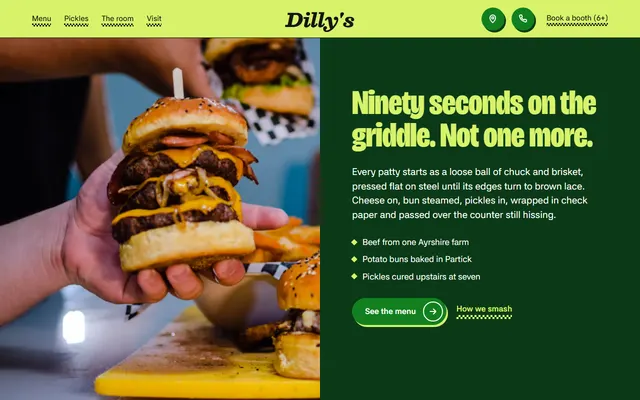
Burger bar. Lime, white, black and deep green grounds take turns, with 1.5px black rules, scalloped stickers and hard green shadows under buttons. Name the shadows, or Bolt softens them.
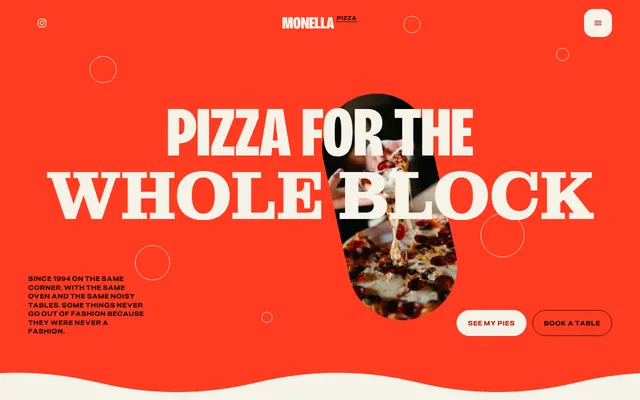
Pizzeria. Tomato red and cream bands joined by ten wavy edges, capsule photos and arch-topped pie cards in four colours. Ask for the wavy edges by name; a screenshot alone may lose them.
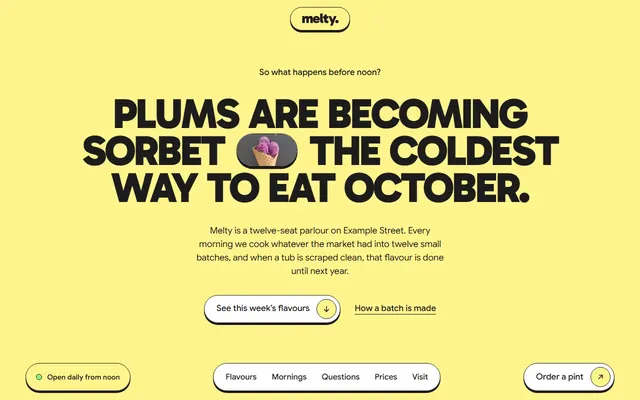
Ice cream parlour. A lemon ground, bright fills, 1.5px ink outlines and hard offset shadows like stickers, with a pill bar fixed to the bottom of the screen. The outlines carry the look.
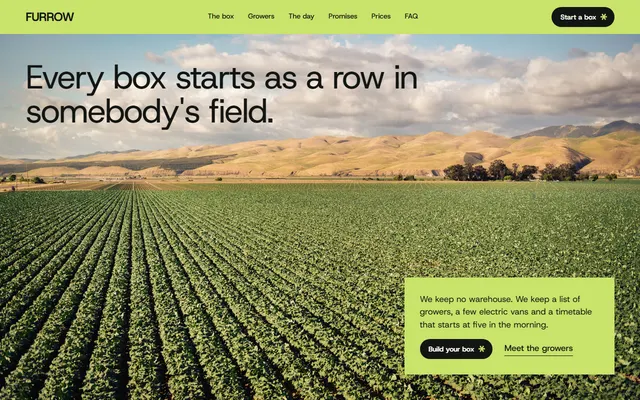
Veg box scheme. Soft lime, near-black and white, square cards beside pill buttons and one typeface. Its box builder shows a live price; check the sums still add up after Bolt rebuilds it.
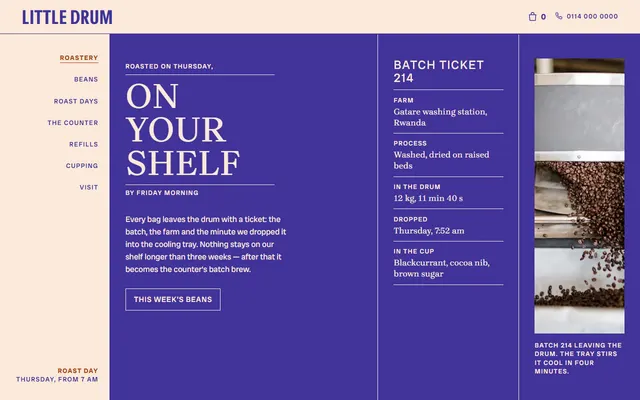
Coffee roastery with a counter. Cream paper, indigo ink and rust, serif capitals, hairline ruled cells and round ring stamps, like a printed roast-day ticket. Three colours hold steady across edits.
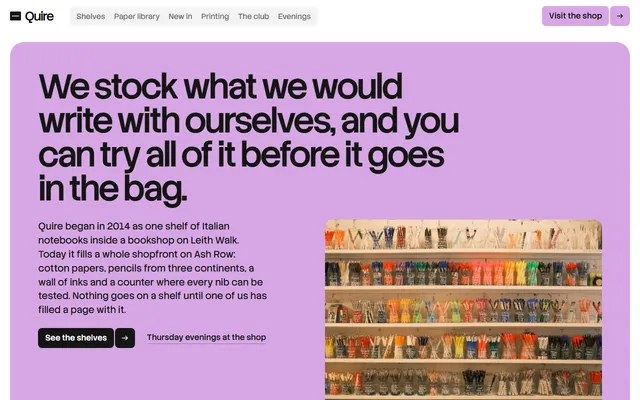
Stationery shop. White, ink-black rounded panels and a single lilac, two cuts of one sans, no shadows. The paper library switches with tabs and arrow keys; ask Bolt to keep that keyboard control.
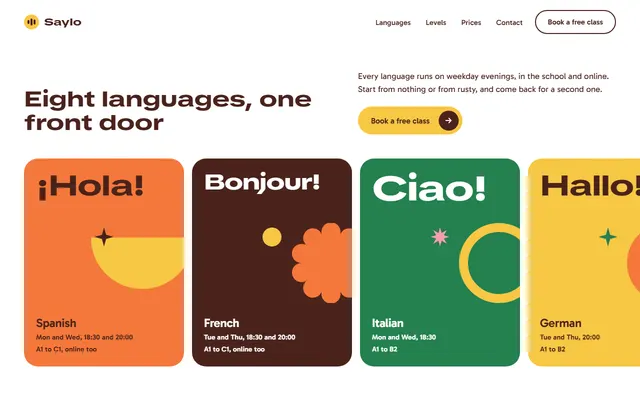
Language school. A white page, extra-wide dark brown headings and flat orange, yellow, green, pink and blue fills; eight language panels slide sideways while pinned. Its shapes are CSS, not images.
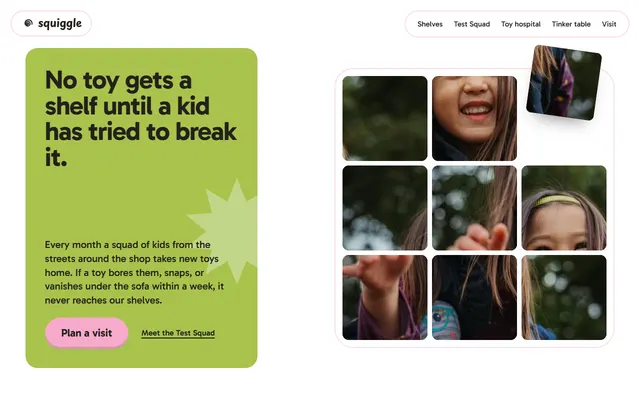
Independent toy shop. Candy yellow, pink, lime and cobalt on white, notched cards with age tabs and tilted pills. The opening photo puzzle solves itself on scroll: describe it, or ask for a still board.
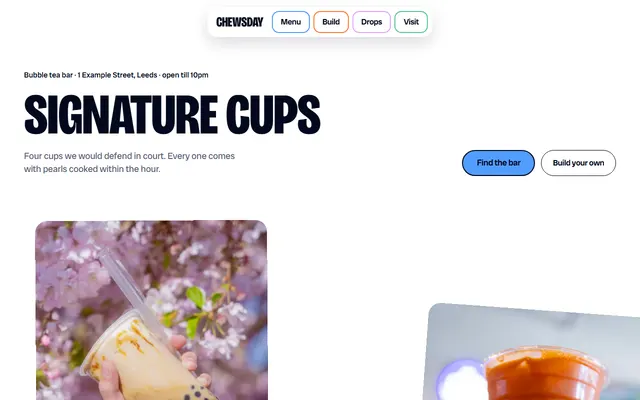
Bubble tea bar. Blue, orange, green, yellow and lilac on white, navy condensed capitals, and scalloped edges on photos and button fills. Say scalloped in the prompt.
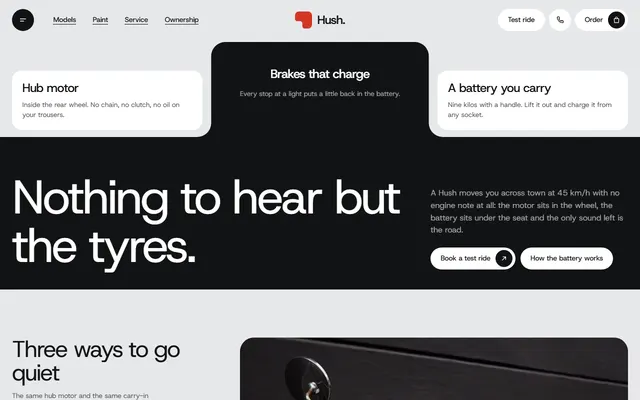
Electric scooter maker. Pale grey, near-black and one red accent with notched corners and four full-screen paint fields. Mention the notches or they become rounded cards.
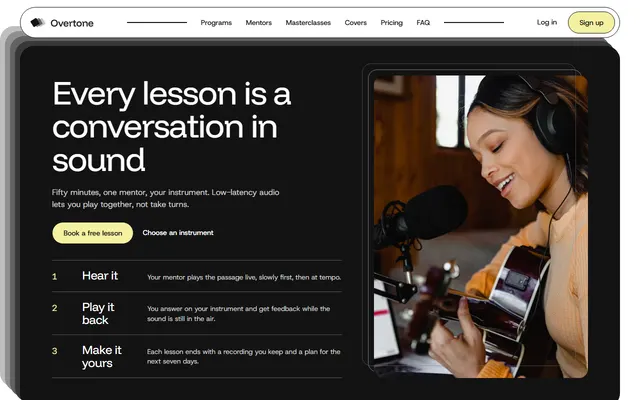
Online music school with a sheet-music shop. White cards with 1.5px black outlines, beige cards, one small orange accent and a masterclass ticket with a dashed stub. Name the outlines.
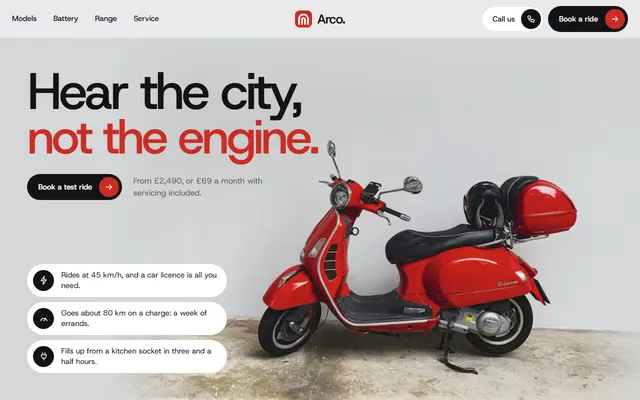
Electric moped maker. Light grey panels, white pill cards and one red accent. The battery and street map are drawn in CSS and SVG, so ask Bolt to draw them, not fetch pictures.
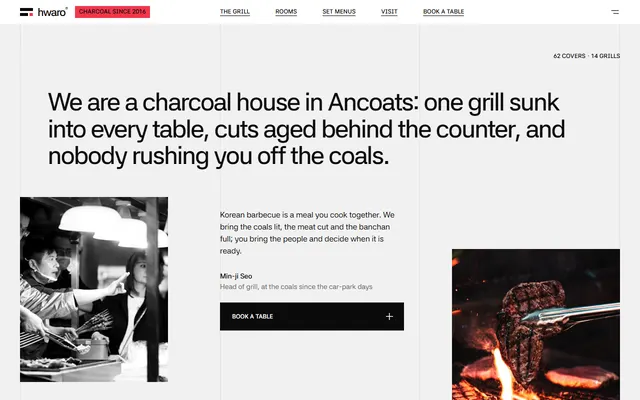
Korean barbecue. White, pale grey, charcoal and black with column hairlines, square corners and one hot red for heat. Most headings carry a Hangul subtitle, so ask Bolt to keep the Korean lines.
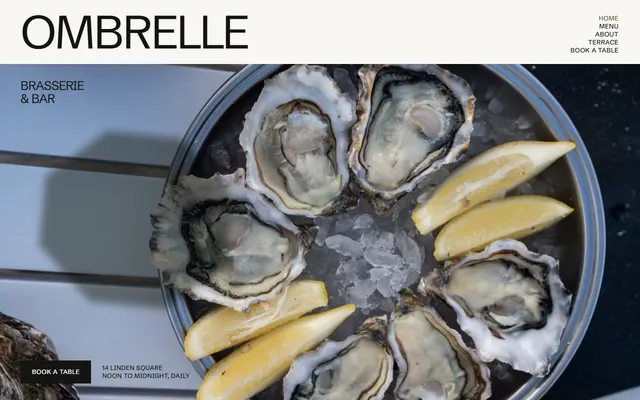
Brasserie and bar. Near-white, olive and night grounds, one typeface in huge uppercase and a single amber light on the hero photo. Tell Bolt the amber is the only accent.
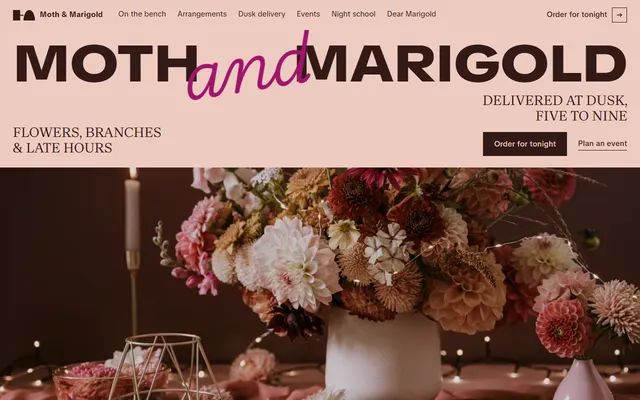
Florist with evening delivery. Blush and chocolate bands, hot pink and magenta, a wide black wordmark and thin script lines. The five-panel delivery track from 5 pm to 9 pm is the scene to describe.
Which templates suit Bolt and why
The 15 cards lean toward owners who want a site live this week: places to eat, small shops, a product to sell, a school with plans. Short palettes and named fonts survive a screenshot plus a prompt.
Pairings, with the weak spot of each:
- A burger bar or diner taking bookings: the loud burger bar design. The booth booking form sends nothing until you connect it to a form service or a booking tool.
- A veg box or farm delivery: the veg box scheme page. Its box builder prices a box but has no checkout; payment needs a service you add.
- A toy shop with repairs and workshops: the independent toy shop page. No cart, and the self-solving photo puzzle is the part most likely to arrive as a still grid.
- A roastery that sells beans over the counter: the small roastery design. It has no form at all, only phone and email links, so online orders are yours to add.
- An electric vehicle with models and plans: the scooter maker page. It pins a model picker, a scroll scene that Bolt may flatten into a plain list.
Using a template in Bolt, step by step
- Choose a card and open its live demo. Take a first-screen screenshot at desktop width as PNG, JPG or WebP. Bolt resizes attached images so the longest side is about 1,500 pixels, so a full-page capture would lose detail.
- Copy the design prompt from the template's page. It lists the decisions.
- Attach the screenshot in the Bolt chatbox with the plus icon and Attach file, or by dragging it in. Bolt's help gives an example of using an attached image as inspiration for colours, fonts and style. The free plan allows 5 attachments per message, paid plans 20, and Bolt reads each file up to 5 MB.
- Paste the prompt, add your facts and send. Bolt writes its own code in the look of the template.
- Or attach index.html itself. The help lists HTML among accepted code formats but says Bolt builds JavaScript-based apps only, so a file in another form works as a reference or for conversion, as the second prompt below asks.
- Or import the repository. On the Bolt homepage, below the chatbox, click GitHub, sign in, choose Import from URL and paste the address of the template's public repository; Bolt loads it as a new project. The help does not say how a plain HTML repository behaves, so test it and be ready to ask for the conversion.
Bolt templates from its own marketplace are another start: copying one is free, customising it spends tokens. The vibe coding guide compares how other builders and agents take the designs here.
Prompts for a Bolt website design
Three prompts for the chatbox. Each fixes decisions, because a vague "modern landing page" gets the average of every landing page.
Build from a screenshot. Attach the first-screen shot of the pizzeria template, then send:
Build a one-page website for a neighbourhood pizzeria with a slice window. Use the attached screenshot as the visual reference: tomato red (#ff3b21) and cream (#f6f2e8) bands joined by wavy edges, near-black ink (#1c0b07). The biggest words in Montagu Slab, other headings in Bricolage Grotesque, all caps; body text in Pliant. Capsule photos, arch-topped pie cards. Sections in order: navigation, opening, the dough in five steps, one house rule, four pies with prices, the slice window, regulars, weekly nights, hours and address, questions, a table request form. Pin the dough steps for a few screens while each photo wipes over the last; add no other pinned scene. Mark any price or time I have not given you as a placeholder.Convert the attached file. Attach the template's index.html, then send:
I attached index.html, a finished landing page. Rebuild it as a JavaScript app and keep the design exactly: the same CSS variables, the same Google Fonts, the same section order and the same GSAP and ScrollTrigger scenes, installed as packages. One component per section. Do not restyle anything, add sections or swap the photos. When the build runs, list every detail you could not reproduce so I can decide what to fix.Keep the look, change the words. Attach the screenshot of the ice cream parlour design, then send:
Keep the look of the attached screenshot and change only the content. The shop is [name], a [what it sells] in [town]. Palette: lemon ground #fff48d, ink #1d1c1c, pink #fd74fd, mint #83f582. Gabarito at weight 900 in uppercase for headings, Google Sans for text. Every card keeps its 1.5px ink outline and hard offset shadow, and the pill bar stays fixed to the bottom of the screen. Write every sentence from the facts below, and leave a visible [TO CONFIRM] wherever a fact is missing instead of inventing one. Facts: [paste them here].More worked prompts, grouped by job, are on the design prompts page.
Keeping the design when Bolt rewrites the site
Every round of prompting lets the colours drift. These habits slow that down.
- Open the template's DESIGN.md and copy its colour and type values into your first message. The DESIGN.md collection explains the format. Name hex values and font names.
- Ask for one change per message and write it as content: "change the menu prices and the questions, leave colours, type and layout alone". A request to modernise the page invites a new design.
- Bolt keeps project knowledge that it can always read, even after the chat context is cleared, and skills, which are reusable instructions with a description that tells Bolt when to apply them. Put the palette and type rule in the knowledge field.
- Bolt's help says it finds and uses an agents.md file in the project automatically. The templates ship that file as AGENTS.md; the help spells the name in lower case, so rename it after an import to be safe.
A pinned palette still looks generic with copy like "crafted with passion", which is why the guide to avoiding the AI look starts with the words.
Publishing a Bolt website
In Bolt, the Publish menu puts the site on a free address ending in bolt.host, and you can rename the subdomain there. A custom domain needs a paid plan, and paid plans can also run a security audit from the same menu before publishing. You can unpublish at any time, after disconnecting a custom domain, and the GitHub integration syncs the code to a repository you control.
If you want the plain HTML file the template ships as, you do not need Bolt at all. Put index.html on any static host, Replit's Static deployment included, and point your domain at it. Keep the Design: 8B footer link unless the site owner asks to remove it.
A third way skips code entirely: the 8B builder designs a site free and publishes with hosting for $9 a month, billed yearly, and it works from Claude and ChatGPT.
What Bolt does not do with a static template
- The page is rebuilt, so pinned scenes and drawn shapes may need a second round.
- Forms send nothing until you connect them. A booking or order form arrives as a layout; Bolt can wire it to a backend if you ask; test it.
- None of the 15 has a cart or checkout. Online payment needs a service added on top.
- The demo content is invented: names, prices, addresses, reviews. Replace it.
- Fonts load from Google Fonts and photos from Unsplash's servers, so the page needs a connection.
Bolt website template questions
Are there free Bolt website templates?
Yes. These 15 cards are free under the MIT license, and the full library has 101. Bolt builds its own version from a screenshot plus the design prompt, or from the attached HTML.
Can Bolt use an HTML template?
Partly. Bolt accepts an attached .html file, but its help says it builds JavaScript-based apps only, so the file works as a reference or for conversion. It can import a GitHub repository by URL; plain HTML repositories are not described, so test one.
How do I make a Bolt website not look generic or AI generated?
Make the decisions before Bolt does: two or three hex colours, named fonts, the section order, one motion idea. Attach a screenshot and write real copy.
Does Bolt read AGENTS.md?
Yes, in its lower-case form. Bolt's help says it finds and uses an agents.md file in the project automatically. The templates ship it as AGENTS.md, so rename it after importing, or paste its rules into project knowledge.
Which prompt works for a website in Bolt?
One that names the business, the sections in order, the typefaces, the colours as hex values and one motion idea, and says what to do about missing facts. The prompts above follow that shape in under 140 words.
Can I publish a Bolt site on my own domain?
Yes, on a paid plan. Bolt lets you connect or buy a custom domain, and free projects publish on a bolt.host subdomain.
Can I use these templates commercially?
Yes. They are MIT licensed, client sites included. Keep the license text, check CREDITS.md for photo sources, and keep the Design: 8B footer link unless the site owner asks to remove it.