Free language course website template
Edit it by hand: it is one index.html with no build step, so you can open it in any text editor, change the words and photos, and upload it to any static host. Not a coder? Describe your business in one sentence to 8B's AI website builder and it designs a new site for you, with more pages when you need them. Designing is free; publishing with hosting is $9 a month, billed yearly. It also works inside Claude and ChatGPT.
MIT license · Made by 8B, an AI website builder · Plain text: small-talk.md, data: small-talk.json
About this language course website template
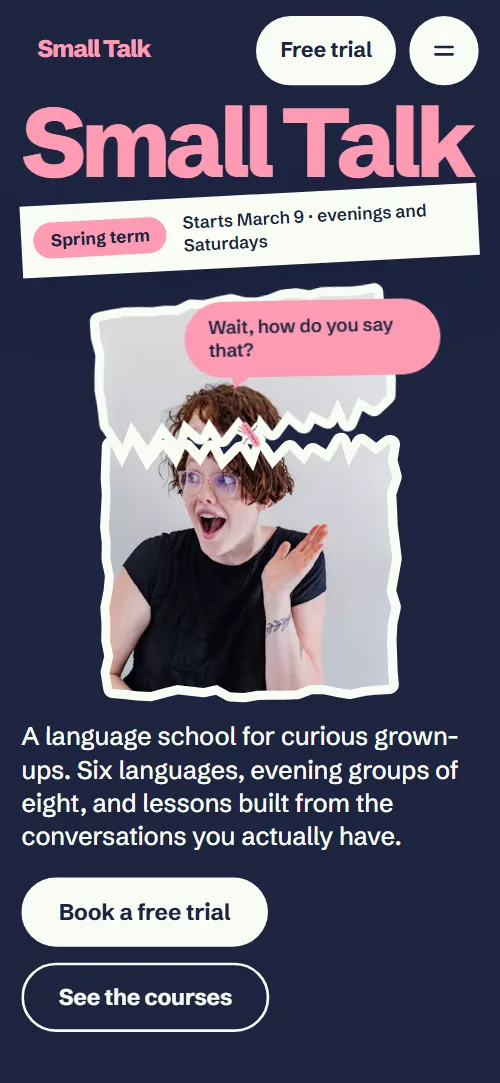
This language course website template is a free one-page HTML site for a school that teaches adults in small evening groups. It has six syllabus cards, six languages with times, four teachers, a level finder, three fees and a trial form, in navy and pink with torn-paper photo stickers. One index.html and AGENTS.md let an AI agent adapt it.
At a glance, October 2026. One 98 KB index.html with its CSS and JavaScript inside, 12 sections, 18 Unsplash photos credited in CREDITS.md, Schibsted Grotesk from Google Fonts, GSAP 3.13.0 (ScrollTrigger, SplitText); Lenis 1.3.4 smooth scroll loaded from jsDelivr.
A school that sells terms, small groups and a free first lesson can use the page almost as it stands. So can a tutoring centre, a music school or a cooking school with groups and teachers. A language school website template has to answer what beginners ask first: which language, which evening, who teaches, what it costs and how to try a lesson. Most language school templates show a menu of courses; this one shows what a term feels like.
Start with the six languages and their times, the three fees, the four teachers, the clubs, the trips and the contact block. Rename the brand and update the wordmark's --len, which sizes the first-screen wordmark. As a language course website template for Claude Code, Cursor or Codex, vibe coding goes fastest when you supply refund terms, hours and teacher bios yourself, then start Claude Code in the folder. Replace the stock teacher portraits with your own staff.
Choose it for a school with groups, terms and a talkative brand. A plainer, flat-colour site is closer in the white template with coloured panels. As a language school template it has weak spots: one page, no course catalogue or student login, a form that sends nothing yet, and a twelve-week syllabus beside ten-week courses. Owners who would rather not edit code can use the 8B builder.
Good for:
Turn the language course website template into your site with an AI agent
With an AI coding agent
Files (PowerShell: curl.exe):
curl -LO https://raw.githubusercontent.com/8bsite/language-course-website-template/main/index.html
curl -LO https://raw.githubusercontent.com/8bsite/language-course-website-template/main/AGENTS.md
curl -LO https://raw.githubusercontent.com/8bsite/language-course-website-template/main/LICENSE
curl -LO https://raw.githubusercontent.com/8bsite/language-course-website-template/main/CREDITS.mdPrompt for the agent:
Read AGENTS.md, then edit index.html. Turn it into the site for <my school: name, city and address, languages or subjects, levels, lesson days and times, term dates, teachers, clubs or trips, fees and refund terms, how people book a trial>. Replace first the brand name with its --len, the languages, times, fees and teachers. Keep the section ids, the classes AGENTS.md lists and exactly three level questions, or change the result ranges. Ask me for missing facts; never invent prices, dates, teacher bios, refunds or contacts.In a terminal
npx degit 8bsite/language-course-website-template my-siteLanguage course website design prompt for any AI tool
Use this to build a language course site from scratch in Claude Code, Codex, Cursor, Lovable, v0 or Bolt, or to brief a designer. It writes this template's design as decisions; with the template itself, the short prompt above is enough.
Build a one-page website for a language school that teaches adults in small evening groups, with a free trial lesson as the goal. Sections in order: navigation, opening, syllabus cards, languages with times, teachers, clubs, student voices, trips, a three-question level finder, fees, contact form, footer. Type: Schibsted Grotesk only, 800 with tight tracking for the giant wordmark, headings and prices, 400 for body text. Colours: #1d2440 navy ground, #f9fcf4 cream text, #ff9bb4 pink accent for wordmark, accent words, bubbles and name bars, #2b2b2b charcoal sections, #a7b0d6 lead text, #151b33 deep navy for menu and form. Style: a wordmark filling the first screen, torn-paper photo stickers, tape, and speech bubbles with greetings in six languages. Avoid a purple gradient, three identical icon cards and a centred hero with two buttons. One motion idea: the wordmark rises on load and a torn cap lifts off a portrait so bubbles burst out as you scroll; respect prefers-reduced-motion. Copy is short and concrete. Ask me for languages, days and times, teachers, term dates, fees and refund terms, address and contacts; never invent them, leave marked placeholders and list them. One primary action, Book a free trial, repeated in the nav, the level result and the fees. Check at 390 px, tap targets 44 px, visible keyboard focus and no console errors.Language course website design and motion
Palette
#1d2440 navy ground of the opening, syllabus, languages, voices, level and contact sections, and the dark text on pink and cream#f9fcf4 body text on navy, the fees ground, sticker rims, quote notes, cream buttons and the second kind of bubble#ff9bb4 the accent: wordmark, heading accent words, bubbles, badge, trips ground, teacher name bars, club dates, the small-print note, button sweep and focus ring#2b2b2b charcoal ground of the teachers and after-class sections#a7b0d6 lead paragraphs, captions, teacher bios and club texts on navy or charcoal#6f7ba9 hairlines between rows, form field borders, menu and footer link dividers, the peeled corner's shade#151b33 deep navy of the full-screen menu, the contact form panel, field fills and the footerFonts
- Schibsted Grotesk: the only typeface, as a variable font from 400 to 800: weight 800 with tight tracking for the wordmark, headings and prices, 700 for statements and titles, 500 to 600 for leads and bubbles, 400 for body text
A giant wordmark fills the width of the first screen, with a tilted tape, a torn portrait sticker and the intro around it. Several sections pair a heavy heading on the left with a short lead on the right, then a list: cards, rows with hairline rules, name bars or plans. Photos get torn edges or a peeled corner, bubbles carry greetings in six languages, and the ground shifts from navy to charcoal, pink and cream.
Pink does the talking: the wordmark, accent words, bubbles, teacher name bars, the trips screen and the small-print note. The wordmark rises, the portrait lands and the tape slides in on load; the torn cap of the portrait and one bubble then keep jiggling while on screen.
Every value of this language course website design, with the type scale, spacing and the motion rules, is in its DESIGN.md file (Google's format), ready for a coding agent or Stitch.
What is on the language course website page
- NavigationFixed bar: pink wordmark, Free trial button and a menu button; full-screen menu with seven links, address and phone; hides on scroll down
The bar slides up out of view while you scroll down and returns on the way up, and the full-screen menu opens from a button and closes on Escape while Lenis smooth scrolling pauses.
- Small TalkTwo screens: giant wordmark, a torn portrait sticker with a bubble, a term tape and intro with two buttons; then a statement surrounded by eight greeting bubbles
On load the wordmark rises, the portrait lands and the tape and intro slide in, then scrolling lifts the torn cap off the portrait, tilts the portrait and bursts eight bubbles around the statement, whose words light up one by one.
- The syllabus is your TuesdaySix week cards with a photo, week badge, situation and a phrase in the language, on a 3 by 2 plan
As the plan scrolls in, six photos fly from scattered sizes and turns onto their slots with corners pressed flat, and the heading lines rise.
- Six languages around one tableSix large language names, each with a greeting bubble, levels and lesson times
A divider is drawn across each row and each greeting bubble is slapped on with a turn when it arrives.
- Who’s talking? Our teachersFour teacher stickers behind name bars, each with a hello bubble and a short bio
Each teacher pops up out of the name bar turning upright, one after another, and the hello bubble pops in after them.
- After class Where’s everyone?Four dated event rows: supper club, film night, market walk, pub quiz
The heading lines rise and a hairline is drawn across each of the four event rows.
- Overheard in classFour student quotes on torn notes, ripped off a pad one after another (pinned screen)
The screen pins for about two and a half screens of scroll while four notes are ripped off a pink pad, lifted with a turn and set in their places.
- Weekends abroad Say it where they say itFour postcards (Lisbon, Lyon, Osaka, Oaxaca) that travel sideways on a pinned pink screen, each stamped with a greeting
The screen pins while the four postcards travel sideways for as far as the track overflows, and each postmark is stamped on as its card comes into view.
- Not sure where to start?A three-question chat with reply buttons that suggests a group
Each reply you click sets a score, and the sum of three answers decides which group bubble shows; the question bubbles are slapped on as they arrive.
- Fees with no small printThree plans and a note called The small print, at full size
The small print starts as a tiny turned scrap and grows to a readable note as it scrolls in, and each price is slapped on with a turn.
- Say hello in any languageAddress, hours, phone, email, a room photo and a free-trial booking form
The heading lines rise and the room photo is slapped on with a turn.
- FooterA grinning face peeking in with a bubble, six links, copyright with the Design: 8B credit, phone, email, Privacy
The face rises into the footer turning, then its bubble pops in.
Before you publish the language course website site
- Replace social preview image, favicon, phone number, contact form (sends nothing yet) and email address and the invented demo facts (prices, dates, addresses). AGENTS.md lists them.
- Free trial button in the nav, Book a free trial in the first screen and in fees, Book that trial in the level finder lead to
#contactnow; point them to your trial booking page, or keep #contact once the form is connected. - See the courses button in the first screen and the Pick your language link under the syllabus lead to
#languages and #languagesnow; point them to keep, or point to your full course catalogue. - Book my free lesson button in the contact form lead to
submits the form to the same page; nothing is sent, a script shows the thank-you linenow; point them to your form service (Formspree, Netlify Forms) or your booking system. - Phone and email links in the menu, contact and footer lead to
tel: and mailto: placeholdersnow; point them to your real phone number and address. - Privacy link in the footer lead to
#contactnow; point them to your privacy policy page. - The voices and trips sections pin the screen while they play; on a short screen the stage is tight and the notes or the postcards sit close to the heading. Both fall back to plain grids without the scripts.
- The big wordmark and the torn top depend on the first screen being tall; on very wide, short windows the portrait and the intro sit close together.
- The syllabus promises twelve weeks (six cards plus six situations in its closing line) while the languages lead and the group fee say ten-week courses: reconcile them with your real course.
Questions about this language course website template
Is this a language school website template free for commercial use?
Yes. It is a single index.html, a whole school on one scroll, under the MIT license, so a school, a freelancer or an agency can use it at no cost. GSAP, ScrollTrigger, SplitText and Lenis load from jsDelivr, and there is no build step. The photos come from Unsplash and the typeface, Schibsted Grotesk, is under the Open Font License.
Can students book a trial lesson on the page?
Not yet. Every trial button jumps to the contact form, which requires a name and an email, shows a thank-you line and clears itself without sending anything. Connect Formspree or Netlify Forms with the steps in AGENTS.md, or point the buttons at your booking system, and rewrite the thank-you line, which promises a call within a day.
How do I hand it to Claude Code, Cursor or Codex?
Put index.html and AGENTS.md in an empty folder with its curl lines, and tell the agent to read AGENTS.md first. Give it the files, not the page address. Then paste the short prompt above with your school's facts. Starting without the template? Use the language course website design prompt below, or open a design in Lovable.
Can I get a language school site like this without editing code?
Yes, with 8B's AI website builder: describe your school in a sentence and its engine designs a new site, not this template. Designing and restyling are free. Publishing with hosting and SSL, full HTML export and AI edits in chat are on Pro, $9 a month billed yearly. It also runs inside Claude and ChatGPT through the 8B connector.
Which parts of the file must I keep?
Keep the ids, data-8b-section, data-8b-motion and data-8b-part, and the classes AGENTS.md lists. Update --len when you rename the wordmark. The level finder needs exactly three questions unless you change its result ranges. Keep the header comment and the 8B meta tag in the head. Keep the Design: 8B footer link unless the site owner asks to remove it.
Does it still work with motion turned off or without JavaScript?
With reduced motion, smooth scrolling and the entrance and scroll animations stop, and the voices and trips sections become plain grids; the bar's hide-on-scroll and the hover fills still run. Without JavaScript the menu button cannot open the menu and the level finder does nothing, but the footer links still reach most sections.