Free landscaping website template
Edit it by hand: it is one index.html with no build step, so you can open it in any text editor, change the words and photos, and upload it to any static host. Not a coder? Describe your business in one sentence to 8B's AI website builder and it designs a new site for you, with more pages when you need them. Designing is free; publishing with hosting is $9 a month, billed yearly. It also works inside Claude and ChatGPT.
MIT license · Made by 8B, an AI website builder · Plain text: loam.md, data: loam.json
About this landscaping website template
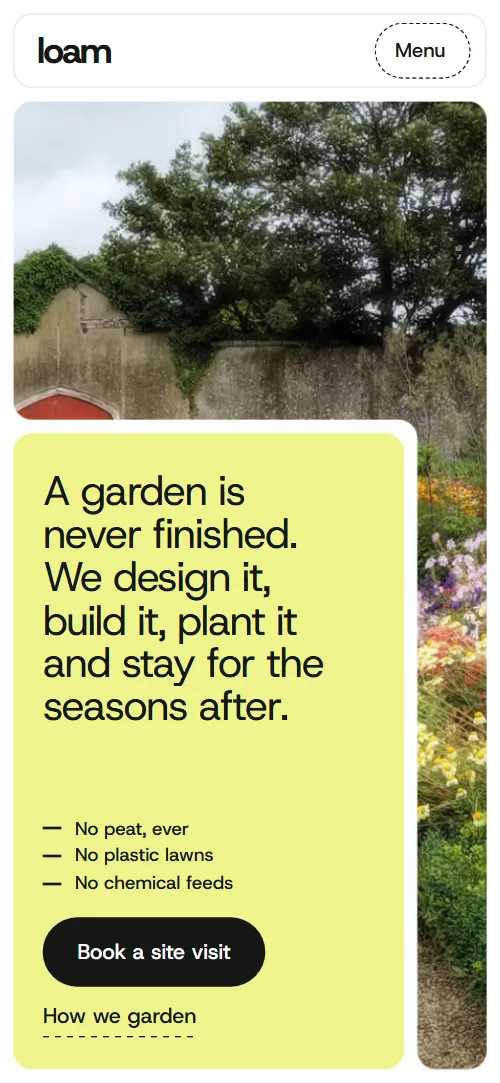
Landscaping website template: one free HTML file for a firm that designs, builds, plants and looks after gardens, with lime, forest-green and sage panels, a screen-high garden photo, a four-step process, three finished gardens, aftercare by season and a site-visit form. AGENTS.md is included, so Claude Code, Cursor or Codex can adapt it.
At a glance, October 2026. One 93 KB index.html with its CSS and JavaScript inside, 12 sections, 24 Unsplash photos credited in CREDITS.md, Host Grotesk from Google Fonts, GSAP 3.13.0 (ScrollTrigger, SplitText); Lenis 1.3.27 smooth scroll loaded from jsDelivr.
People who search for landscaping websites want proof of work and an easy way to book a visit. Here the proof is three finished gardens with size, build time and one more fact each, plus five local materials with how far each comes from. A garden designer, a maintenance firm, a tree and hedge contractor or a nursery can use it as a landscaping business website by swapping those rows for their own jobs.
Using this landscaping website template for Claude Code, Cursor or Codex goes fastest when the agent gets the facts only the firm has: founding year, service area, price ranges, garden count, sizes and weeks of finished gardens, visits per season, hours and company number. The demo invents all of them, plus the three client quotes. Keep policy lines such as no peat and no plastic lawns only if they are true for you. In Replit, Agent starts from its card with the design prompt, or import the repository.
As one of the landscape website templates for a firm that sells a garden as design, build and years of visits, it suits calm, large type and lots of photography. A trade that quotes single jobs, like the renovation template's kind of business, fits a different story. The weak spot is length: one page, long scrolling, no blog. For a no-code route, 8B can design a site from a sentence.
Good for:
Turn the landscaping website template into your site with an AI agent
With an AI coding agent
Files (PowerShell: curl.exe):
curl -LO https://raw.githubusercontent.com/8bsite/landscaping-website-template/main/index.html
curl -LO https://raw.githubusercontent.com/8bsite/landscaping-website-template/main/AGENTS.md
curl -LO https://raw.githubusercontent.com/8bsite/landscaping-website-template/main/LICENSE
curl -LO https://raw.githubusercontent.com/8bsite/landscaping-website-template/main/CREDITS.mdPrompt for the agent:
Read AGENTS.md, then edit index.html. Make this the site for <my landscaping firm: name, town and service area, year founded, services, price ranges, gardens built with sizes and weeks, aftercare visits per season, materials and distances, hours, phone, email, company number>. Replace first the name, the three gardens, the client quotes and the numbers in the copy. Keep the section ids, the classes AGENTS.md lists, four service beds and the footer wordmark len. Ask me for missing facts and never invent prices, certifications, reviews, distances or contacts.In a terminal
npx degit 8bsite/landscaping-website-template my-siteLandscaping website design prompt for any AI tool
Use this to build a landscaping site from scratch in Claude Code, Codex, Cursor, Lovable, v0 or Bolt, or to brief a designer. It is this template's design written as decisions, like the prompts gathered by job; with the template itself, the short prompt above is enough.
Build a one-page website for a landscape gardening firm that designs, builds, plants and looks after gardens, for homeowners who want a garden and seasonal visits. Use one HTML file with GSAP and ScrollTrigger. Section order: navigation, opening, four principles, services, a wildlife statement, three finished gardens, local materials, aftercare by season, three client quotes, questions, a site-visit form, footer. Type: one family, Host Grotesk, regular weight headings with tight tracking, medium weight labels, bold wordmark. Colours: #ffffff page, #141713 text and buttons, #eef48b lime panels, #1f3d2c forest panels, #e5eae2 sage panels, #525a50 captions; terracotta #d57d4f and pale blue-grey #dce7ed only for the autumn and winter panels. Layout: rounded panels with a notched corner and a small tab carrying a label or facts, a screen-high garden photo opening, large quiet type, no shadows, no gradients, no purple, no three icon cards, no centered hero with two buttons. Motion: panels shift shape and position with the scroll, the four season panels slide sideways while the background colour changes; switch scroll scenes off for reduced motion. Copy: short, concrete. Ask me for the firm's name, town, prices, garden sizes and build times, visits per season, hours, phone, email and company number, and never invent them or any review; mark every gap as a placeholder. One primary action, Book a site visit, repeated in the bar, after the gardens and in the form. Mobile: test at 390 px, sections become one column, tap targets at least 44 px. Finish by checking: no console errors, visible keyboard focus, and list every placeholder left.Landscaping website design and motion
Palette
#ffffff page background, the navigation bar, form fields, text on forest and near-black panels#141713 body text, filled buttons, the fourth principle band, the footer panel, dashed field borders#eef48b lime panels (opening statement, first principle band, contact, first quote, spring), button hover fill, mobile menu overlay, footer wordmark#525a50 captions, fact labels, place names, lead text and answers in the questions section#1f3d2c forest panels (second principle band, wildlife sentence, summer, third quote) and the ground behind photos#e5eae2 sage panels (third principle band, second quote), the navigation outline and photo thumbnail ground#d57d4f terracotta, used only for the autumn panel#dce7ed pale blue-grey, used only for the winter panelFonts
- Host Grotesk: the only typeface: regular-weight headings with tight tracking, medium-weight labels, buttons and card titles, regular body text, and a heavy 750 weight for the nav logo and the footer wordmark
Rounded panels with notched corners: the section name, the facts of a garden or the contact details sit on tabs cut out of a panel corner with CSS clip-path. Most sections open with a heading and a lead in a seven to five column split. Lime, forest, sage and near-black panels alternate, and photos fill their panels edge to edge. Links draw a dashed underline that fills on hover, and filled buttons fill with lime from a corner.
This landscaping website design saves warm and cool colours for the seasons: terracotta in the autumn panel, pale blue-grey in winter. Headings stay regular with tight tracking, the footer wordmark is lime on near-black, and the contact title starts bold and thins to regular as it scrolls in.
Every value of this landscaping website design, with the type scale, spacing and the motion rules, is in its DESIGN.md file (Google's format), ready for a coding agent or Stitch.
What is on the landscaping website page
- NavigationWordmark, three links and a Book a site visit button; a Menu button and full-screen overlay on phones
The white bar hides after 24 px of scrolling down, once past the top of the page, and comes back on scrolling up; this runs with reduced motion too.
- A garden is never finished. We design it, build it, plant it and stay for the seasons after.One screen: a garden photo with a lime panel holding the promise, three never-use lines and the buttons
On load the block lifts in and the three headline lines rise into place, and the photo drifts slowly sideways and back, nine seconds each way, pausing when the section is off screen.
- Soil first. Everything else follows.Four rule bands (Compost, Rainwater, Habitat, Local), each a panel with a heading, a paragraph and a corner tab
From the second band on, each band starts pulled up over the one before and tilted 1.6 degrees, then settles into the stack as you scroll.
- How a garden gets madeA board of four photo beds (Design, Build, Plant, Tend) whose seams slide so each takes the board in turn
Held in place: the board of four photo beds moves its seams through five states as you scroll, so each bed takes the largest share in turn, ending in an even two by two plot (an even stack of four on phones).
- Room for wildlifeOne large sentence with four inline photo pills, lit word by word as you read
The long sentence is split into words that go from faint to full as you scroll, and each photo pill opens from its centre.
- Gardens we have madeThree finished gardens as large photo panels with a name tab and a facts tab, stacking over one another
Each of the first two garden panels is held near the top while the next slides over it, shrinking to 93% and darkening, and the photos drift inside their frames.
- What we build withFive rows of local materials with a small photo, a line and how far it comes from
Each thumbnail opens from its upper-left corner once, as it comes into view.
- Aftercare, all year roundFour season panels (Spring, Summer, Autumn, Winter) that travel sideways while the background colour turns with the year
Pinned: the four season panels travel sideways while the background colour turns from lime to forest, terracotta and pale blue-grey.
- What it is like to have us aroundThree client quotes on panels with a small photo, dealt out from one pile
The three quote panels start as one tilted pile and are dealt into a row, or a column on narrow screens, as the section scrolls up.
- Questions we are askedFive questions and answers in native details elements
Only the heading rises into place; the questions open and close with native details elements.
- Let’s walk your gardenA site-visit form on a panel with a notched tab holding phone, email, yard address and hours
On wide screens the notch for the contact tab opens in the panel corner and the tab slides in while the title thins from bold to regular weight.
- FooterA near-black panel with the about line, a button, five links, the address and the large wordmark
Before you publish the landscaping website site
- Replace social preview image, favicon, contact form (sends nothing yet), phone number and email address and the invented demo facts (prices, dates, addresses). AGENTS.md lists them.
- Book a site visit buttons (navigation bar, menu overlay, opening, footer) lead to
#contactnow; point them to keep them on the contact form, or point them to your booking calendar. - How we garden link in the opening lead to
#principlesnow; point them to keep it, or change it if you rename or remove the principles section. - What aftercare involves link in the wildlife section lead to
#seasonsnow; point them to keep it, or point it to a separate aftercare page. - Phone links in the contact tab and the footer lead to
tel: links to a placeholder numbernow; point them to your office phone in tel: form (+44...). - Email links in the contact tab and the footer lead to
mailto: links to a placeholder addressnow; point them to your office email. - Request a visit button of the form lead to
a script that checks name, email and postcode and shows a thank-you line; nothing is sentnow; point them to your form endpoint (Formspree, Netlify Forms) or your CRM form, and drop the thank-you script. - The contact form sends nothing: the script only checks the three required fields and prints a thank-you line, so connect a form service or CRM.
- The services board is held by CSS sticky over a stage 430svh tall (400svh on phones) and the seasons are pinned, so the page asks for long scrolling; check both on short laptop screens.
- The opening photo and the gardens panels are large images (up to 1600 px and 1440 px wide); replace them with your own, optimised.
- GSAP, ScrollTrigger, SplitText and Lenis load from the jsDelivr CDN at the end of the body; with reduced motion the effects, pins and smooth scrolling are off and the page shows its plain layout, but the bar still hides and returns on scroll and the hover fills still run.
Questions about this landscaping website template
Is this one of the free landscaping website templates I can use for client sites?
Yes. It is one index.html under the MIT license, so a freelancer doing web design for landscapers can ship it for clients at no cost. GSAP, ScrollTrigger, SplitText and Lenis load from jsDelivr, there is no build step, and CREDITS.md lists the 24 Unsplash photos.
Can it work as a lawn care website template?
Yes, with edits. The aftercare section already shows four seasons with a visit count and three tasks each, which suits mowing, feeding and hedge work. The services board has four fixed beds, so rename them to your jobs, and replace the three finished gardens with your own work.
Where does the site-visit form send its messages?
Nowhere yet. The form needs a name, an email and a postcode, then prints a thank-you line and clears the fields without sending anything. Connect Formspree or Netlify Forms using the steps in AGENTS.md, or point the Book a site visit buttons at your calendar. Edit the line that promises a call within two working days.
How do I hand it to Claude Code, Cursor or Codex?
Put index.html and AGENTS.md in an empty project folder with the curl lines at the start of AGENTS.md, then have the agent read AGENTS.md before it touches index.html. Hand it the files, not the page address, because a URL comes back as a summary. To vibe code from scratch instead, the landscaping website design prompt below works without the template.
Which parts of the file break if I change them?
Keep the section ids, the data-8b-section, data-8b-motion and data-8b-part attributes and the classes AGENTS.md lists. Keep four service beds and set the footer wordmark's len to the new name's length. Keep the header comment and the 8B meta tag in the head. Keep the Design: 8B footer link unless the site owner asks to remove it.
Can I get a site like this without editing code?
Yes, through 8B's AI website builder: you describe the site in a sentence and it designs a new one, its own design rather than this template. Designing and restyling are free. Publishing with hosting and SSL, HTML export and AI edits in chat are on Pro at $9 a month billed yearly. It also runs inside Claude and ChatGPT.