Base44 website templates
Base44 website templates here are 16 free MIT designs from 8B for apps, SaaS and small businesses with bookings and quotes. Base44 documents no link that opens a design directly, so the shortest path is one paste: in a new Base44 app press + in the prompt box, choose Start from URL and give the template's live demo address. Base44 rebuilds that look in its own code.
Here is how Start from URL goes, per Base44's docs. It asks you to confirm the site is yours or that you have full rights to it, then offers Content and Design or Design only; these designs are MIT and their photos are under the Unsplash license. For the hand car wash, for example, you paste https://8b.com/templates/two-buckets/demo.html, a price board by vehicle size and a wash club, and Base44 recreates the visible front end, not the scripts behind it.
Base44, an AI website builder and app builder, has a marketplace of its own at base44.com/templates, where Use Template copies a Base44 app into your workspace. The templates here are different: free HTML designs with every decision already made, meant to be shown to an AI builder as a reference rather than cloned. They also work as Base44 design templates when your own prompt keeps coming back plain.
Each Base44 website example here is a real template with a live demo you can screenshot first.
At a glance, October 2026. This page lists 16 templates, all free under the MIT license and made by 8B, an AI website builder. They have 11 to 13 sections each. By kind: two are app pages, seven are schools, studios and clinics (coding, languages, cookery, dance, Pilates, podiatry, speech therapy), five are service and hire firms, and two are venues (a coworking space and a board game cafe). Four use a single typeface and twelve use two.
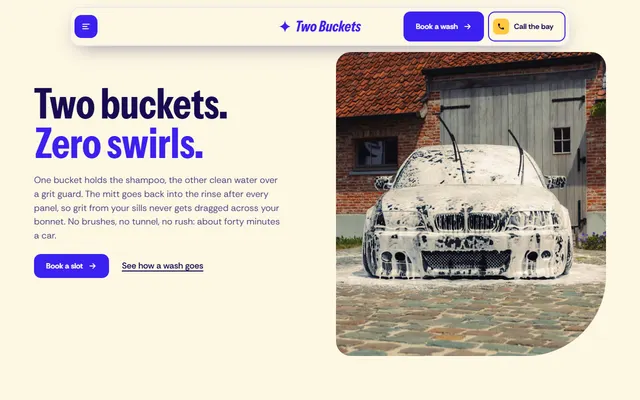
Car wash page with a price board that changes with vehicle size, a monthly wash club and a booking form. Violet, cream and scalloped edges: name the cut photo corners.
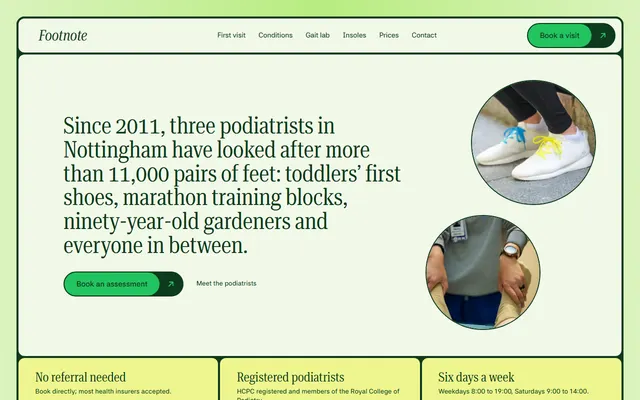
Podiatry clinic built as rounded tiles with 4 px gaps of deep green, a serif voice and round photo discs. A call-back form suits a Base44 form added behind it.
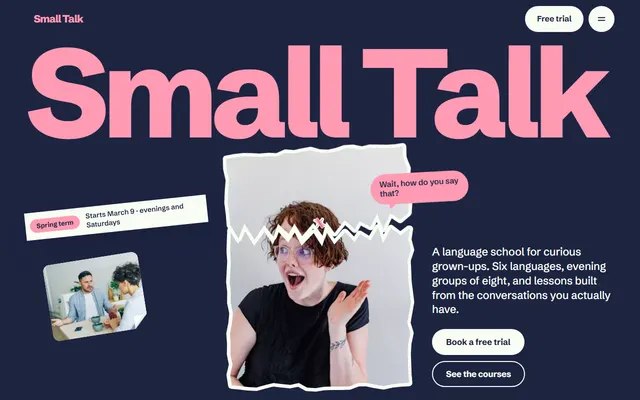
Evening language classes under a giant wordmark with tilted tape and a torn portrait sticker, navy and pink, one typeface. The three-question level finder is a small piece to rebuild.
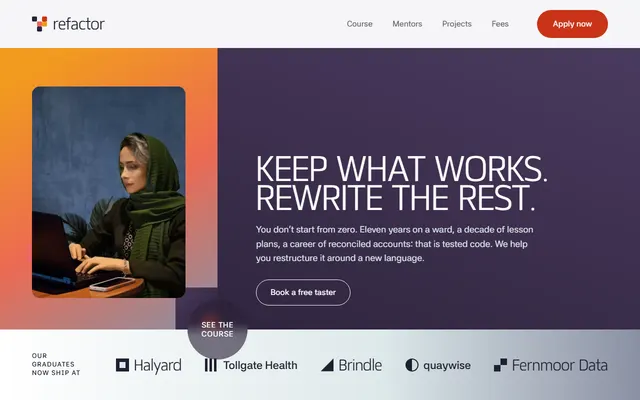
Part-time coding school with uppercase headings, ruled career rows and fee plans. A five-square pixel glyph repeats in the top bar and headings; put it in the prompt.
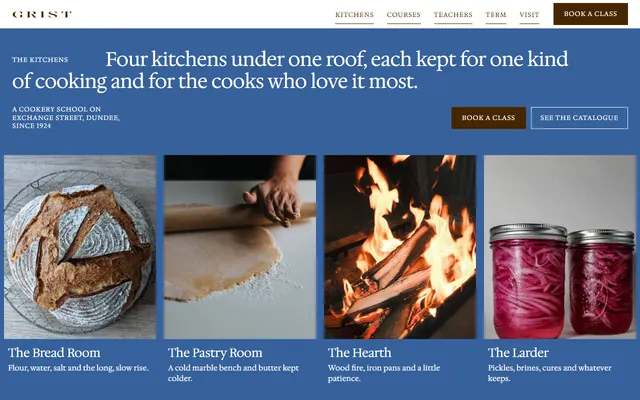
Cookery school in chocolate brown on white with one cobalt first screen and wide serif capitals. Course rows swap a sticky photo; the termly timetable is a ruled table.
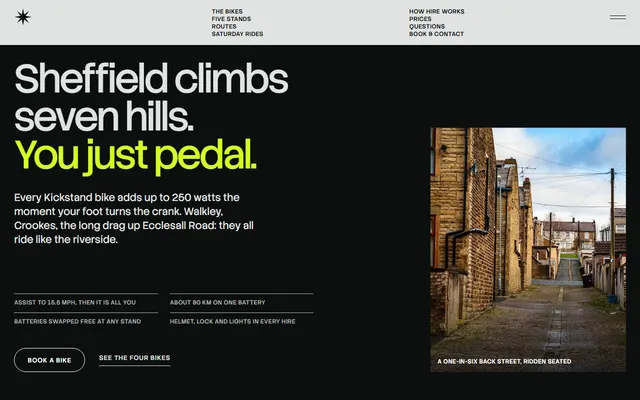
E-bike hire in pale grey and near black with one acid-lime accent, double rules and a price table. The stair-step headline and lime plus mark are what to keep.
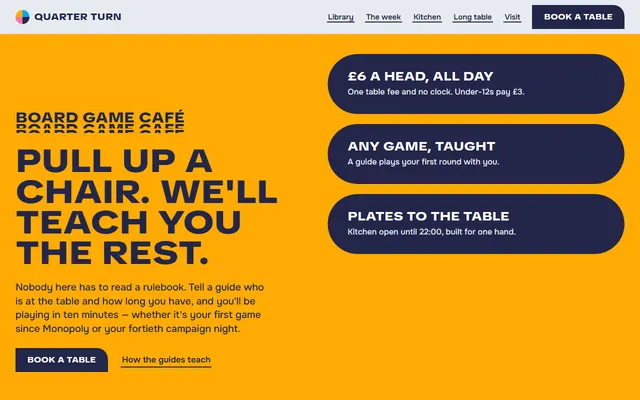
Board game cafe in flat navy, sky blue, amber and pink slabs, with quarter-circle tiles and one rounded corner per button. Describe those shapes or Base44 rounds everything.
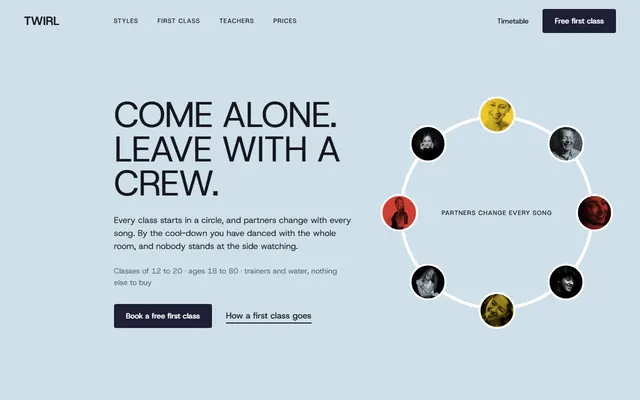
Dance studio for adult beginners in one grotesque face: huge uppercase headings, red hand-drawn loops and photos cut to circles. Rebuild the week timetable and four passes.
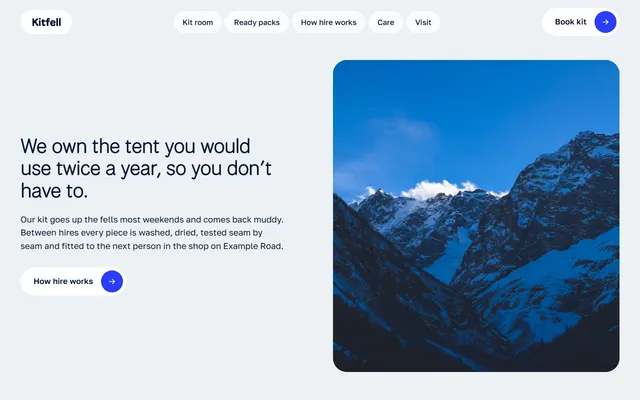
Kit hire shop in pale blue, navy and one electric blue accent, with nightly prices and packs that switch by nights. The switch is a small interactive piece to name.
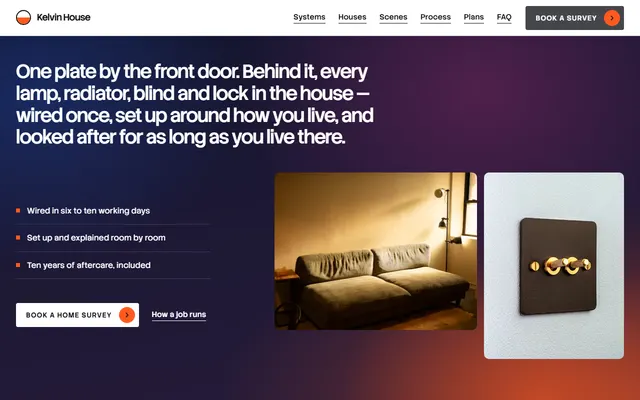
Smart-home installer on white and pale grey with three dark sections, five tall system columns and stacked house cards. Three plans fit a Base44 pricing block.
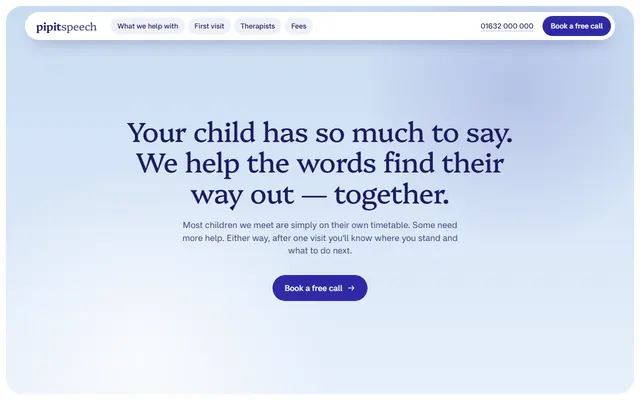
Speech therapy practice in soft sky blue and indigo, stadium and arch photo windows, a floating pill nav and a parent message thread. Describe the window shapes in the prompt.
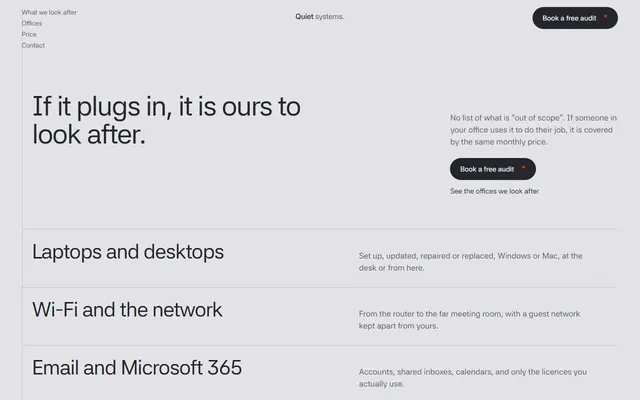
IT support firm: one typeface on pale grey, a left hairline, a ruled list of eight services and a price slider that gives Base44 a real calculation to rebuild.
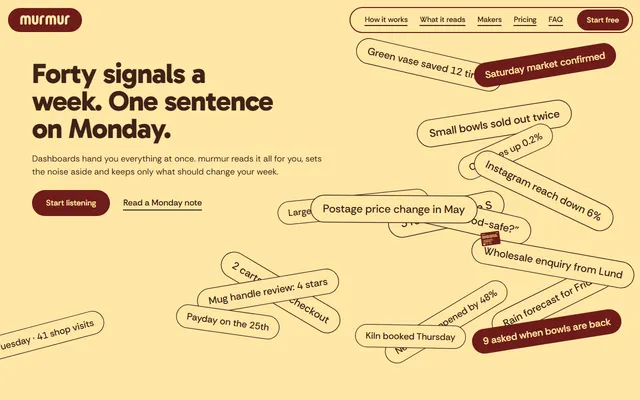
Weekly-message SaaS page: colour slabs, two typefaces, a sticky phone. Name the signal chips that settle on a pinned scroll or Base44 drops them.
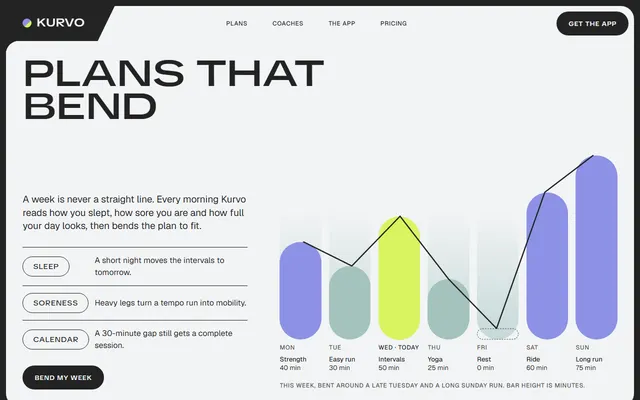
Fitness app in a charcoal frame with 12 px gaps around flat rounded panels. Name the slanted corner tabs and wide uppercase headings and Base44 keeps them.
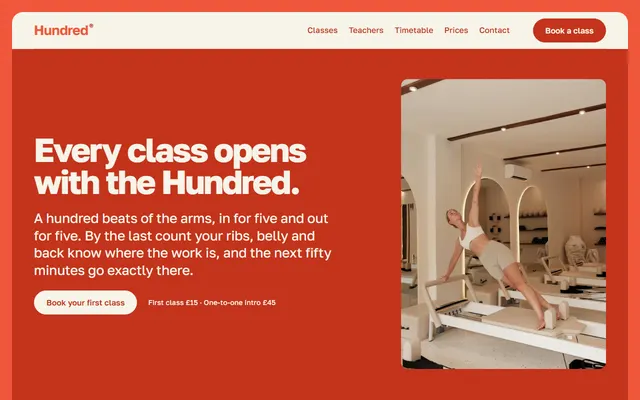
Pilates studio: a cream sheet inside a bright coral frame, heavy coral headings, a weekly timetable and three prices. One typeface, two colours to enter in the Theme panel.
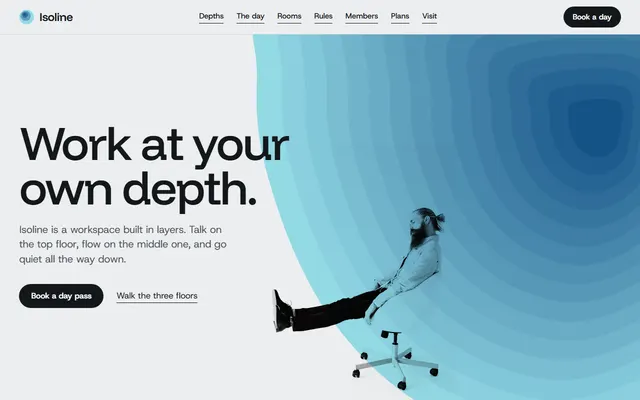
Coworking space of nested stepped colour bands, pale at the rim and dark at the core, photos hung as prints from clips. Day passes and memberships map to pricing cards.
Which Base44 website templates suit which kind of project
Base44 is built for apps with logins, data and backend functions. These 16 templates fit that crowd: app pages, and sites for businesses that take bookings, quotes and requests. Read the weak spot before the first prompt.
- SaaS or app with a phone mockup: the weekly-note app page. Weak spot: the pinned signal-chip scene is flattened unless you ask for it.
- Fitness or consumer app: the training app landing. Weak spot: the headline that opens from condensed to extended letters is a font-width effect, so name the face.
- Service business that quotes prices: the managed IT company page has a monthly price slider. Weak spot: it ends in a contact request, not a payment.
- Booking by vehicle size: the hand car wash page has a price board and a wash club. Weak spot: the booking form sends nothing until connected, and the club has no payment behind it.
- Clinic with a call-back form: the podiatry clinic page lists conditions and prices. Weak spot: the prices and the clinicians are invented.
- Hire by the day: the e-bike hire page has a price table and a booking form. Weak spot: it shows no live availability.
- School or course: the retraining school sells fee plans and free taster evenings. Weak spot: booking buttons need a calendar or a Base44 form behind them.
- Classes sold by the place: the historic cookery school shows an eight-date timetable with places left and private kitchen hire. Weak spot: every Book link jumps to the timetable or contact section, and places left are typed by hand.
- Installer or hardware firm: the home automation installer lists three plans. Weak spot: the order is a request, not a checkout.
Using a template in Base44 step by step
Base44 has three doors for an existing design. Start from URL rebuilds a live page. The chat builds from a prompt and a picture. Base Code connects a GitHub repository. None is an upload of index.html, and the docs do not promise that either keeps a plain HTML file as it is.
- Start from URL. Open a new app, press + in the prompt box, choose Start from URL and paste the live demo address from the template's page. Or build from a prompt, as below.
- Copy the design prompt from the template's page and screenshot the live demo: first screen and one inner section, desktop width.
- Start a new app, press + in the prompt box, then Attach files. Images serve as visual reference; text and Markdown files inform content and structure, so the template's DESIGN.md can go in too.
- Paste the prompt with your business in two sentences. Plan mode shows the build plan first and costs a fraction of a credit per message.
- Review at two widths and change one thing per message. A first build uses about one credit.
Base Code imports a repository and edits it in chat on a branch, ending in a pull request. The docs ask for a web or full-stack project, an Editor role and write access, and do not say whether a plain static repo qualifies, so treat it as untested for these files. Replit, by comparison, imports a public repository directly and keeps the file as it is. Without write access to our repository, Base Code offers a public fork or a private copy. It gives a development preview, not hosting.
Prompts for Base44 that carry a template look
Base44's prompt guide asks for what appears on the page, the reason and the visual style, and warns against "make it better". These name real decisions from two templates, plus a repair message. Replace the angle brackets, attach the screenshot, send one at a time. More are in a separate collection of prompts.
Build a one-page landing site for <app: what it does and for whom>. Use the attached screenshot as the visual reference: copy its structure, not its words. Frame: a charcoal border with 12 px gaps around flat rounded panels, one colour each (mint, lime, white), panel headings in charcoal corner tabs with a slanted edge. Type: a wide uppercase display face for headings, a plain sans for body. Motion: the headline opens from condensed to extended letters once on load. Sections: hero, plan, coaches, three plans, FAQ, contact. Ask me for prices and quotes instead of inventing them. No gradients, no emoji, no row of three icon cards.Build a site for <business, town>. One typeface, regular weight headings, on a pale grey ground, hairline rules between sections, and a ruled list of services right under the headline. One accent colour, used only for focus rings, small marks and the price slider. Add a monthly price card with a slider for <unit> from <min> to <max> at <rate> each, total in <currency>. Add a contact form and tell me how I receive submissions. Ask before writing any claim about response times.Home page hero only. Do not change colours, fonts or other sections. Compare with the attached screenshot: heading larger and tighter, buttons square-cornered, background one flat colour. Tell me the plan, then change only that.Keeping the template design when Base44 rewrites the page
Base44 regenerates code, so a design survives only as far as you pin it down, in three places. The Theme panel sets colours and fonts for the whole app: enter the template's two or three colours and its typeface before asking for layout. AI Controls hold global guidelines such as corner radius, gradient use or animation level, and can freeze files or pages. Edit mode changes one element at a time, and manual edits there use no credits.
Each template ships hex values, type sizes and spacing in the token file written for each template. Attach it and say it is the source of palette and type. Write the rule once in AI Controls: change content, not the look.
If the page starts to look like every other generated site, read the usual giveaways of generated sites and remove each by name: purple gradients, one font everywhere, three equal icon cards, a fade-up on every block.
The same logic holds in other builders; Lovable's chat and GitHub import differ in the details.
Publishing a Base44 site and where it stops
In Base44 the Publish button puts the app live on a free yourapp.base44.app address. A custom domain needs the Starter plan or higher; buy one inside Base44 or connect yours, and DNS changes at an outside provider can take up to 48 hours. A subdomain such as app.example.com works too, so the app can sit beside a site on the main domain. Set each page's title and description in the Meta tags tab of the SEO and GEO page; the site must be published before search engines reach it.
The limits. Demo names, prices, reviews and addresses are invented; replace them or Base44 publishes them. The forms in the files send nothing; Base44 can add its own contact form, and its docs say to test every form end to end. Fonts and photos load from outside servers, and a chat rebuild may simplify the GSAP scroll scenes. None of these files has a cart.
If you want the file itself, any static host serves it, and the Claude Code guide edits the downloaded HTML in place.
To skip code and hosting choices, the 8B builder designs for free and publishes with hosting for $9 a month billed yearly.
Base44 template questions
Are there free Base44 templates?
Yes, in two places. Base44 has its own marketplace of apps and websites at base44.com/templates. This catalog has 101 free HTML templates under the MIT license; 16 are picked here, used through a prompt and a screenshot.
Can Base44 use an HTML template?
Not as the same file. Base44 writes its own code in chat. You can attach a screenshot and the template's design prompt, use Start from URL with Design only, or connect a GitHub repository in Base Code, whose docs do not say whether a plain HTML project works.
How do I make a Base44 site not look generic or AI generated?
Make the design decisions yourself and state them: one typeface, two or three colours, one motion idea, real copy. Set colours and fonts in the Theme panel, put your rules in AI Controls, and attach a screenshot of a designed page as the reference.
Does Base44 read AGENTS.md?
Its docs do not say so, while Bolt's help says it picks up an agents.md file automatically. In Base44 the nearest thing is the custom instructions in AI Controls, or you can attach the file in the chat, since Markdown files are read as context.
What prompt should I use to build a website in Base44?
One that names the page's purpose, its sections in order, the typeface, the palette and the scope of the change. Base44 recommends specific prompts, Plan mode before building, and one feature at a time.
Can I publish a Base44 site on my own domain?
Yes, on the Starter plan or higher. Open Dashboard, then Domains, and buy a domain or connect yours with DNS records. HTTPS is issued for you. A free yourapp.base44.app address works without a plan upgrade.
Is it free to use these templates commercially?
Yes. They are MIT licensed, for your own and client sites. Keep the Design: 8B footer link unless the site owner asks to remove it. Photos stay under Unsplash's license, listed in each CREDITS.md.