Free coding school website template
Edit it by hand: it is one index.html with no build step, so you can open it in any text editor, change the words and photos, and upload it to any static host. Not a coder? Describe your business in one sentence to 8B's AI website builder and it designs a new site for you, with more pages when you need them. Designing is free; publishing with hosting is $9 a month, billed yearly. It also works inside Claude and ChatGPT.
MIT license · Made by 8B, an AI website builder · Plain text: refactor.md, data: refactor.json
About this coding school website template
Coding school website template: one free HTML file for a part-time school that retrains adults, with before-and-after careers, a five-module course, a weekly timetable, mentors, taster evenings and three fee plans. The look is flat colour planes in orange, plum and ice. AGENTS.md is included, so Claude Code, Cursor or Codex can adapt it.
At a glance, October 2026. One 160 KB index.html with its CSS and JavaScript inside, 13 sections, 16 Unsplash photos credited in CREDITS.md, Asta Sans and Matangi from Google Fonts, GSAP 3.13.0 (ScrollTrigger); Lenis 1.3.27 smooth scroll loaded from jsDelivr.
The structure suits a school that teaches evenings and weekends to adults changing careers, as a coding school website template for Claude Code and Cursor, or by hand. Cohorts, fixed start dates and fee plans are laid out. Language, data or trade courses with the same rhythm can reuse it. Its second section, six old jobs struck through beside the new ones, speaks to career changers directly.
Vibe coding with Claude Code, Cursor or Codex starts with facts only the school has: course length, modules, timetable, fees, funding rules and start date. Ask the agent to replace the school name in the menu, footer and legal line, then the career rows, mentors, capstone clients and employer names. Graduate quotes, ages, outcomes and the employers in the opening band are invented; the owner supplies real ones or deletes them.
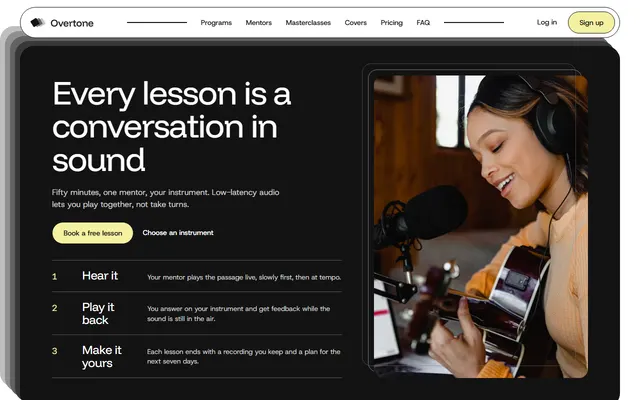
Choose this for a cohort course with fixed sessions, a fee page and a taster evening. If you teach single instruments or private lessons instead, the lesson studio template with programs and a booking form fits better. The weak spot is booking: the Apply buttons and the Book buttons beside the dates only jump to the form, taster dates are fixed text, and there is no calendar. Without code, 8B's builder is the other route.
Good for:
Turn the coding school website template into your site with an AI agent
With an AI coding agent
Files (PowerShell: curl.exe):
curl -LO https://raw.githubusercontent.com/8bsite/coding-school-website-template/main/index.html
curl -LO https://raw.githubusercontent.com/8bsite/coding-school-website-template/main/AGENTS.md
curl -LO https://raw.githubusercontent.com/8bsite/coding-school-website-template/main/LICENSE
curl -LO https://raw.githubusercontent.com/8bsite/coding-school-website-template/main/CREDITS.mdPrompt for the agent:
Read AGENTS.md, then edit index.html. Make this the site for <my school: name, city, subjects, course length and modules, weekly timetable, fees and funding, next start date, mentors, graduate stories, employer names, opening hours, how people book a taster>. Replace first the school name, six career rows, four mentors with portraits, three capstones and the fees. Keep the section ids, the classes AGENTS.md lists and the five i elements in each pixel glyph. Ask me for missing facts and never invent outcomes, employers, quotes, prices, dates or contacts.In a terminal
npx degit 8bsite/coding-school-website-template my-siteCoding school website design prompt for any AI tool
Use this prompt to build a coding school or bootcamp site from scratch in Claude Code, Codex, Cursor, Lovable, v0 or Bolt. It is this template's design written as decisions, like prompts for schools and shops; with the template itself, the short prompt above is enough.
Build a one-page website for a part-time coding school that retrains working adults for tech jobs. Sections in order: top bar, opening panel, careers (six old jobs struck through beside new ones), a five-module course that pins and slides sideways, weekly timetable, mentors with portraits, three capstone projects, graduate quotes, taster evenings, three fee plans, six questions, application form, footer. Type: Matangi 500 uppercase for headings, names and prices; Asta Sans 400 to 600 for body, buttons and labels; no third face. Colours: #f5f5f7 ground, #1e2130 text, #c93418 red for every action and the strike line, #f29a1f orange, #4a3a5f plum, #dde8ea ice. Build structure from flat colour planes with 24px corners and round buttons; no shadows, no stock icons, no purple gradient, no three icon cards, no centred hero with two buttons. Motion idea: order from disorder; planes and rows start turned or stacked and settle straight on scroll; switch all of it off under prefers-reduced-motion. Copy: short, plain, concrete. Ask me for the school name, city, course length, modules, timetable, fees, funding, start date, mentors and employers; never invent outcomes, quotes, prices, dates or contacts; leave marked placeholders and list them. One primary action, Apply, repeated in the bar, the fees and the form. Mobile: a Menu button replaces the links under 900 px, tap targets at least 44px. Checks: no console errors, works at 390 px, keyboard focus visible, every placeholder listed.Coding school website design and motion
Palette
#f5f5f7 page ground, the solid bar after scrolling, the form field backgrounds#1e2130 body text and headings, the dark employer marks, text on the light planes#5e606b lead paragraphs, nav links, struck-through old jobs, notes under fees#c93418 the red accent: buttons, focus outline, the strike line, the taster panel, the last module and weeks 20 to 24, the labels of the contact details#f29a1f orange plane in the first screen, first module and weeks 1 to 5, first project and fee gradients, pixel glyph#ec6a52 coral: the tint behind old jobs, second module and weeks 6 to 10, gradient ends, minus signs#4a3a5f plum: the graduates and footer sections, the full-screen menu, the second project and fee cards, mentor labels, FAQ icons#2a2137 deep plum: the course section background, button hover wipe, gradient ends, the favicon square#8a90a3 slate: fourth module and weeks 16 to 19, gradient ends, field hover border#dde8ea ice: the mentors and questions sections, new-job rows, third module and weeks 11 to 15, lead text on dark sections#ffffff fee cards and the form surface, text on dark planes, button labels#dcdde3 hairline rules, form field borders and the bar's shadow lineFonts
- Matangi: headings, module and mentor names, fee prices, the menu links and the wordmark: weight 500, uppercase, slightly tracked
- Asta Sans: body text, buttons, form fields and small tracked uppercase labels: weights 400 to 600
A 1440 px column with side gutters of 20 to 64 px. Most section heads split in two: an uppercase heading on the left, a lead paragraph on the right, aligned at the bottom. Hairline rules separate the career rows, timetable slots and contact details. A five-square pixel glyph repeats in the top bar, the careers, graduates and questions headings and the footer. Below 900 px the columns stack and a Menu button replaces the links.
Orange, coral, plum and ice rectangles fill the first screen, each module and the contact area. Module planes turn level as they arrive and contact planes fall from a tilted heap into bands, both tied to the scroll. This coding bootcamp web design uses no drop shadows.
Every value of this coding school website design, with the type scale, spacing and the motion rules, is in its DESIGN.md file (Google's format), ready for a coding agent or Stitch.
What is on the coding school website page
- NavigationLogo glyph and word, four links, an Apply now button and a Menu button; full-screen menu
The bar turns solid after 24 px of scroll and slides away on the way down, returning when you scroll up.
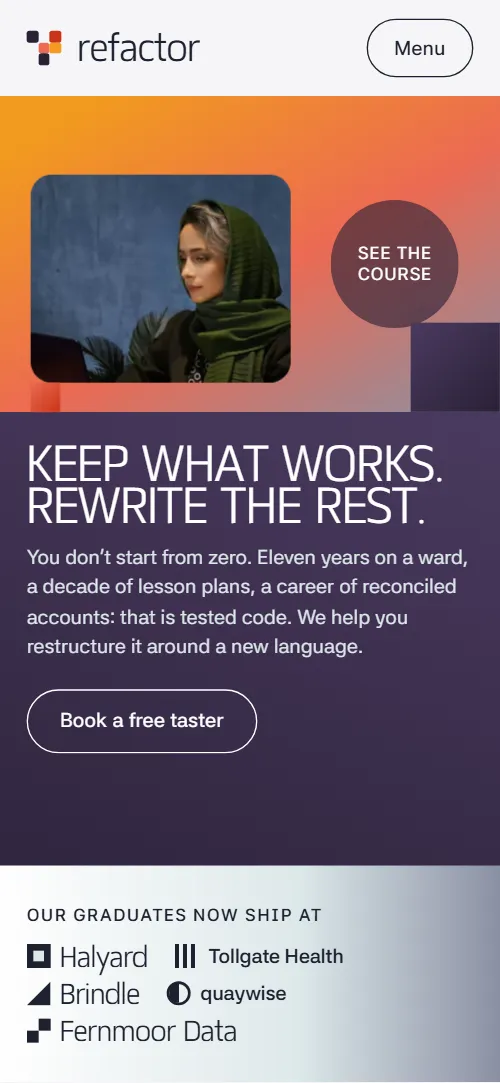
- Keep what works. Rewrite the rest.One screen: a panel of colour planes with a photo, the h1, a paragraph, a taster button and a row of employers
On load the panel and then the heading, paragraph and button lift into place; the colour planes themselves stay still.
- Your first career isn't dead code.Six rows of old job to new job, each with what carried over
Each of the six rows is scrubbed on scroll: the old job is struck through and greyed, the new job wipes in from the left, then the Kept line fades up.
- Twenty-four weeks. Five modules. One real product.A pinned horizontal track of five course modules with a strip of 24 week squares that fill in
Pinned: the five module panels slide sideways while 24 week squares fill in order and each module's planes turn level as it arrives.
- Built around the job you still have.Three fixed weekly sessions with a photo each
The heading and lead rise out of a clip, and each of the three photos settles from a tilt, once, as they near the screen.
- Mentors who made the same jump.A sticky portrait window that changes as four mentor stories scroll past
The portrait window is sticky; as each mentor card nears the middle, the next portrait wipes in on a slant and settles from a slight zoom.
- Capstones that are still running.Three project cards that stack as you scroll
The three project cards stick near the top and stack; the card underneath tilts, shrinks to 88% and darkens as the next slides over.
- What changed, in their words.One large quote and four shorter ones with name and former job
The heading, the lead quote and four shorter quotes rise into view, and the heading's pixel glyph assembles from scattered squares.
- Not sure yet? Sit in on a real class first.A red disc that grows into a panel listing four taster evenings
The red panel starts as a small disc with an arrow and grows on scroll until it fills its box, then the four dates rise inside.
- One fee. Three ways to carry it.Three fee plans dealt out from one stack
The three fee cards start stacked and slightly turned on one card, then are dealt into their columns as the section scrolls up.
- Questions adults actually ask.Six questions and answers (native details) beside a sticky heading
The heading rises and its glyph assembles; the six answers open and close natively, without JavaScript.
- Book a taster, or just ask.Colour planes falling into bands behind a contact form and details
Three colour planes behind the form fall from a tilted heap into bands, and the four detail rows fade up.
- FooterWordmark, short description, six links and the address
Before you publish the coding school website site
- Replace social preview image, favicon, phone number, email address and contact form (sends nothing yet) and the invented demo facts (prices, dates, addresses). AGENTS.md lists them.
- Book a free taster button in the first screen lead to
#tasternow; point them to your booking page or form for taster evenings, or keep it on the dates section. - See the course round link in the first screen lead to
#coursenow; point them to keep it, or point it to a syllabus PDF or a course page. - Book buttons next to the four taster dates lead to
#contact, the contact formnow; point them to a booking link for each date (Eventbrite, Cal.com, a form), or keep them on the form. - Apply and Check eligibility buttons on the three fee plans lead to
#contact, the contact formnow; point them to your application form or funding checker, or keep them on the form. - Apply now button in the top bar and in the menu lead to
#contactnow; point them to your application page if you have one. - The contact form lead to
action="#"; a small script stops the submit and shows a thank-you line, nothing is sentnow; point them to a form endpoint (Formspree, Netlify Forms, your own) and remove the preventDefault script. - The course section pins for 1.15 times the track overflow: about 4,240 px of scroll at 1440 px wide (nearly five screens), about 1,550 px on a 390 px phone; more modules lengthen it. The mentors portrait window, the stacked capstone cards and the growing taster panel are CSS sticky and need enough screen height.
- The employer band in the opening is one row of five names on desktop and wraps to two rows on phones, inside a band 20 to 22% of the panel high; check both widths when you change the names or their number.
- The contact form does not send anything until you connect an endpoint, and the taster dates are fixed text, not a calendar.
- gsap, ScrollTrigger and Lenis load from a CDN near the end of the body, and the motion scripts after them wait for those files.
Questions about this coding school website template
Is this a free coding school website template I can use for clients?
Yes. It is one index.html under the MIT license, with the styles and scripts inside the file. GSAP, ScrollTrigger and Lenis load from jsDelivr, and there is no build step and no CMS. Photos are Unsplash images and the fonts are open licensed; CREDITS.md lists them.
Can I use it for a full-time coding bootcamp rather than a part-time school?
Yes, after a text pass. The demo is a part-time school in Sheffield: 24 weeks, two evenings and a Saturday, fees in pounds and regional skills funding. Replace the timetable rows, module weeks, fees and funding with your own, and change the numbers in the course heading.
How do I give the template to Claude Code, Cursor or Codex?
Download index.html and AGENTS.md into one folder, add LICENSE and CREDITS.md, then paste the prompt after filling in the angle brackets. In Base44, paste the demo address into Start from URL to recreate the look. Starting without the file? The coding school website design prompt further down works in Lovable, v0 or Bolt, which build their own code from it.
What must I keep when I change the text?
Keep the section ids, the data-8b-section, data-8b-motion and data-8b-part attributes, and the classes AGENTS.md lists for each animated section. Keep five empty i elements in every pixel glyph and one portrait per mentor card. The week strip is a 24-column grid, so change its CSS if you change the squares.
Does the contact form send applications?
No. As shipped it checks the fields, shows a thank-you line and disables the button, and sends nothing. Connect Formspree, Netlify Forms or your own endpoint and remove the script that stops the submit. The Apply buttons and the Book buttons beside the taster dates only jump to the form.
Can I get a school site like this without editing code?
Yes, with a different tool. 8B's AI website builder designs a new site from a sentence, and its own design is not this template. Designing and restyling are free; publishing with hosting and SSL, full HTML export and AI edits are on Pro at $9 a month billed yearly. It also runs inside Claude and ChatGPT.