Website templates that don't look AI generated
A website looks AI generated when nobody made its design decisions, so a model filled every gap with the most common choice: Inter, a purple gradient, a centred hero with two buttons, three icon cards. These templates are the other case. Each one fixes its typefaces, a small palette, one motion idea and business-shaped copy before an agent touches a line.
Ask a model for a modern landing page and you get ai slop in web design: a page that fits any company and belongs to none. Below is a numbered list of the tells you can check on your own site without reading code, the reason they appear, and a short check before launch. The twenty templates further down, from a library of 101 free ones, are the worked examples.
They were made with 8B's design engine from references that people chose, so they do not claim to be free of AI. The claim is narrower and you can check it in the page source: the type, colour, layout and motion were decided, and prompts you can paste into an agent can keep them that way.
At a glance, October 2026. This page shows 20 of the 101 free MIT templates, made by 8B, an AI website builder, chosen for the widest spread of decisions. By what carries the identity, they fall into four kinds: rules and grids in 5, paper and stickers in 4, flat colour blocks in 5, a photo-led stage in 6. Across all 101, 36 typefaces appear and Inter is not one of them. 29 of the 101 use a single family.
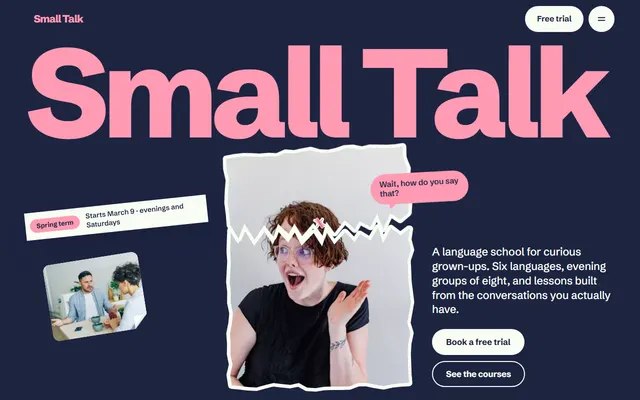
Language course. A giant wordmark fills the width, with tape, a torn portrait sticker and bubbles that burst around the statement as you scroll.
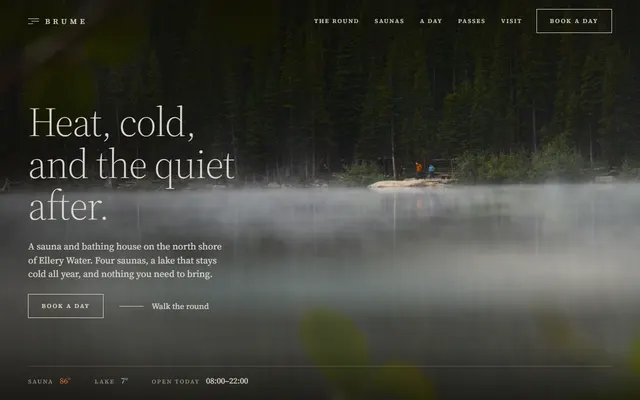
Sauna. One serif family throughout, a dark ground with copper accents, a vertical label rail at the left, and fog that drifts over the lake photo.
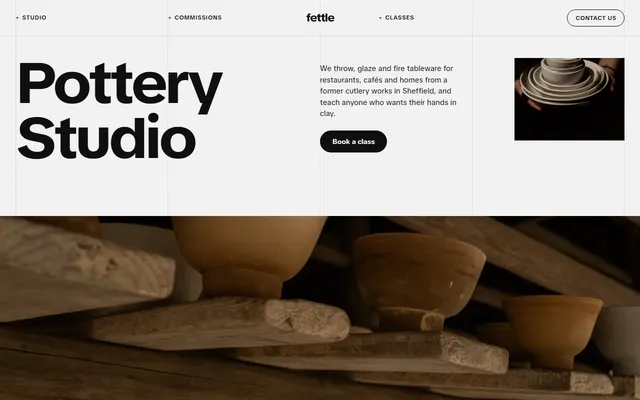
Pottery studio. Four columns and five hairlines stay fixed over the whole page; huge headings span two or three columns, text often starts on the third.
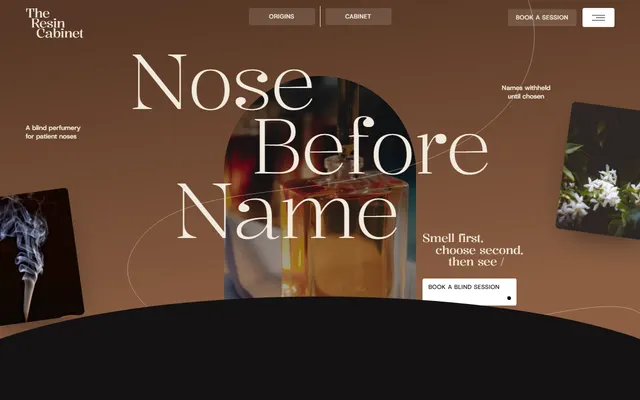
Perfumery. Kalnia display lines step to the right like a staircase, and photos sit in arched windows on alternating dark and cream sections.
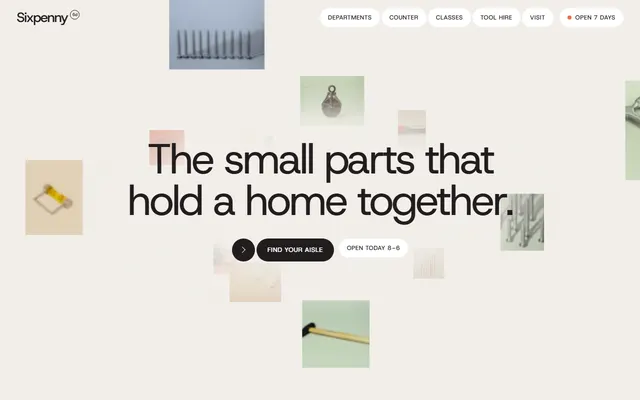
Hardware store. A cloud of floating product tiles opens the page instead of a stock photo, then each department panel wipes up over the last.
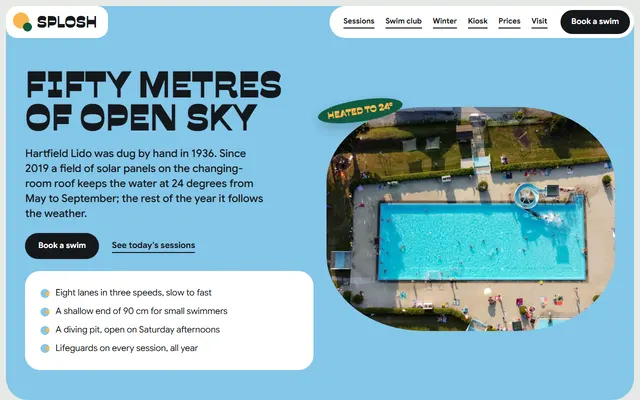
Swimming pool. Tiles with 30px corners in pool blue, yellow, orange and deep green, and a round photo that swims across the pinned lane bands.
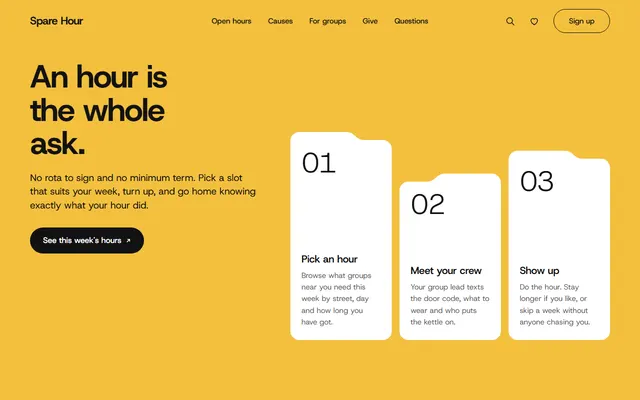
Nonprofit. Folder-tab cards at stepped heights instead of icon cards, yellow and white grounds, a script accent, folders that lift, tilt and slip to the back.
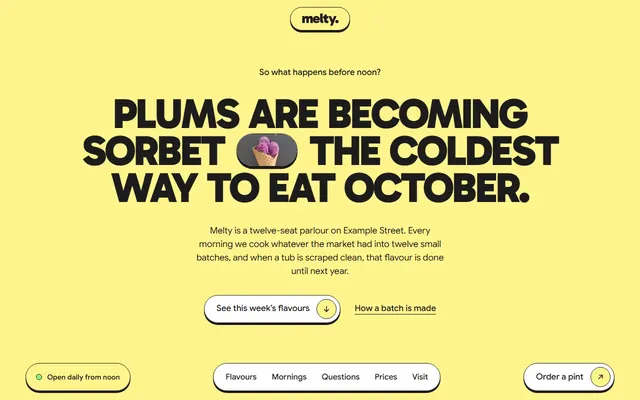
Ice cream shop. Flat boxes with a 1.5px ink outline and hard shadow instead of glass, huge uppercase headings, flavour cards that pile up with a tilt.
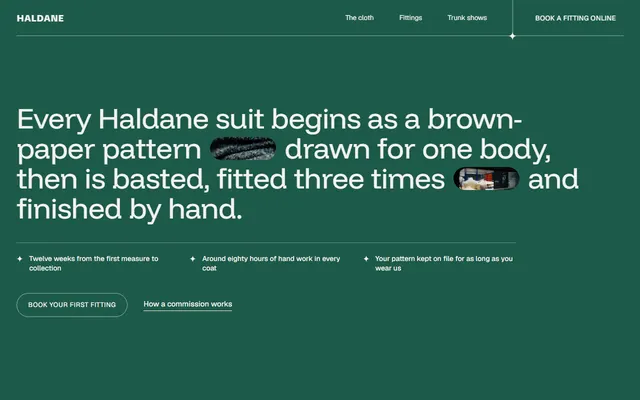
Tailor. A green panel opens with one long sentence holding two photo pills that open from a slit on load, in place of a headline and two buttons.
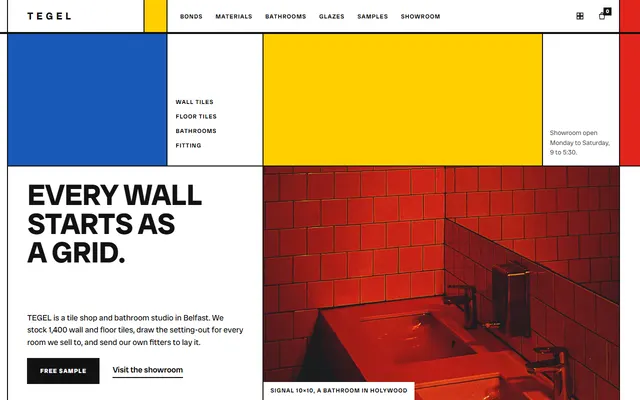
Tile store. Every section is a ruled grid with two pixel near-black gaps, blue, yellow and red cells and heavy uppercase type: no rounded cards, no centred hero.
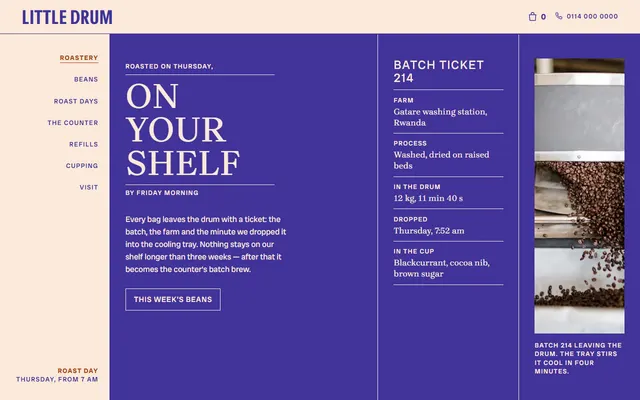
Coffee roaster. Hairlines cut sections into cells over cream, indigo and rust grounds instead of white cards, and a round bean frame turns a full circle.
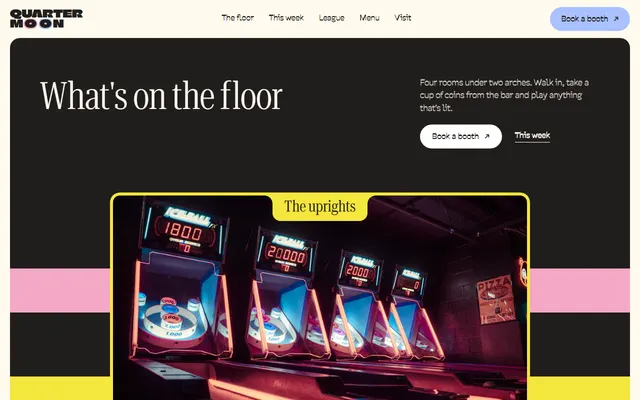
Arcade bar. Condensed serif headings under a Climate Crisis wordmark, pink and blue blocks with notched title tabs on cream, photo cards that stack and shrink.
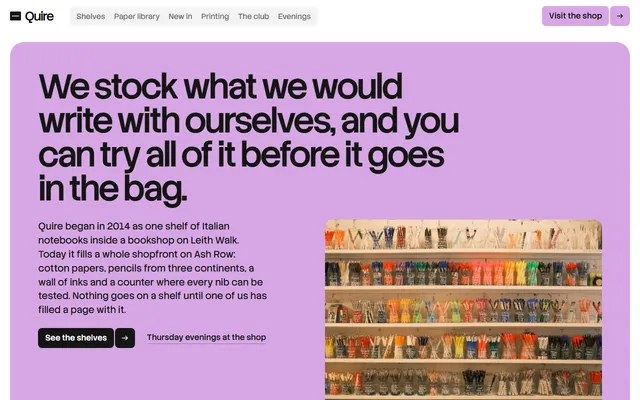
Stationery shop. A lilac rounded panel holds the opening and ink-black panels hold the paper library and tiers, on a 12-column grid, not white end to end.
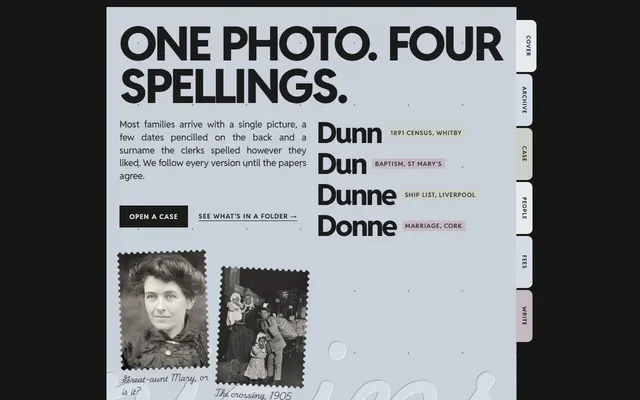
Genealogy research. Paper sheets in one column on a black desk, index tabs in four paper tints, and a handwriting face for notes beside uppercase sans headings.
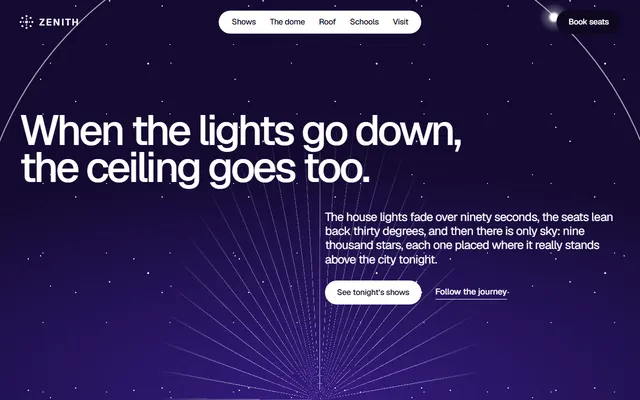
Planetarium. Headings split into words that sit in opposite corners, and a glowing runner travels a progress line along five stops.
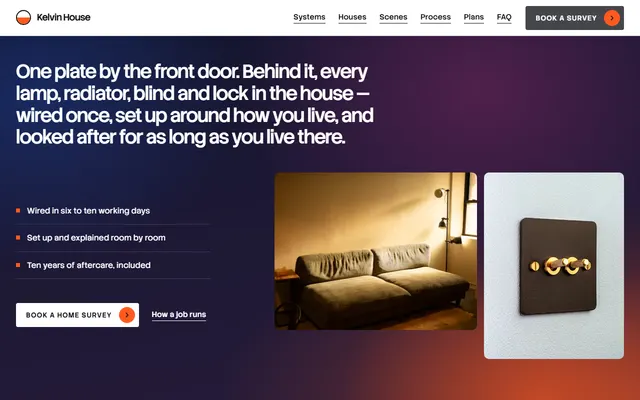
Smart home. No floating device mockup: five tall columns share a row, and the pinned stage opens one beside a larger photo while the others narrow.
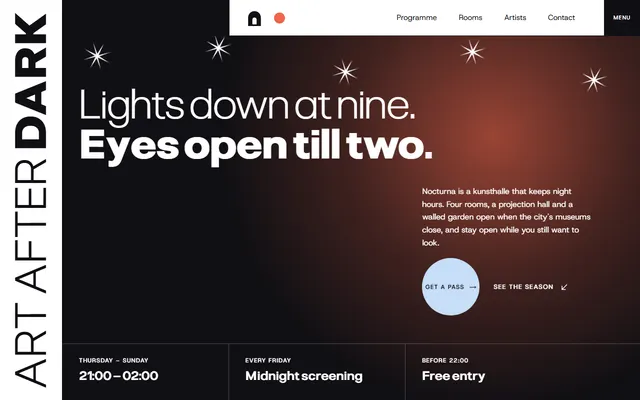
Art gallery. Hairlines divide each section, a third-width label column sits at the left, and photos rise into arches over the previous row. No soft shadows.
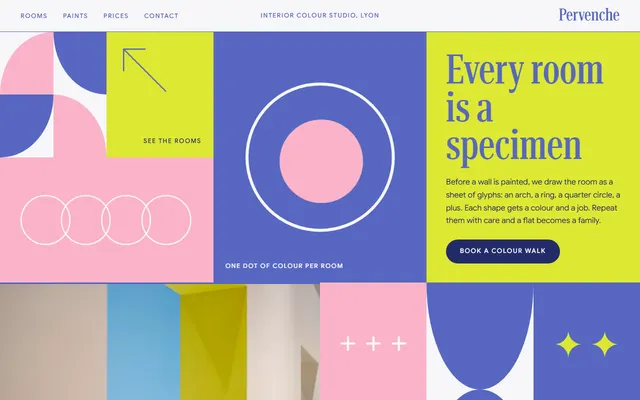
Interior colour studio. Nine tiles of different sizes in a six-column mosaic instead of a three-card row, periwinkle bands and tall condensed serif headings.
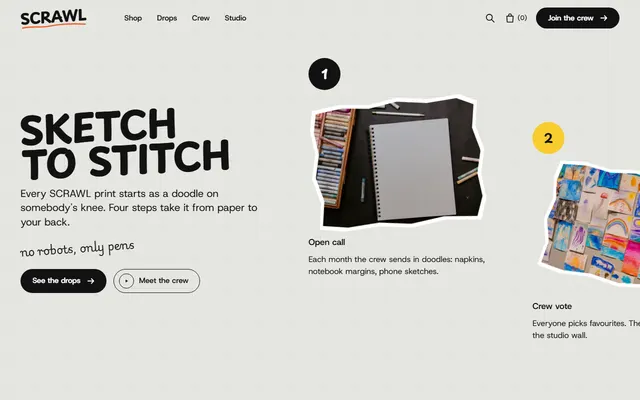
Streetwear brand. Off-white paper with a faint 64 px grid, tilted ragged stickers instead of neat photo crops, and a crew wall dealt out from a pile.
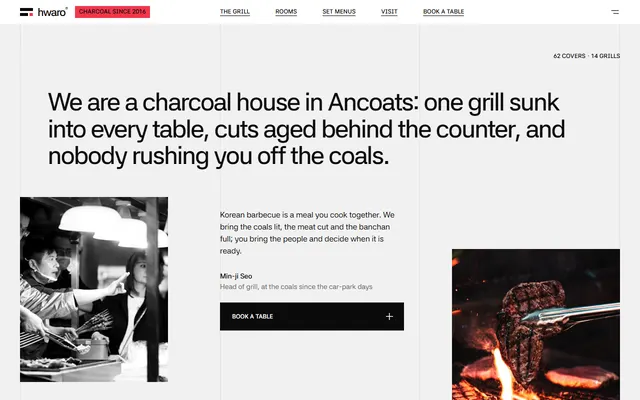
Korean restaurant. A three-column hairline grid, Hangul subtitles on most headings, and statement words that burn from ash grey through red to ink on scroll.
What makes a website look AI generated: 16 tells to check
No code needed. Open your site on a laptop and a phone and go down the list. One or two hits are normal; five or more, and visitors read it as a generic vibe coded website before they read a word. Each line says what to do instead.
- A purple to blue gradient behind the headline. Use a flat ground in a colour from your trade.
- Glowing blobs floating behind the content. Remove them; a real photo or a plain ground says more.
- One sans-serif for everything, often Inter, in one weight. Choose a heading face with character and set it large.
- One headline word in gradient or another colour. Make the sentence itself specific instead.
- A small all-caps label above every heading. Keep a label only where it says something, such as a step or a date.
- A centred hero with a pill badge and two buttons. Open with what is most yours (the room, the dish, the product) and one clear action.
- Three cards with an icon each. Show the offer as a menu, a price table, a timeline or a list shaped like the business.
- The same radius and soft shadow on every box. Pick one shape language on purpose and vary it by role; the flat, hard-edged grid pages show how far that choice can go.
- Frosted glass panels. Use solid ones; glass over a photo also hurts reading.
- Emoji as bullets. Use plain bullets, or numbers only where order matters.
- Every block fading up on scroll. Choose one moment that moves and let the rest stand still.
- Hero, features, testimonials, pricing, FAQ in that order for any business. Order sections by what a customer asks first: hours for a bar, price for a class.
- Headlines that fit any company, such as "Revolutionize your workflow". Write one sentence with a number, a place or a house rule.
- Words in threes: fast, simple, powerful. Replace each adjective with the fact behind it, or cut it.
- Proof nobody can check: logos of firms that never hired you, quotes from people who do not exist. Show only what you can back up.
- Stock pictures of people at laptops. Use your own photos or screenshots of the real product.
Why vibe coded websites look the same
A design is a few dozen small decisions: typefaces and sizes, two or three colours and where each goes, the section order, the corner radius, what moves, what the headline says. A prompt like "a clean landing page for my startup" settles none. The model fills each gap with the choice it has seen most often, and since nearly everyone leaves the same gaps, nearly everyone gets the same page, even when the products have nothing in common.
The stack adds its own defaults: a starter kit's single corner radius, shadow, spacing scale and icon set reach the page untouched, because nothing asked to change them.
Asking the model to "make it unique" does not get you out. It moves the page to the next most common look. Anthropic's frontend design skill for Claude, written to counter generic output, names the looks that generated design now clusters around, among them "a warm cream background (near #F4F1EA) with a high-contrast serif display" and "a near-black background with a single bright acid-green or vermilion accent". Its verdict: "they are defaults rather than choices, and they appear regardless of subject."
So the fix is not a stronger adjective in the prompt. Decide the type, palette, layout, one motion idea and the copy yourself, then write them down where the agent reads them on every run: a DESIGN.md with the tokens for the look, and AGENTS.md for what must not change. An agent that reads both keeps the decisions instead of averaging them away.
How these templates avoid the ai slop look in type, colour and layout
Type first. Across the 101 templates 36 typefaces are in use, Inter is not one of them, and 29 templates stay on a single family. The spread is not perfect: Host Grotesk appears in 25. The arcade bar sets condensed serif headings under a Climate Crisis wordmark; the sauna uses Source Serif 4 alone on a dark ground. Colour is a short list with jobs: the tile store runs near-black with blue, yellow and red cells. Layout is where hero plus three cards gives way:
- The genealogy template stacks paper sheets in one column no wider than 820px, with index tabs at the side.
- The tailor template opens on a green panel whose headline is one long sentence containing two photo pills.
- The perfumery template steps each heading to the right and puts photos in arched windows.
- The pottery studio template fixes four columns and five hairlines over the whole page.
- The arcade bar template stacks four photo cards, each shrinking to 90% as the next covers it.
Motion and copy that do not read as AI generated
Instead of one fade-up on everything, each template spends its motion on one idea:
- In the coffee roaster template a round frame turns one full circle beside the list.
- In the hardware store template the departments are pinned for about four screens while each photo panel wipes up over the last.
- In the planetarium template a glowing runner travels a line along a strip of five stops.
All 101 load GSAP, ScrollTrigger and Lenis from jsDelivr, and each page still reads in full with reduced motion. Copy is the quieter tell. The demo text is invented but reads like a real business: the genealogy template's method line says nothing goes on the chart until two independent records agree, which is a rule, not a slogan.
Keeping an agent from turning the site back into AI slop
Most damage happens at the second prompt, when someone asks an agent to "make it more modern". Ask for content changes instead. Keep the fonts and the CSS variables in :root, keep the section ids and the data-8b attributes the scripts read, and put the DESIGN.md from the ZIP download next to index.html. The steps for Cursor, Codex or Claude Code are in a longer walkthrough for coding agents.
A prompt that holds the decisions in place:
Open index.html, AGENTS.md and DESIGN.md. Replace the demo text with the facts I give you below. Do not invent numbers, names, prices or addresses: ask me when a fact is missing. Keep the fonts, the variables in :root, the layout and the animations. Change content only; no new gradients, cards or sections. When you finish, open the page at 1280 and 390 pixels wide and list anything that looks different from before.A pre-launch check so the site does not read as vibe coded
- Search the page for the demo names, prices, addresses and dates, and for links that go to
#. Replace each with your own, or remove the block. - Read every headline aloud. If a competitor could use it unchanged, rewrite it around a fact.
- Delete any logo, quote or number you cannot back up.
- Swap stock photos for your own where you can, each with a short alt text.
- Open the page at phone width: nothing scrolls sideways, buttons are easy to tap, the menu opens and closes.
- Press Tab through the page: you can always see where you are, and every link and field can be reached.
- Turn on reduced motion in your system settings and reload: all the text is there and readable.
- Send a test through each form and check that it arrives. Forms here send nothing until you connect Formspree, Netlify Forms or a backend.
- Show the first screen to someone for ten seconds, then ask what you do and where. If they cannot say, fix that screen.
Limits of an anti AI slop template
A template is a starting point, not proof that a site is not AI generated. Leave the invented demo copy in place, or let an agent rewrite it from memory, and the page reads generic again. Photos are stock images from Unsplash. Some looks here, such as hairline grids or a cream ground, are on that skill's list of common generated styles too: take one because it fits your trade, not because it is not purple. AI was involved in making these pages; what differs is that the decisions exist and sit in the file.
Questions about AI generated website design
What is AI slop in web design?
It is the generic look of a page whose design decisions were all left to a model: Inter, a purple gradient, a centred hero, three icon cards, fade-up on everything, and copy that fits any product. The page works but says nothing about the business behind it.
Why do vibe coded websites look the same?
Because the prompts leave the same gaps. With no typeface, palette, section order or motion named, a model picks the most common option for each, so different users get nearly the same page. Asking for something unique only swaps one common look for another.
How can you tell a website is AI generated?
By a cluster, not one sign: a gradient behind a centred headline with a pill badge, one default sans, three identical rounded cards, emoji bullets, the same entrance animation on every block, and claims with no number or place. Five or more together point to ai slop.
How do I make an AI-built site not look AI generated?
Decide before you prompt: typefaces, three or four colours with a job each, the section order and one motion idea. Write them into DESIGN.md and AGENTS.md, give the agent real facts, and ask for content edits, not a modern redesign. Then run a pre-launch check.
Is it bad to use AI to build a website?
No. The problem is not the tool but unmade decisions. These templates were themselves made with 8B's design engine from references people chose. A site built with an agent looks specific when someone fixes the type, colour and motion first and supplies real copy.
Can I use these templates with Claude Code or Lovable?
Yes for Claude Code, Cursor and Codex: each template is one index.html the agent edits in place, with an AGENTS.md that says what to keep. Lovable generates its own code and does not take the HTML as it is, so give it the design prompt with the live demo as the reference; on 16 templates an Open in Lovable button sends both in one click.