Website templates for Google AI Studio and Gemini
Website templates for Google AI Studio and Gemini give the model a finished design to follow instead of a blank prompt. Build mode in AI Studio and Canvas in the Gemini app write their own code, so you hand them a template's design prompt, plus a screenshot where the tool takes images. Gemini CLI edits files, so there you use the HTML file itself, with its AGENTS.md. All free under MIT.
Ask Gemini for a site from nothing and you get the usual sans, a soft gradient and a centred headline over three cards. A Gemini website builder session goes better when the decisions arrive with the request. Each template below has settled its typefaces, a small palette, one motion idea and its section order, and writes that down as a prompt you can paste.
Which route you take depends on the tool. AI Studio Build mode and the Gemini app generate an app of their own, so the result is a Gemini website in the look of the template, not the same file. Gemini CLI works inside a folder, so it can edit the real index.html. The guide to agents and AI app builders compares both families.
Where Google's documentation is silent, the text below says so. Prompt wording for other agents has a page of its own.
At a glance, October 2026. This page lists 16 templates, all free under MIT and made by 8B, an AI website builder. Grouped by how much type and script a Google tool must reproduce: 4 use a single typeface (the sauna, the planetarium, the wedding planner and the lighting shop), 11 pair two typefaces and the bakery uses three. All 16 load GSAP, ScrollTrigger and Lenis from jsDelivr, and 8 of them also load SplitText. They run 11 to 13 sections: one has 11, eight have 12 and seven have 13.
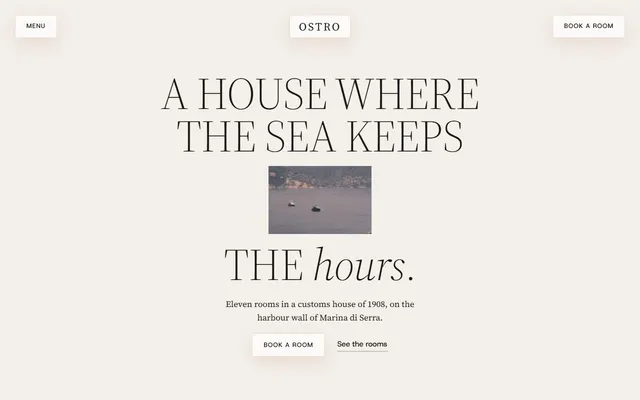
Boutique hotel. Its prompt names Source Serif 4 in light uppercase, a warm off-white and terracotta palette and one idea, a photo window opening to full frame.
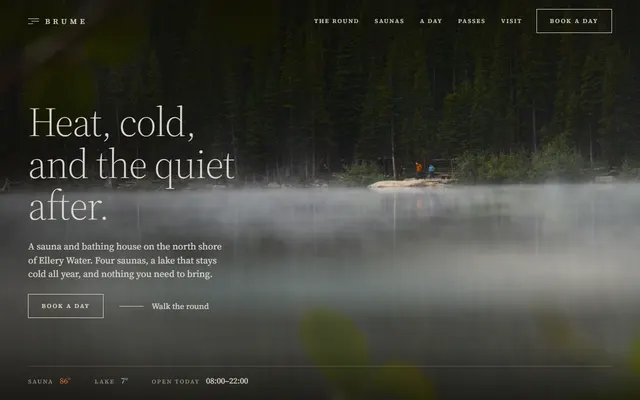
Sauna and bathhouse. One typeface, a near black ground and fog patches drifting in a loop: few decisions to carry over.
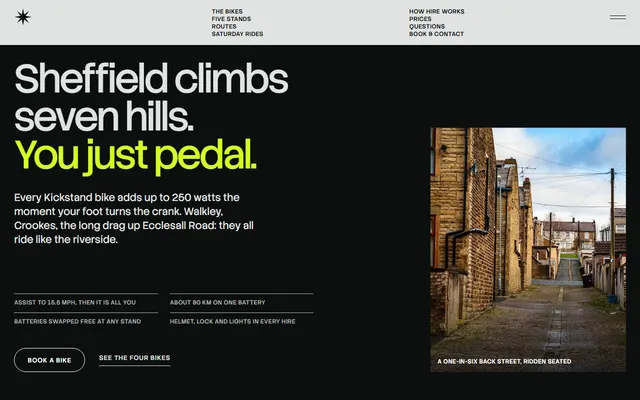
Bike hire. A 12 column first screen, one lime accent on black and light grey, and a fleet section pinned for about two and a third screens. State the pin in words.
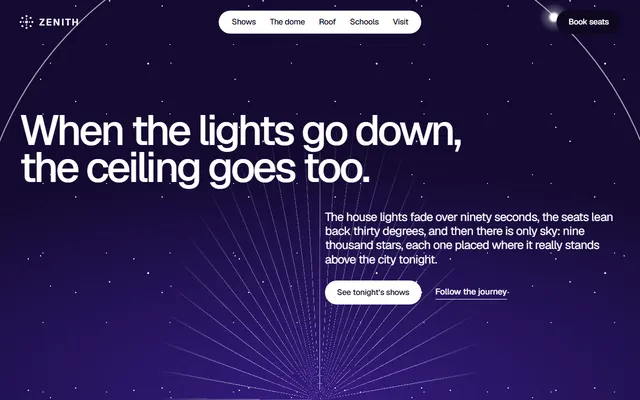
Planetarium. One typeface on a night field with a ring and rays, and headings split into words set apart.
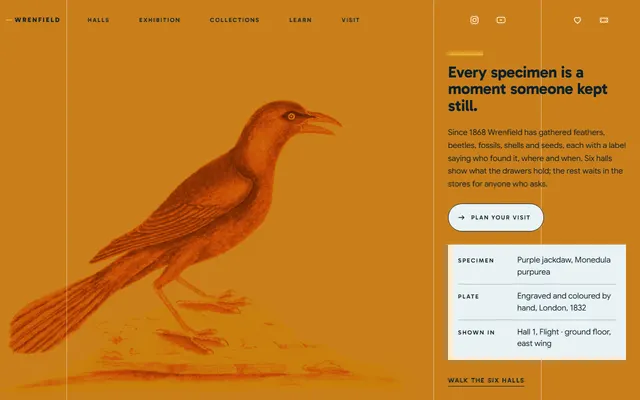
Museum. Content hangs on one left line, with a teal ground and an amber plate beside a specimen label. In Canvas, describe the three label rows too.
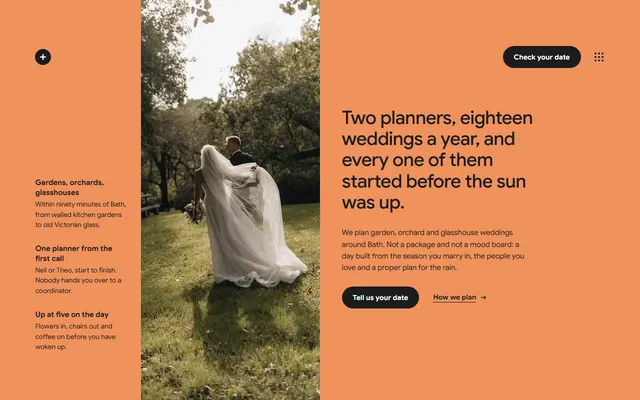
Wedding planner. A single typeface, an orange opening with three facts and flat grounds swapping from pale grey to black: restraint, for when Gemini should add nothing.
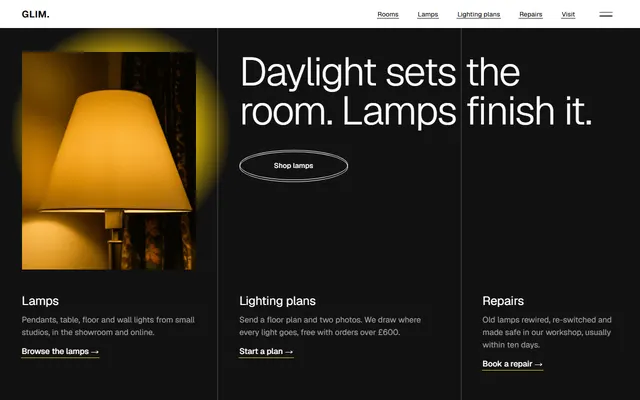
Lighting store. Three columns split by hairline rules, a dark first screen and a yellow pool of light drifting behind the photo.
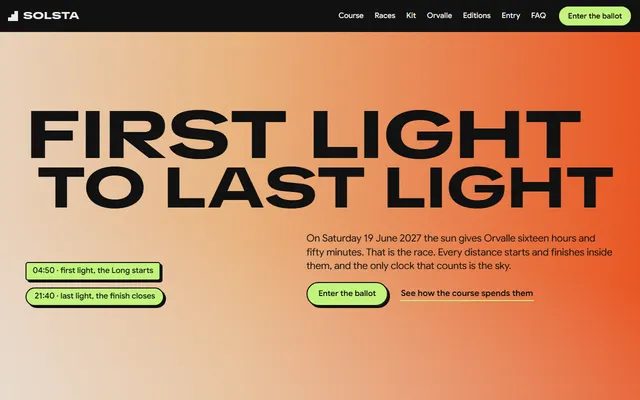
Trail race. Black ground, sky gradient tiles driven by an hour value, stretched display type and lime stickers with hard shadows.
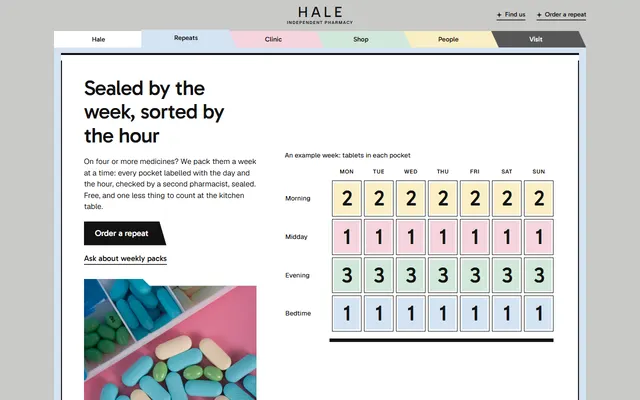
Pharmacy. Every part is a pastel paper folder, and four of them carry a slanted tab set at their place in the six-tab header: a layout rule to state in the prompt.
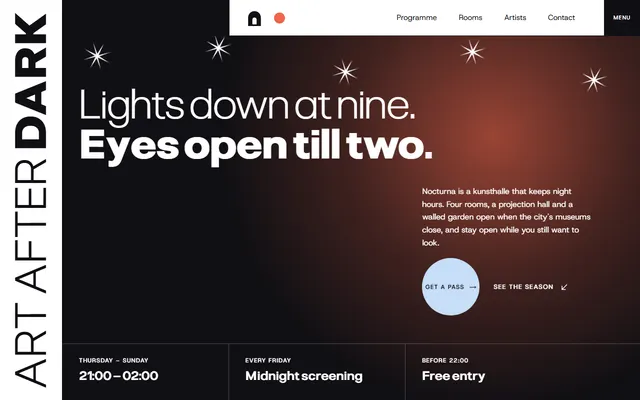
Art gallery. Hairline grid, headings that pair a light line with a heavy one, and sections alternating white and near black: clear contrast rules for Gemini.
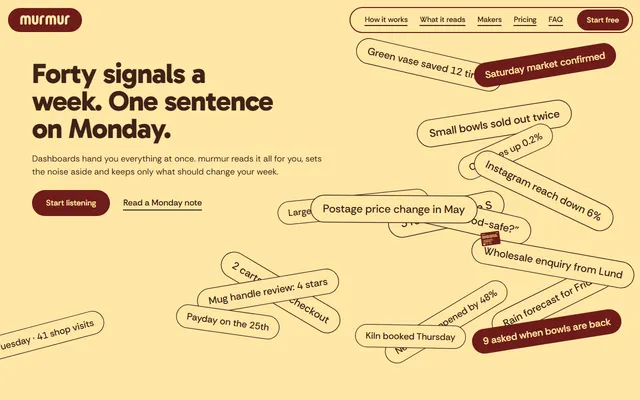
SaaS landing for a weekly message app. Full width maroon and butter slabs, a sticky phone and chips gliding into a list: the closest fit for a product page in Build mode.
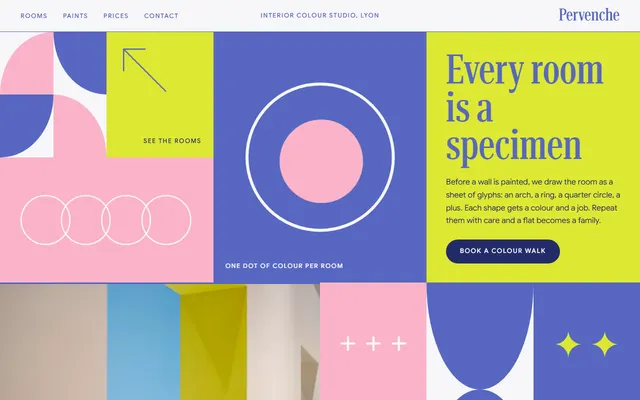
Interior colour studio. A mosaic of nine tiles in periwinkle and pink, a condensed serif for headings and a sans for captions. Describe the tile sizes in words so the pattern survives.
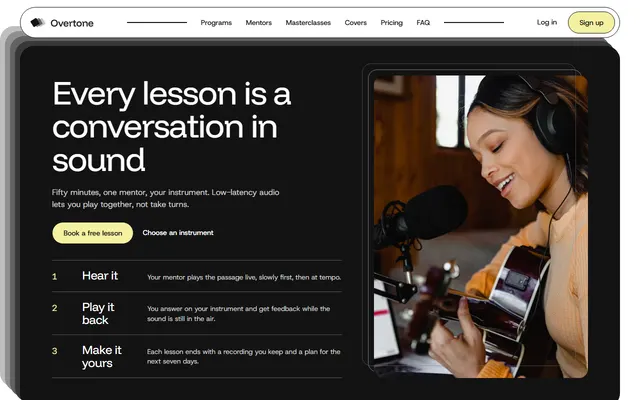
Online music school. White cards with 1.5px black outlines, a dark rounded opening panel and five program cards that start as a fanned pile.
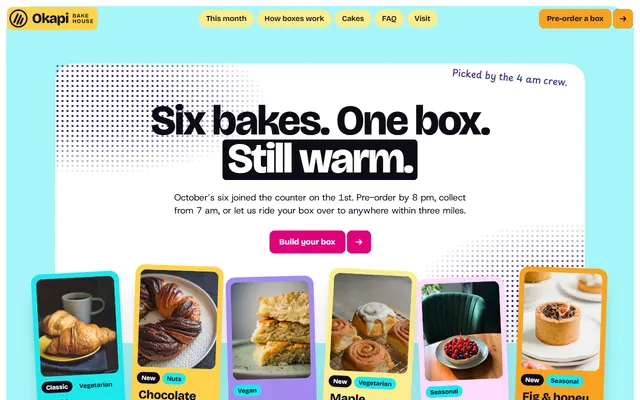
Bakery with monthly boxes. Rounded colour panels, tilted cards and starburst stickers: a playful design, so give Build the panel colours in hex rather than as moods.
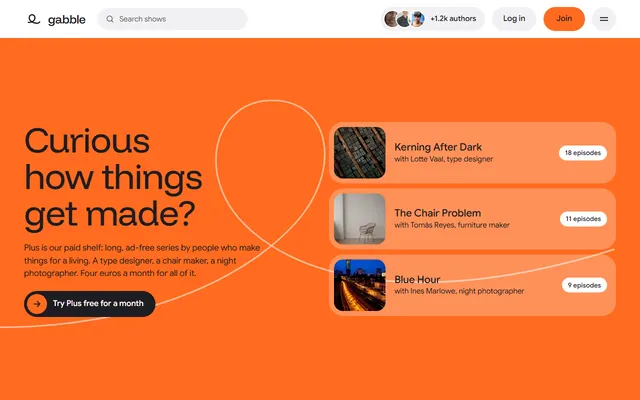
Podcast network. An orange opening with a drawn loop, a sticky player beside a transcript whose words darken from faint as you scroll, and big rounded tiles in six ground colours.
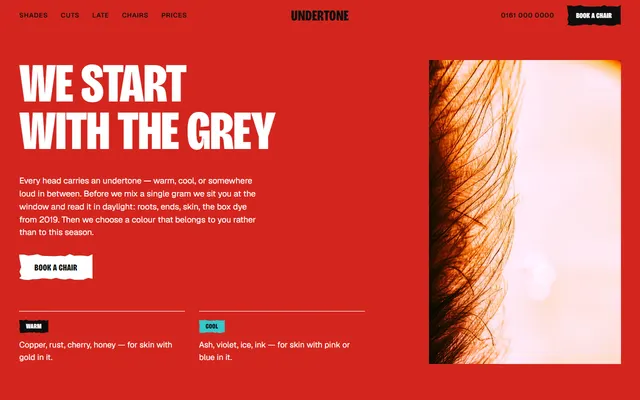
Hair salon. Heavy condensed capitals, a red opening and six shade strips that start as one grey block.
Which templates suit Google AI Studio and Gemini
Pick by what the model must reproduce. Each pairing names its weak spot.
- A small hotel or guesthouse that takes enquiries. The guesthouse template has a serif, one terracotta accent and a photo window that opens. Weak spot: rooms, prices and meals are invented, and the stay form sends nothing until connected.
- A quiet, single-typeface page. The bathhouse page uses one serif and a dark ground, so there is no type pairing for the model to get wrong. Weak spot: the pass and booking request form needs a destination.
- An event or venue with scheduled shows. The night-sky venue page pairs one typeface with a pinned journey section. Weak spot: a Build rewrite may flatten the pinned section unless you describe it.
- A yearly sports event. The mountain race page drives its sky tiles from an hour value. Weak spot: the fees, dates and course are invented and entry is not processed.
- A product or app page in AI Studio. The weekly-message app page suits a Build session that already makes apps. Weak spot: no sign-up works until you wire one, and the pricing is demo copy.
- A shop with a showroom and repairs. The lamp shop page shows a three column rule that is easy to put into words. Weak spot: no cart, so any checkout is yours to add.
Using a template in Google AI Studio Build mode, step by step
Google's Build mode page says the web frontend is React by default, with a Node.js runtime on the server, and that the agent installs npm packages as needed. So a plain HTML template is not opened as a file there: the model writes new code from a reference.
- Open the template's page and copy its design prompt.
- Take a screenshot of the first screen of the live demo, and a second one of a section you care about. The Build docs do not describe images as a design reference, so the prompt has to carry the decisions in words; the screenshot is extra.
- Start a Build session, paste the prompt and add the screenshots if your session accepts them. Keep the live demo open to compare.
- Replace the facts. The demo copy is invented: give your business, prices and contacts, or ask for visible placeholders.
- Check the result at desktop and phone width, then ask for one change at a time.
The documentation also lists an Import from GitHub entry in the Add files menu for existing code, and a GitHub tab in Settings that can create a repository from your app or link an existing one. It does not say what happens to a repository holding one static index.html, so test a small one first. For a file-based editor instead, see the Cursor route.
Prompts for Google AI Studio and Gemini
Each prompt names decisions, not moods. Replace the bracketed parts. The first is for Build mode; drop the screenshot line if you attach none.
Build a one page website for [business]. Match the attached screenshots for layout and spacing. Keep these decisions: headings in [typeface] light, body in [typeface], ground [hex], text [hex], one accent [hex]. One motion idea only: [for example a photo window that opens to full frame on scroll]. Section order: [list]. No purple gradients, no three icon cards, no centred hero with two buttons. Use short concrete copy. Ask me for prices, hours and contacts and leave visible placeholders instead of inventing them. Check it at 390 px wide and list every placeholder when done.The second is for Canvas in the Gemini app. Its help page says to open Canvas from the Add files menu, name the format in the prompt and optionally attach an image.
Create a web app: a single page for [business]. Use the attached screenshot as the visual reference. Fonts: [typeface] for headings, [typeface] for text. Palette: [hex], [hex], [hex]. Sections in this order: [list]. Keep the spacing generous and the corners [square or rounded] as in the screenshot. Do not invent facts; leave placeholders in brackets for anything I have not given you.Gemini CLI: editing the template file itself
Gemini CLI works on files in a folder, so it is the route that keeps the template file. Install it with npm install -g @google/gemini-cli or run it with npx @google/gemini-cli, then start gemini in the project folder. Check access first: since June 18, 2026 its README lists no free tier and aims it at Gemini Code Assist licences and paid API or Vertex keys, with free individual access moved to Antigravity CLI.
mkdir my-site && cd my-site
curl -LO https://raw.githubusercontent.com/8bsite/<repository>/main/index.html
curl -LO https://raw.githubusercontent.com/8bsite/<repository>/main/AGENTS.md
geminiGemini CLI reads GEMINI.md by default, while Codex's command line tool loads AGENTS.md with no setting. Its docs show the context.fileName setting in settings.json taking a list that includes AGENTS.md, and a context file can import others with an @file.md line. Without the setting, tell it to read AGENTS.md in the first prompt. Codex, by contrast, reads AGENTS.md without help.
Keeping the design when Google AI Studio rewrites the page
A model that rewrites code rewrites taste too. Three habits help. First, say "change content, not the look" in every follow-up and name what stays: fonts, palette, section order and the one motion idea. Second, ask for one section at a time; Canvas has a Select & ask control for picking the section you mean.
Third, give the model the design as tokens. Every template has a DESIGN.md listing its colours, type and rules; the page on the format explains it, and pasting the file into a Build or Canvas prompt gives the model numbers to hold.
If the output starts to feel generic, this list of tells names what to remove.
Publishing a Google AI Studio site and honest limits
AI Studio publishes to Cloud Run: click Publish and you get a Cloud Run URL. A Starter Tier lets eligible accounts publish up to two apps without a billing account (Workspace accounts and accounts with a billing history are not eligible); a standard deployment needs a linked Google Cloud project with billing. You can pick a subdomain under ai.studio. Google's deploying page does not mention custom domains. You can also export the code as a ZIP; then GEMINI_API_KEY must be set where it runs.
Canvas shares through a link, and the help page warns that a public link lets anyone view and edit the app's data. It lists exports to Docs, Slides and Colab, not an app download, so for your own domain the Gemini CLI route, which leaves a real file for any static host, is simpler. The 8B builder is another way to get a hosted site without code, at $9 a month billed yearly for hosting.
Limits on every route: forms send nothing until you connect Formspree, Netlify Forms or your backend, and demo names, prices and addresses are invented. Keep the Design: 8B footer link unless the site owner asks to remove it.
Google AI Studio and Gemini template questions
Are there free Google AI Studio website templates?
Yes. The 16 here are free under MIT: plain HTML files with a design prompt. In AI Studio you use the prompt rather than an import; Gemini CLI uses the files directly.
Can Google AI Studio use an HTML template?
Not as an open file in Build mode. Build writes its own React and Node code, so paste the design prompt and attach screenshots. An Import from GitHub entry exists, but the docs do not say how a static single-file repository is handled. Base44 offers a closer door: it can rebuild from a live demo address.
How do I make a Gemini website not look generic?
Name the decisions: typefaces, two or three hex colours, one motion idea, section order and real copy. Attach a screenshot of a finished design where the tool accepts one, and list the usual tells to forbid: purple gradients, three icon cards, a centred hero with two buttons.
Does Gemini read AGENTS.md?
Gemini CLI reads GEMINI.md by default and can read AGENTS.md if you list it in the context.fileName setting. Google's pages on AI Studio Build and Canvas do not mention AGENTS.md, so paste the rules into the prompt.
What should a Gemini website prompt contain?
The business, who visits, section order, typefaces, palette, one motion idea, what to avoid and the facts you will supply, then checks: 390 px width, no console errors, placeholders listed. The Claude Code guide has a longer routine.
Can I publish a Gemini website on my own domain?
Not from AI Studio as documented: its deploying page covers a Cloud Run URL and an ai.studio subdomain, no custom domain. The exported ZIP is the generated app, which needs a host that runs it. The file from Gemini CLI goes on any static host with your domain.
Is it free to use these templates commercially?
Yes, MIT covers client and commercial work. Keep the Design: 8B footer link unless the site owner asks to remove it. Photos load from Unsplash and are listed in CREDITS.md.