Free fitness app landing page template
Edit it by hand: it is one index.html with no build step, so you can open it in any text editor, change the words and photos, and upload it to any static host. Not a coder? Describe your business in one sentence to 8B's AI website builder and it designs a new site for you, with more pages when you need them. Designing is free; publishing with hosting is $9 a month, billed yearly. It also works inside Claude and ChatGPT.
MIT license · Made by 8B, an AI website builder · Plain text: kurvo.md, data: kurvo.json
About this fitness app landing page template
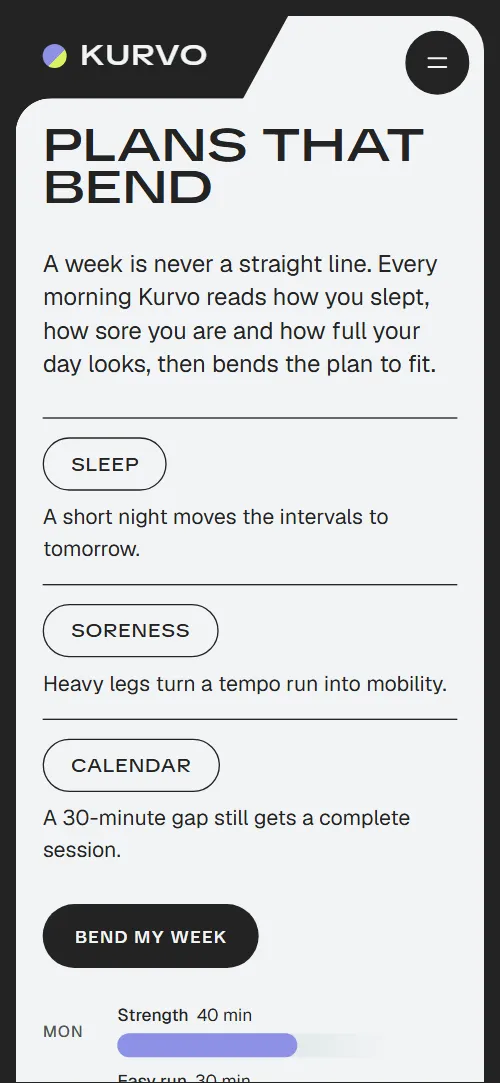
Fitness app landing page template: one free HTML file for a training app with adaptive plans and coaching. Rounded panels in a charcoal frame hold a seven-day chart, four coaches, a drawn phone whose screen changes as you scroll, a distance challenge, weekly group runs and three plans. AGENTS.md tells Claude Code or Cursor what to replace and keep.
At a glance, October 2026. One 85 KB index.html with its CSS and JavaScript inside, 12 sections, 13 Unsplash photos credited in CREDITS.md, Geist and TikTok Sans from Google Fonts, GSAP 3.13.0 (ScrollTrigger); Lenis 1.3.27 smooth scroll loaded from jsDelivr.
Health and fitness website templates usually describe a place: a gym and its timetable. This one is a mobile app landing page for something people install, so pricing sets a free tier beside two subscriptions. It suits a running, cycling or strength app, an online coaching service or a watch's companion app. If you collect cool fitness websites, note that its first screen charts a week of sessions instead of showing a hero photo.
For vibe coding with Claude Code or Cursor, give the agent your app's facts first: the demo invents every one, down to 200 coaches and 18,000 members. The week chart lives in two places: each day's --cv-h height and the line's seven points. The script pairs three phone screens with three notes, so keep both. Five checkpoints sit on the route; a new count means changing the path, their positions and the script's point list together. Replace the third story's avatar, cropped from a crowd photo.
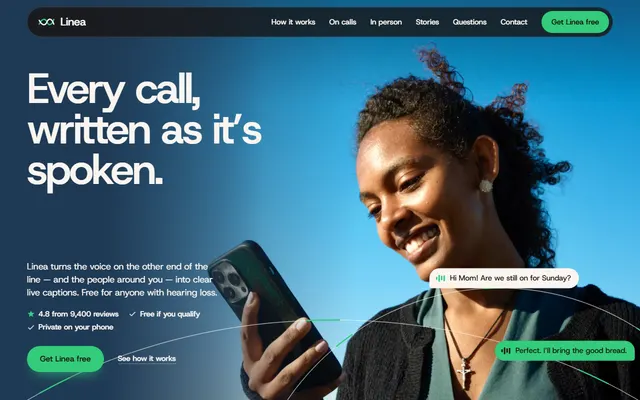
Choose this as your fitness landing page when you sell a training app with free and paid plans, coaches, challenges and group runs. An app outside fitness, shown feature by feature, sits better on the captioning app template. Two weak spots: with no store badges or QR code, every Get the app, plan, Find my coach and Join the hundred button stops at the plans list, and the copy promises five disciplines beside four rows. Set real links and match the count before launch.
Good for:
Turn the fitness app landing page template into your site with an AI agent
With an AI coding agent
Files (PowerShell: curl.exe):
curl -LO https://raw.githubusercontent.com/8bsite/fitness-app-landing-page-template/main/index.html
curl -LO https://raw.githubusercontent.com/8bsite/fitness-app-landing-page-template/main/AGENTS.md
curl -LO https://raw.githubusercontent.com/8bsite/fitness-app-landing-page-template/main/LICENSE
curl -LO https://raw.githubusercontent.com/8bsite/fitness-app-landing-page-template/main/CREDITS.mdPrompt for the agent:
Read AGENTS.md, then edit index.html. Make it the landing page for <my fitness app: name, how it adapts training, disciplines, coaches, publishable member results, challenge, clubs, plans and prices, store and sign-up links, contacts, company name>. Replace first the name, week chart, coaches, member stories, prices and every #get-app button. Keep the classes AGENTS.md lists, three phone screens with three notes and five route checkpoints; make every --len match its line's character count. Ask me for anything missing; never invent prices, member numbers, results, coach credentials or store links.In a terminal
npx degit 8bsite/fitness-app-landing-page-template my-siteFitness app landing page design and motion
Palette
#232323 charcoal frame and footer, corner tabs, dark buttons, the drawn phone, text on light panels, the line over the chart bars#c5d8d8 mint: the app and run club panels, the HIIT row, member story cards, the free plan card, the rows, ring track and coach's bubbles inside the phone#f2f4f5 off-white: the first screen, member stories and pricing panels, the Cycling row, the phone's screen, text on graphite and charcoal#8d91e6 lilac: the disciplines panel, the regular chart bars, the session card, recovery ring and your own chat bubbles in the phone, sparklines, the challenge route#d8f45f lime: today's bar, the recommended plan, the contact panel, the small filled tags (class counts, member results, Today and Ready in the phone) and the buttons on dark panels, the challenge dot and checkpoints, the active note marker#444444 graphite: the coaches, challenge and questions panels, the Strength and Yoga rows, the two-person plan, coach portrait rings, the contact shade#a4c3bd sage: the bars of the easy days in the week chart#c2c2c2 light grey: secondary text on graphite panels, the dashed ghost route, unlit checkpoints, rules between questions, footer text, and the grey the chart bars start from#4f5552 dark grey-green: day labels and caption under the chart, the rest day's dashed outline, membership lengths, meeting points, the price noteFonts
- TikTok Sans: display face at weights 500 and 600 with a width axis: the very wide uppercase headings and footer wordmark, discipline names, subheads, button labels, pills and tags, prices, the recovery number, the contact lines
- Geist: text face at weights 400 and 500: body copy and leads, small uppercase labels such as the nav links and day names, text links, member quotes
A charcoal frame shows in 12 px gaps around rounded panels, each in one flat colour. From the second section on, each panel's heading sits in a charcoal corner tab cut into its upper left with a slanted edge; the logo uses the same tab, and the contact panel ends with a mirrored one at the lower right. Pills repeat: chart bars, discipline rows, badges, buttons. Most sections pair two columns, for example the route beside an arched photo.
In this fitness website design the letters move: section headings open from condensed to extended width as they arrive, and button labels widen on hover. Each discipline name is sized from its character count to fit its row. Lime marks today's bar, the recommended plan and dark-panel buttons.
Every value of this fitness app landing page design, with the type scale, spacing and the motion rules, is in its DESIGN.md file (Google's format), ready for a coding agent or Stitch.
What is on the fitness app landing page page
- NavigationFixed top bar: logo in a dark corner tab, four section links, Get the app button; hides on scroll down; full-screen menu on phones
The bar slides away while you scroll down and returns when you scroll back up; after 400 px its link pill turns charcoal and its Get the app button turns lime.
- Plans that bendFirst screen: the h1, a lead, three cues as pills with a line each, a button, and a seven-day bar chart with a line over the bar tops
On load the headline opens from condensed to extended letters and the seven bars, starting nearly level and grey, grow or shrink to their minutes and take their colours one after another; on screens 768 px and wider the line over them draws itself.
- Coaches who know youFour coaches as large overlapping round portraits with name, discipline pill and one line; lime Find my coach button
The heading stretches open as the panel arrives, and each discipline pill drops in tilted, then settles level with a bounce.
- Train anythingFour disciplines as full-width pill rows: big name, weekly class count, one line and a photo
Scrubbed with the scroll, the four rows come in lower, tilted, shifted sideways and clipped short, then level out, line up and open to show the class count, text and photo.
- One screen, whole weekA phone drawn in CSS with three app views (today's session, recovery score, coach chat) beside three notes on a timeline
The phone stays in view while you scroll past three notes, the second and third screens wiping up over the one before as a lime dot marks the matching note; on phones it is held for about a screen of scrolling, then the notes follow.
- Real people, real curvesThree member stories: a small result curve with a lime result tag, a quote, an avatar, a name and how long they have been members
As each card arrives its sparkline draws itself from left to right and its lime result tag drops in and settles.
- The October hundredA monthly 100 km challenge: a route with five checkpoints and rewards, a photo with an arched top and a lime join button
Scrubbed: the route draws itself while a lime dot rides along it, each checkpoint lighting up as the dot passes; on phones the route runs down beside the list.
- Sunday clubsWeekly free group runs: a photo and a list of six cities, each with a meeting point and a start time
The heading stretches open, and the six start time pills drop in with a bounce as they reach the screen.
- Pick your planThree plans side by side with the same five rows: a free one, the recommended one in lime, and one for two people
Scrubbed: on wide screens the three plans start stacked and fanned over the middle card and spread into a row; up to 900 px they start pulled up onto the first card and slide apart downward.
- Questions, answeredQuestions and answers (native <details>) beside a short intro with a link to contact
The heading stretches open on arrival; the round plus beside each question turns into a cross when the answer opens and fills lime on hover.
- Let's moveLime contact panel: lead, Get the app button, email, phone, address, three social links and a Write to us corner tab (contacts are placeholders)
Scrubbed as the panel rises into view, a graphite shade covering most of it shrinks into the upper left corner and leaves the panel lime.
- FooterThe wordmark across the full width, copyright with the Design: 8B credit, six links and a tagline
The full-width wordmark opens from condensed to extended letters as it reaches the screen.
Before you publish the fitness app landing page site
- Replace social preview image, favicon, email address, phone number and social media links and the invented demo facts (prices, dates, addresses). AGENTS.md lists them.
- Get the app buttons in the top bar, the phone menu and the contact panel lead to
#get-app, which scrolls to the three plans in pricingnow; point them to your App Store and Google Play links, or one page that sends each phone to its store. - Start free, Try Pro free and Try Duo free buttons on the three plans lead to
#get-app, the plans list they sit in, so a click does nothing visiblenow; point them to your sign-up or checkout URL for each plan. - Find my coach button in coaches lead to
#get-app (the plans)now; point them to your coach directory or the sign-up step where members pick a coach. - Join the hundred button in the challenge lead to
#get-app (the plans)now; point them to your challenge sign-up page or an app link that opens the challenge. - Bend my week button on the first screen and the Coaching is in every paid plan link in coaches lead to
#pricingnow; point them to keep it, or point it to your sign-up page. - Write to us corner tab in contact lead to
a mailto to the placeholder emailnow; point them to your support email or help-desk form. - The page has no app store buttons or QR code: every Get the app, Find my coach, Join the hundred and plan button scrolls to the plans list until you add your store and sign-up links.
- The two crossed-out rows of the free plan are at 55% opacity, about 3.2:1 on the mint card.
- On desktop windows shorter than about 660 px the held phone in the app section (620 px tall) does not fit, so its top slides under the window edge while it is held; on phones the held phone takes about a screen of scrolling of its own.
Questions about this fitness app landing page template
Can I use this mobile app website template on a client's project for free?
Yes. Under the MIT license a freelancer can ship it for a client's workout or coaching app. Unlike a WordPress fitness website theme, there is nothing to install: index.html opens in a browser as it is, fetching GSAP and Lenis from jsDelivr. The Unsplash photos and the two Open Font License fonts keep their own terms, which CREDITS.md lists.
Where do the Get the app and plan buttons lead?
To the plans list. With no store badges, QR code or sign-up form, Get the app, Start free, Try Pro free, Try Duo free, Find my coach and Join the hundred all point to #get-app. As a download app landing page, it needs your store and sign-up links; a waitlist needs a form wired to Formspree or Netlify Forms.
What is the right way to begin with Claude Code, Cursor or Codex?
Download first: the four curl lines on this page save the HTML file, AGENTS.md, LICENSE and CREDITS.md in your folder. Fetching the demo address hands an agent a summary instead of the markup, so work from the downloaded file. Then fill in the angle brackets of the prompt above and paste it: its first line sends the agent to AGENTS.md.
What has to stay in the file so the scroll animations keep working?
Every id, every data-8b-section, data-8b-motion and data-8b-part value and the script classes in AGENTS.md. Keep three phone screens, three notes and five route checkpoints; a renamed --len line needs its new length. Keep the header comment and the 8B meta tag in the head. Keep the Design: 8B footer link unless the site owner asks to remove it.
How does it behave on phones, with reduced motion or with JavaScript off?
Up to 900 px the nav links fold into a menu button; on phones chart days become rows with sideways bars. Reduced motion stops smooth scrolling, entrance and scroll animations and lists the three phone screens one under another; hover effects and the hiding nav bar stay. Without JavaScript the menu cannot open; the six footer links and questions work.
Can I build a fitness website without editing code?
Yes: describe the site in a sentence and 8B's AI website builder designs a new one, not this template. Designing and restyling are free; publishing with hosting and SSL, full HTML export and AI edits in chat are on Pro at $9 a month billed yearly. It also runs inside Claude and ChatGPT through the 8B connector.