Lovable website templates
Lovable website templates you can open in one click: each of the 16 free MIT designs below has an Open in Lovable button that starts a Lovable chat with the design prompt already written and the live demo attached as the reference page. Lovable then writes its own project code in that look; it does not open the file as it is.
Here is what the button does. It opens Lovable with that design's prompt in the chat box, its live demo attached as the HTML reference and a screenshot as the image reference. Nothing is sent until you press send, so you can add your business facts first. On the plumber card, for example, the chat opens with the plumber design's prompt (sections, typefaces, hex colours, motion) and its demo as the page to follow: condensed capitals, hot orange buttons and an emergency number block.
Ask Lovable for a landing page with no direction and you get the average one: a centred headline, a gradient, three feature cards. The fix is decisions, not adjectives: two typefaces, a small palette, one motion idea, the section order. Every template below has them written as a design prompt. For how agents and builders differ, the page on agents that edit files sets them side by side.
The result is Lovable's own code in the look of the template, not the same file. It suits product, SaaS and small business sites, so the 16 designs here lean that way. The more you pin down in the prompt, the less is left to Lovable's defaults, which is why the prompts below name fonts and colours.
At a glance, October 2026. This page lists 16 templates, all free under the MIT license and made by 8B, an AI website builder. Grouped by what you ask Lovable to build: four product and app pages, four service business sites, four brand and media pages and four community, school or trade pages. Files run from 85 KB (the fitness app) to 160 KB (the coding school).
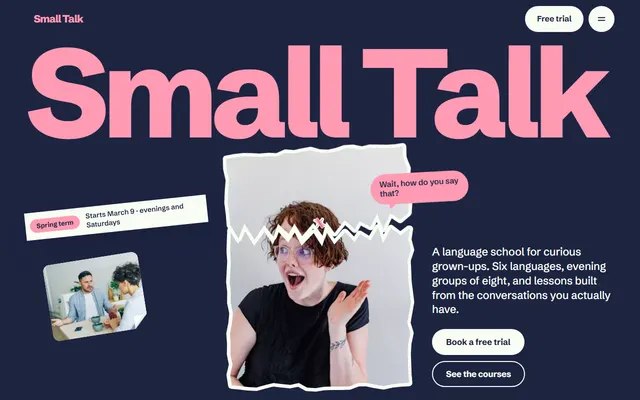
A language course with a level quiz, speech bubbles and torn photo stickers on navy and pink. Give the three questions and score ranges to rebuild the quiz.
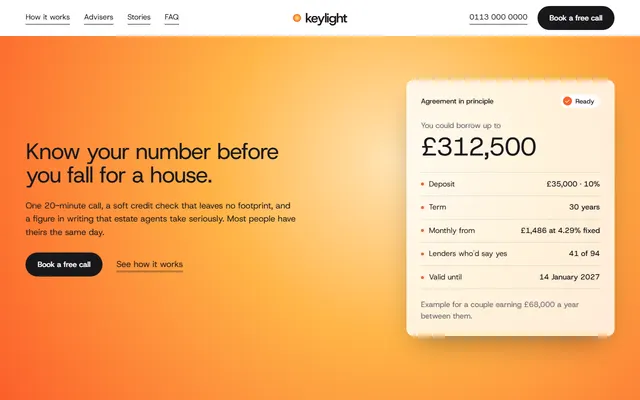
A mortgage broker page with a nine-row fee ledger and a call-back form. White, zinc and amber with one typeface: little room for drift.
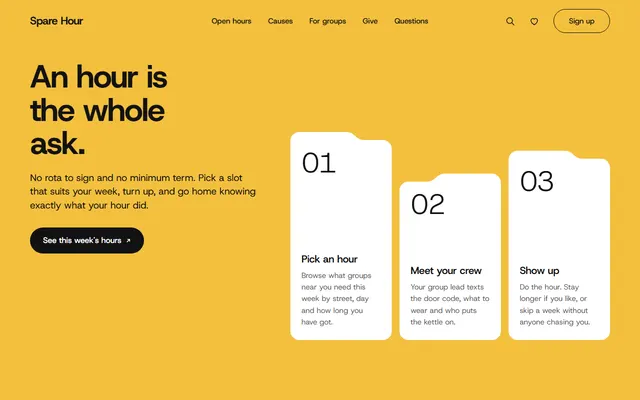
A volunteering network with folder-tab cards, yellow and black grounds and a donation picker. The prompt asks for your donation amounts; Give now only shows a preview until Lovable has your payment link.
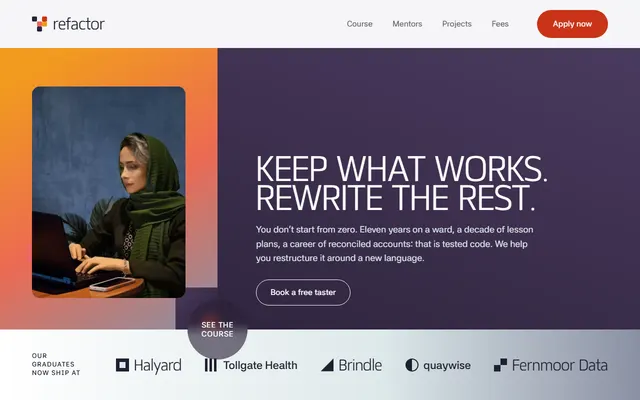
A part-time coding school with fee plans, taster evenings and a sideways curriculum. The heaviest file here: send layout first, interactions second.
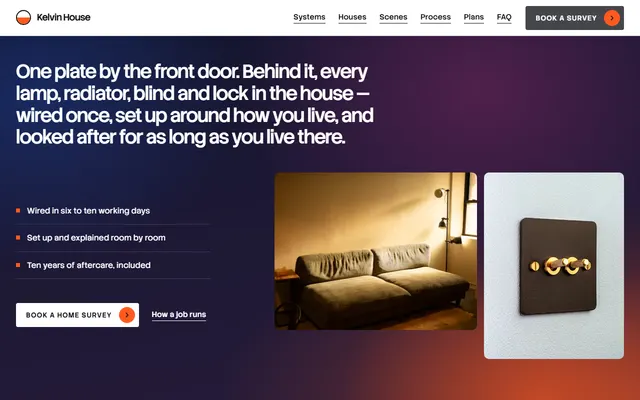
A smart-home installer with three priced plans and a long scene section. Dark and white bands alternate; the prompt lists the dark sections so Lovable does not even them out.
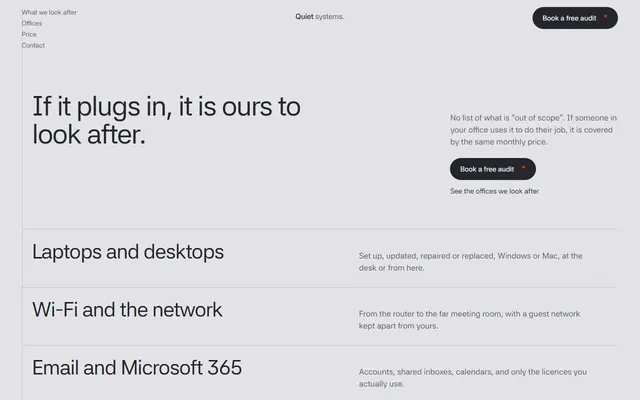
An IT support firm with a price card and a headcount slider. A test of working logic: the prompt asks for a monthly total that follows the slider; give Lovable your price per person.
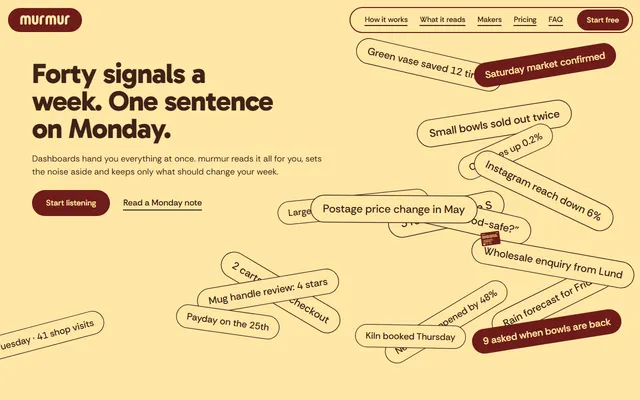
A SaaS page for a weekly-message app. The prompt fixes two plans, a phone mockup and one idea: scattered chips sorting into a sentence. Name the hex values to keep the maroon and butter slabs.
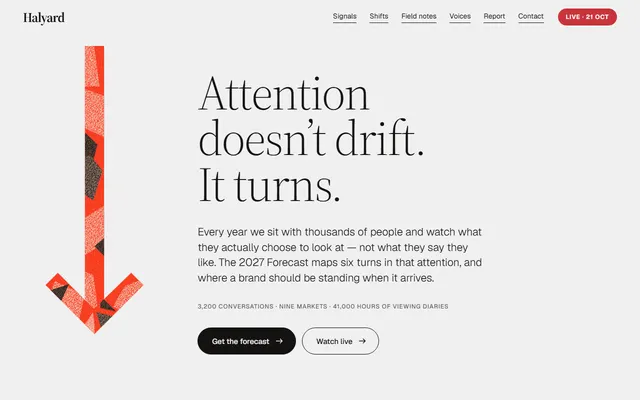
A marketing agency page built around one big paper-cut arrow that returns in five sections. One repeated motif is easy to describe.
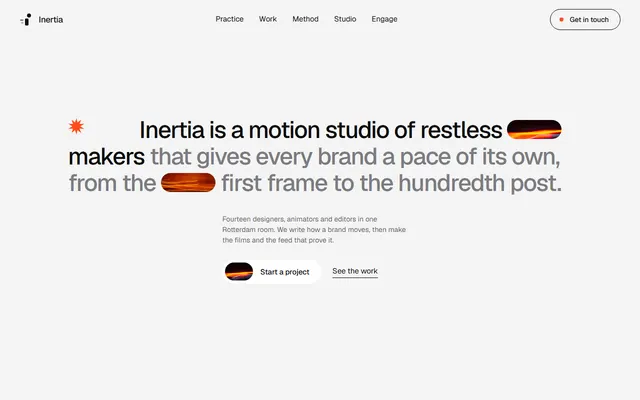
A motion design studio with pill-shaped photos, a tilted pile of cards dealt into a row and dark bands between pale ones. Name the shapes, or you get rounded boxes.
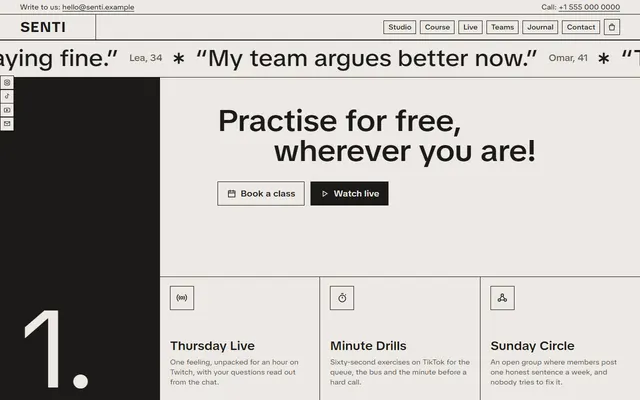
A coaching and course page with three black numbered columns and giant words. One wide typeface and one grid are easy rules to hold.
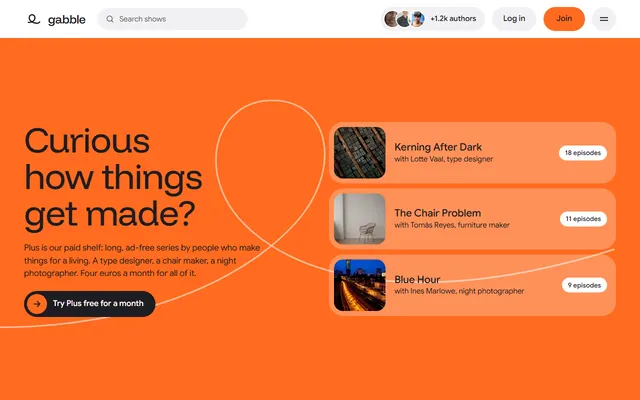
A podcast network on an orange opening field with a drawn loop, shows as tall photo tiles and a sticky player beside a transcript. Name the sticky player; it carries the page.
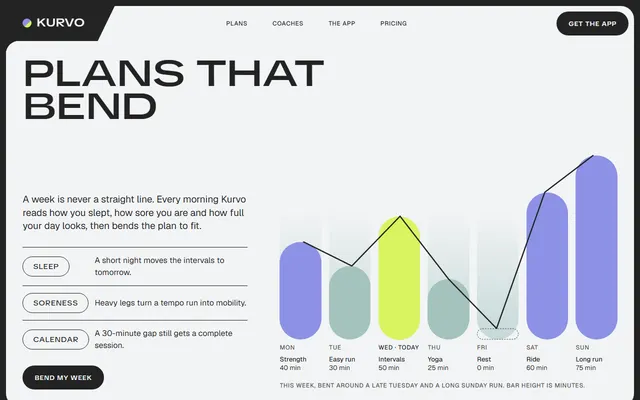
A fitness app page. Its look is rounded flat panels inside a charcoal frame, with slanted corner tabs on headings. Name the frame and tabs, or Lovable draws plain cards.
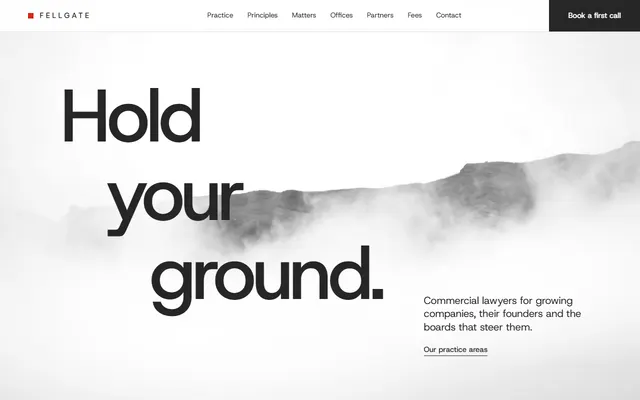
A commercial law firm in white and grey with one red accent, a serif for promises and fog over the opening photo. Restraint is the brief: say what not to add.
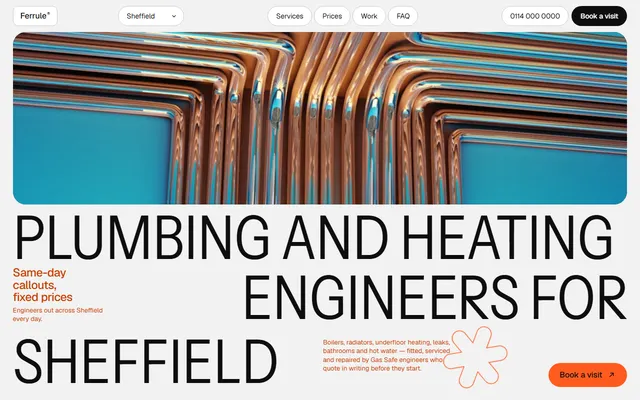
A plumber and heating firm in condensed capitals, hot orange buttons, outlined pills and an emergency number block. Add the demo link too: capitals sized to fill their boxes are hard to put in words.
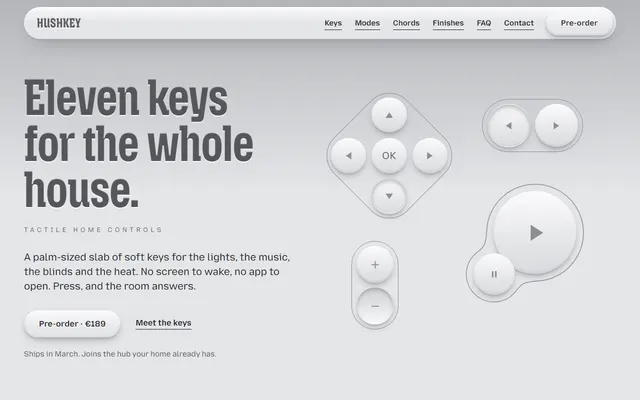
A device pre-order page in soft grey neumorphism. Spell out the surface rule, keys rise and headings press in, or Lovable falls back to flat shadows.
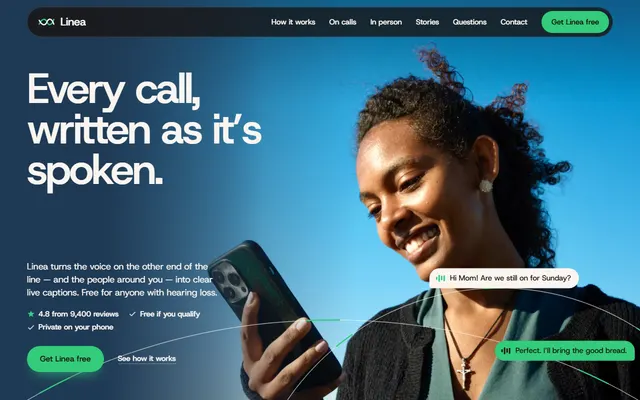
A mobile app page with a phone drawn in markup, not a screenshot. One typeface, navy and paper, green call buttons: short, exact instructions.
Which templates suit Lovable and for what job
Many Lovable projects are products, so start from a template that looks like one. For a launch page the device pre-order template, with two priced finishes, and the phone app page both draw the product in markup and repeat one clear action. Pick the closest case and mind its weak spot.
- A SaaS or app page: the weekly-message app page, the phone app page and the fitness app page. Weak spot: the product, prices and quotes are invented, and no checkout is connected.
- A B2B service with a calculator: the managed IT support page has a price slider. Weak spot: the total is written in pounds, so say your currency and rate.
- A lead-gen page for an adviser: the mortgage advice page and the law firm page. Weak spot: forms send nothing until Lovable connects a backend or form service.
- A school: the language classes page has a level quiz. Weak spot: the quiz is demo logic, so give Lovable the questions and score ranges again.
- A community or charity: the volunteer network page has a sign-up form and a donation picker. Weak spot: no payment is connected.
- A hardware installer: the connected home firm lists three plans and a long scene section. Weak spot: the order is a request form, not a cart.
- A trade with an emergency line: the plumber page is a ready Lovable plumber template for a heating firm. Weak spot: prices, the phone number and engineer names are placeholders.
Using a template in Lovable, step by step
These routes follow Lovable's documentation.
- Pick a template and copy its design prompt. Every template page has one: sections in order, typefaces, hex colours, motion, what to avoid, what to ask you, in about 1,500 characters.
- Open Lovable with the prompt and the demo as a reference. Lovable's Build with URL link,
https://lovable.dev/#prompt=...&html=..., opens the editor with the prompt filled in.promptis required, up to 50,000 characters, URL-encoded;htmltakes a public page Lovable uses as a reference for layout, content and styling;imagestakes JPEG, PNG or WebP addresses. Up to 10 references per link; you still press send. - Use the demo address as the page reference. Each template has a public demo at
https://8b.com/templates/<slug>/demo.html; Lovable skips private addresses and pages behind a login. By hand, paste the prompt and the demo address into one chat message. - Replace the invented facts. The demo's names, prices and addresses are made up. The prompt tells Lovable to ask for yours and leave visible placeholders.
There is also an import route. Import a website takes a public page address you may copy (MIT allows it) and rebuilds text, images, fonts, colours and layout as a project; forms lose their sending and animations may differ. Upload code rebuilds a ZIP the same way, and Git sync only creates new repositories. Either way you get Lovable's code, not the template's index.html. Base44 has a similar door, Start from URL with Design only, and it too rebuilds in its own code.
Prompts to paste into Lovable
Written for Lovable's chat; replace the brackets. Longer versions are on the template pages, and the collection of prompts for other jobs has more.
1. A product page from a template look.
Build a one-page marketing site for <product>, <what it does>, for <audience>. Visual reference: <demo address>. Keep its section order. Type: one display face for headings, one text face for body. Colours: a dark ground, one light slab colour and one accent, taken from the reference. Motion: one idea, a short hero entrance and one scroll scene, static for reduced motion. No purple gradient, no row of three icon cards. Ask me for the product name, prices, plan limits and support email; show visible placeholders for anything unknown.2. A service business that wants calls or bookings.
Create a website for <business> in <city>. Follow the layout of this page: <demo address>, same sections and same tone. The only action is <Book a visit / Request a call>, repeated in the header, after the services and in the footer. Build the contact form to send to <email or form service>. Do not invent reviews or awards. Ask me for opening hours, prices, the phone number and real quotes. Check 390 px width: stacked columns, 48 px tap targets.3. Fix drift after a few edits.
Compare the current page to my first version. List every change to fonts, colours, spacing and section order that I did not ask for, then undo them. Keep the new text. From now on change only what I name in each message, and do not restyle anything else.Keeping the design when Lovable rewrites it
A builder that regenerates code drifts toward its defaults one edit at a time. Three habits slow that.
- Hand it the tokens. Each template has a DESIGN.md file with its exact colours, type sizes and spacing. Paste its colours and type into the chat, or save them as project instructions (up to 10,000 characters, per Lovable's docs).
- Use a repository instruction file. The same page says instruction files in the project's repository, such as
AGENTS.md, guide the agent, and a root AGENTS.md is always read. Write a short one with the tokens and the rule to change content, not the look. The template's own AGENTS.md is about its HTML classes, which Lovable's rebuilt code does not have. - Ask for content, not a redesign. "Change the headline and the three prices" is safe. "Make it more modern" is the sentence that brings the gradient back. If a page already reads as generic, the ways to avoid a page that looks AI built names the tells to ask Lovable to remove.
A single repeated motif is the easiest look to keep: the communications agency page returns to one paper-cut arrow in five sections, so "the arrow is the only graphic" holds it together.
A page of many shapes is harder. The page for a studio that animates films has pill-shaped photos and a tilted pile of cards dealt into a row; name them, or you get rounded boxes. After larger edits, check phone width.
Publishing a Lovable site on your own domain
Lovable publishes from its editor. Its documentation puts custom domains on paid plans, under Project, Settings, Domains: add the DNS records it shows, wait for the status Live, and the published project serves there.
If you would rather keep the single HTML file, that file can sit on any static host, for example GitHub Pages or Netlify, without Lovable at all. And if you want a page designed and hosted without writing prompts, the 8B builder publishes a site for $9 a month billed yearly.
Before publishing, replace the invented contact details and keep the Design: 8B footer link unless the site owner asks to remove it.
Limits of Lovable website templates
- No exact copy. Lovable writes its own code; scroll scenes may come out simpler. If the original file has to survive, Replit's GitHub import keeps it as it is.
- Demo content is invented, and forms send nothing until connected.
- No checkout. None of these has a cart; ask Lovable for one if you need it.
The same flow in another builder is covered on the v0 route page.
Bolt has its own limits; the Bolt version lists them.
Lovable template questions
Are there free Lovable templates?
Yes. These 16 designs are free under the MIT license. Lovable does not open them as files; you paste each one's design prompt and demo address, or import the demo page, and Lovable builds its own version of the look.
Can Lovable use an HTML template?
Not as a file it keeps. Lovable generates its own project code. Its documentation describes Import a website, Upload code for a ZIP and a Build with URL reference page; all three rebuild the design in Lovable's code, none keeps a plain HTML file as it is.
How do I make a Lovable site not look generic or AI generated?
Give it decisions, not adjectives: two typefaces, a small palette, one motion idea, the section order and real copy, plus a ban on purple gradients and identical cards. A template's design prompt does that.
Does Lovable read AGENTS.md?
Yes. Its documentation says instruction files in the project's repository, such as AGENTS.md or CLAUDE.md, guide the agent, and a root AGENTS.md is always read. Project instructions in the editor take up to 10,000 characters. The templates' own AGENTS.md is written for the HTML file, so give Lovable the design tokens instead.
What is a good Lovable landing page prompt?
One that names sections in order, the typefaces, hex colours, a single motion idea, what to avoid and what to ask you. The prompts on this page are a working start.
Can I publish a Lovable site on my own domain?
Yes, on a paid plan. Connect the domain in Project, Settings, Domains, add the DNS records Lovable shows and publish the project. DNS can take up to 72 hours.
Can I use these Lovable templates for clients?
Yes, under MIT. Replace the invented text and keep the Design: 8B footer link unless the site owner asks to remove it.