Cursor website templates
Cursor website templates are finished web designs you open as a folder in Cursor, the AI code editor, and adapt to your business by chatting with its agent. Each one here is a single index.html with an AGENTS.md beside it, which Cursor reads. They are free under the MIT license, work without a build step, and keep their typefaces, colours and scroll motion while the agent replaces the text.
Ask any agent for a site from nothing and it fills every decision you did not make with the most common choice: a centred headline, a purple gradient, three equal cards. A designed file turns the job into editing.
This page covers the Cursor side of that: which templates fit, the setup in Plan mode, three prompts, how to keep the design from drifting, and publishing. If you work in a terminal agent instead, the guide for Claude Code has the same job in a different tool.
At a glance, October 2026. This page shows 16 of the 101 templates, all free under the MIT license and made by 8B, an AI website builder: five product or app pages, four service and studio pages, a podcast network and six places and shops.
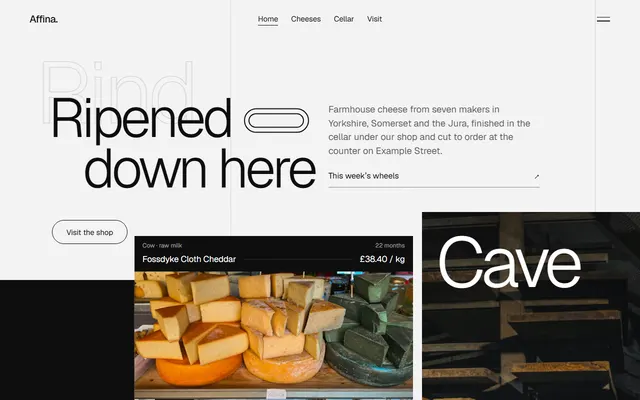
Cheese shop set in Geist at weight 300, five counter panels at different heights. Cursor swaps cheeses, milks and prices while one typeface carries the look.
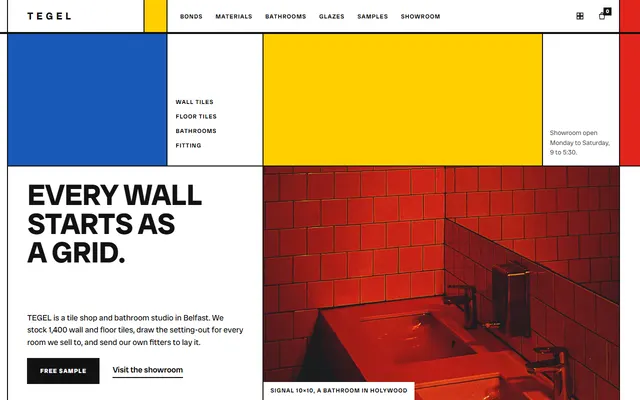
Tile store as ruled cells: two pixel gaps show a near-black ground while yellow, blue and red fields wipe in. Cursor must keep those gaps or the lines vanish.
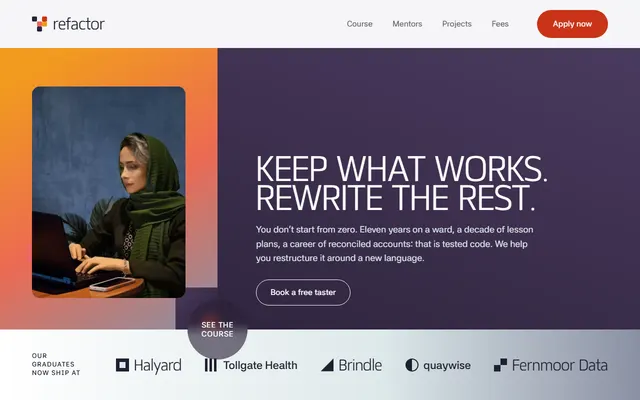
Coding school in orange, coral, plum and ice planes. The largest file here at 160 KB, so ask Cursor to work one course module at a time.
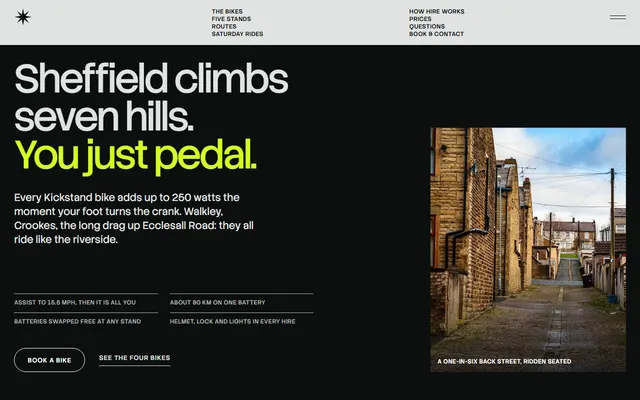
Bike hire in near black and pale grey with one lime accent, its fleet pinned for about two and a third screens. Prices sit in a table, so a new rate is a row.
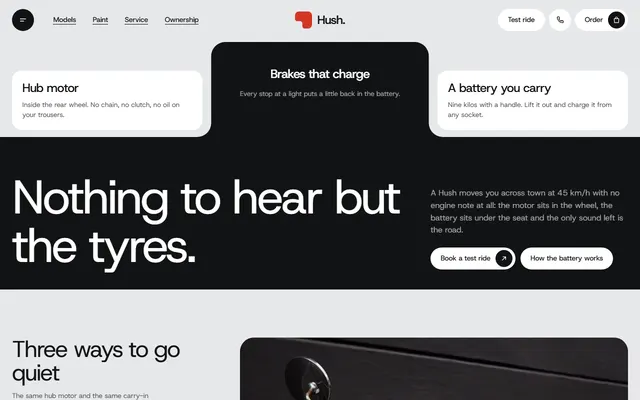
Electric scooter page with pinned model cards and photo frames notched by clip-path. Cursor edits specs and prices; photos should keep the supplied proportions.
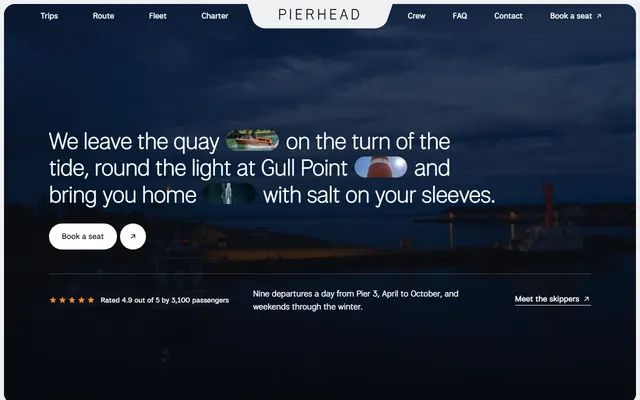
Boat trips on dark rounded panels, orange only on hover fills, focus outlines and the rating stars. Fare rows alternate sides; a fourth trip means copying a row and flipping it.
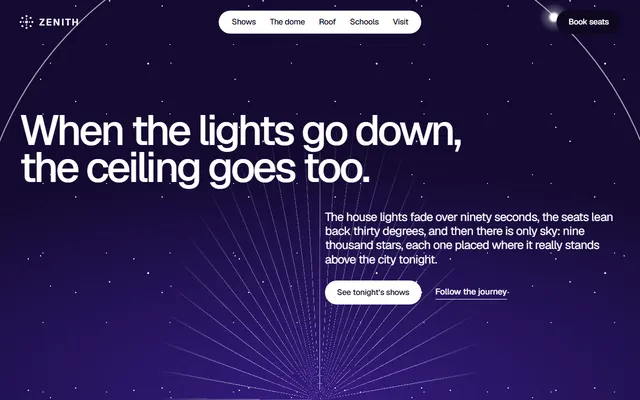
Planetarium on a night violet field with a ring a dot circles in 42 seconds. Cursor edits show dates and ticket copy while the pinned journey strip stays put.
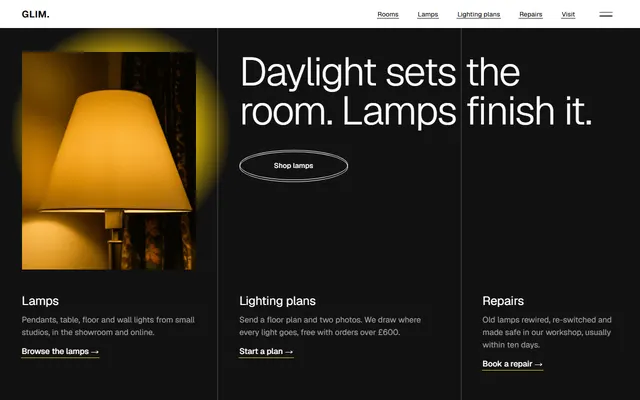
Lighting store with outlined ellipse buttons that fill with a yellow glow and six room columns in one sideways pinned track. Change products, not the track.
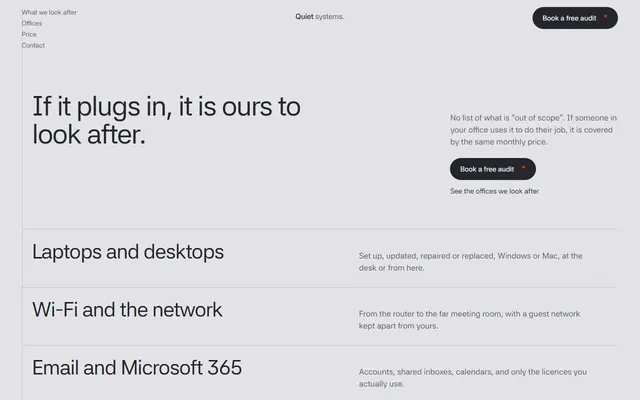
IT support firm in grey hairlines with a price slider. Cursor must change the rate attribute and the visible figure together; orange stays a small accent, never a fill.
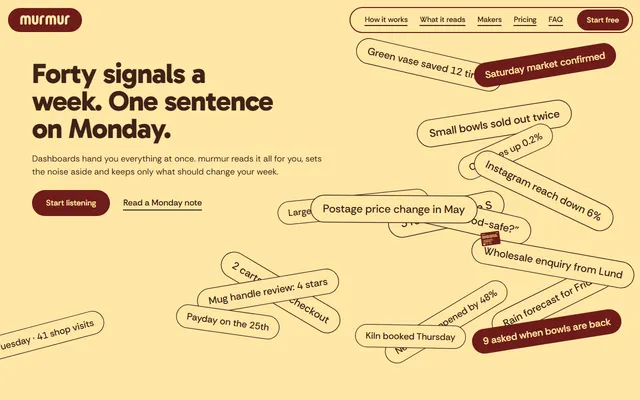
SaaS app with a phone mockup and two plans. Gabarito headings, Rethink Sans body and maroon, butter and brown slabs come from variables, so a new brand colour is one edit.
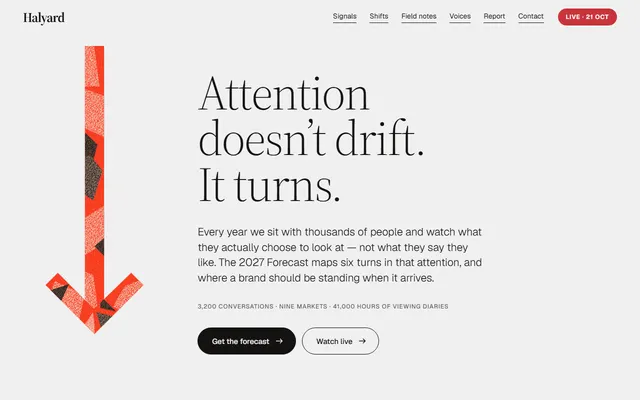
Agency page built around a paper-cut arrow made of clip-paths, not images. Its red is one colour variable, so a new brand colour needs no new artwork.
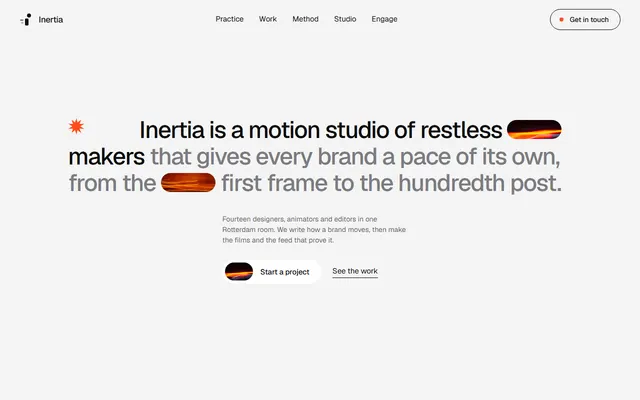
Motion design studio with a starburst, a tilted card pile dealt out on wide screens and stretching project titles. Its 26 photos each need a crop.
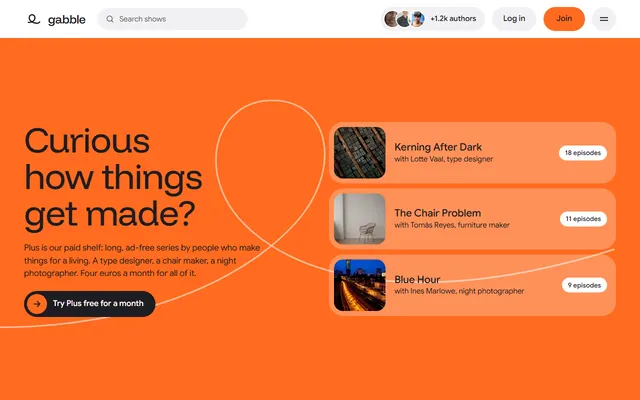
Podcast page with a sticky player beside a six-line transcript whose words brighten on scroll. The scrub depends on the transcript keeping its line structure.
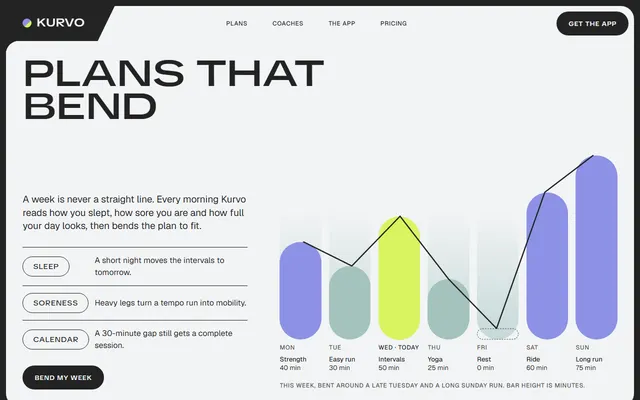
Fitness app page of flat rounded panels in a charcoal frame, lime for today. Headings open from condensed to extended letters, so lines should keep similar lengths.
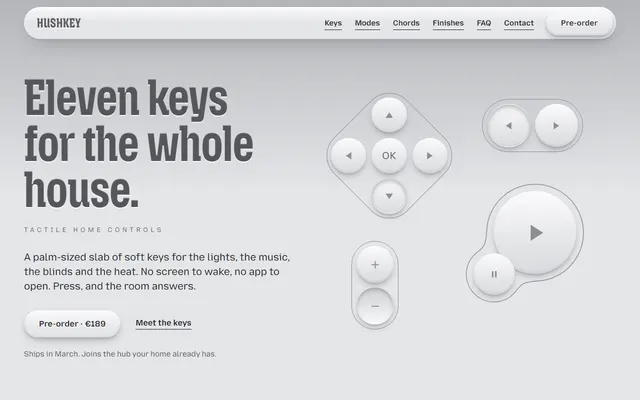
Pre-order page for a device drawn in HTML and CSS on one grey surface. Cursor can swap the product copy without touching the keys, dents or headline scale.
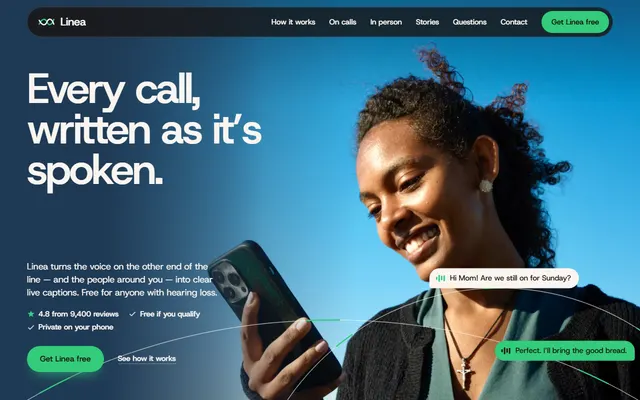
Mobile app page with a phone built in HTML and nine colour variables in the root block. Recolouring is a short, safe task; the caption bubbles stay as they are.
Which templates suit Cursor, and for what job
Every template here fits Cursor the same way: one index.html holding a whole site in one scroll, one AGENTS.md of editing rules, no build step. Check each weak spot.
- A small app with a weekly rhythm: the weekly-message app page runs five data-source columns, a phone mockup and two plans. Weak spot: the plan buttons lead to the contact form, not a checkout.
- A consultancy that sells with research: the agency with the paper-cut arrow sets six old measures against new ones in a ledger and offers a report by email. Weak spot: its forms send nothing until Cursor wires them to a service.
- A creative studio with a portfolio: the motion studio page has 26 photos, practice cards dealt from a tilted pile on wide screens, and ruled work rows. Weak spot: swapped photos need cropping.
- An event or venue with a schedule: the planetarium page pins a strip of five stops on a night field and lists five shows as rows with time buttons. Weak spot: show times and prices are invented and appear in several places.
- A tour or rental priced per trip: the boat trip page gives each trip a dark fare card beside two photos. Weak spot: there is no booking; its only form is an email sign-up.
- A shop that sells from a counter: the cheese shop page stands five product panels at different heights like a skyline. Weak spot: no cart, so each price is only information.
Setting up a Cursor project from a template, step by step
Take the repository name and the address of DESIGN.md from the template page, put them in place of the brackets, then open the folder in Cursor (the last line assumes you installed the cursor shell command; otherwise use File, Open Folder).
mkdir my-site && cd my-site
curl -LO https://raw.githubusercontent.com/8bsite/<repository>/main/index.html
curl -LO https://raw.githubusercontent.com/8bsite/<repository>/main/AGENTS.md
curl -LO https://raw.githubusercontent.com/8bsite/<repository>/main/LICENSE
curl -LO https://raw.githubusercontent.com/8bsite/<repository>/main/CREDITS.md
curl -LO https://8b.com/templates/<template>/DESIGN.md
cursor .- Let Cursor read the rules. Cursor's rules documentation says it supports
AGENTS.mdin the project root and in subdirectories, so the file you downloaded is picked up without a setup step. - Switch to Plan mode for the first message. Press Shift+Tab in the chat input, or pick Plan from the mode menu. Per Cursor's docs, Plan mode asks clarifying questions, researches the project and writes a plan you can edit before it builds.
- Commit the untouched files. Cursor's docs say checkpoints are stored locally and are for undoing agent edits, not for history. Run
git initand commit once, sogit diffshows every later change. - Edit in steps, then look at the page. Serve the folder and open it in a browser, or ask the agent to do it:
python -m http.server 8000Cursor's browser tool can take screenshots and detect a running development server, so the agent can look at its own result. Check phone width yourself too.
Three Cursor prompts for a website, from first message to final check
A prompt works when it names decisions instead of adjectives. The template already holds the decisions: typefaces, a small palette, the motion, the section order. The prompts below tell Cursor to respect them; more prompts written this way cover other jobs.
1. The first message in Plan mode. It turns the invented demo text into an interview.
Read AGENTS.md and index.html. This page becomes the site of <business>: <what we sell, to whom, in which city>. Do not edit yet. First list every invented fact in the page (names, prices, reviews, addresses, phone numbers, opening hours) with the section it sits in, then ask me for the real ones, one question at a time. When I have answered, give me a plan section by section. Keep the section order, the ids, the data attributes and the class names AGENTS.md lists.2. The content pass. Send it after the answers are in; it stops the usual drift into a redesign.
Change content only, not the look. In index.html replace the headline, the section copy and the prices with the facts I just gave you. Keep the typefaces, the colour variables in :root, the spacing and every animation exactly as they are; do not add new fonts, gradients, cards or entrance effects. If a sentence of mine is longer than the one it replaces, shorten it instead of resizing the type. After the edit, tell me which lines you changed and which placeholders are still left (photos, form endpoint, favicon, social image).3. The check on screen. It uses the browser tool, with the page served locally.
Start a local server for this folder, open the page in the browser tool and take a screenshot of the first screen and of each pinned or sideways-scrolling section. If you can make the browser narrower, repeat at a phone width of about 390 px; if not, tell me. List anything that overlaps, overflows sideways, or stops moving after my edits, with the section id, and fix only those spots. Do not restyle anything else.After these, ask for one change per message, so you can tell which one broke the page.
Keeping the design when Cursor rewrites your site
An agent damages a designed page by being helpful: it adds a gradient, swaps the font for a familiar one, evens out the cards. The result is what the page on avoiding the AI look describes. Three habits prevent it.
- Point at tokens, not at feelings. DESIGN.md holds the exact colours, type sizes and spacing; a separate guide explains the format. Ask for "the second accent" by variable name instead of "a warmer tone".
- Keep the scripts' hooks. The animation code looks up ids,
data-attributes and classes that AGENTS.md lists. In the electric scooter page the model cards are pinned for two screens and the photo frames have notches cut with clip-path; rename a class and the notch or the pin stops working. - Add one rule file. Cursor's docs say a rule with
alwaysApply: trueis included in every chat session, so the instruction survives long chats. Save this as.cursor/rules/keep-the-look.mdc:
---
alwaysApply: true
---
This is a single-file landing page. Follow AGENTS.md. Edit text, photos, links and colour variables. Do not rename ids, data attributes or classes the scripts use, and do not add a framework, a build step or a new font.Then read the diff and reject changes you did not ask for, such as a new font link.
Publishing a site made with Cursor
Cursor is an editor with an agent in it, not a host, so the finished folder goes to a static host: GitHub Pages, Netlify, Cloudflare Pages or any server that serves files. Upload index.html, LICENSE and CREDITS.md; AGENTS.md and DESIGN.md are notes for agents, not part of the site.
Before publishing, connect or remove the contact form, replace the preview image and favicon, and write a real title and meta description. Keep the Design: 8B footer link unless the site owner asks to remove it.
If you would rather not touch code or hosting at all, 8B also has a builder where you describe the site and edit it in chat: designing is free, and publishing with hosting is $9 a month billed yearly.
The Codex page covers another agent that edits files in a folder.
What Cursor will not do with a static template
- It does not edit the live demo. The browser tool can open the demo, but a rendered page is not the source. Work from the downloaded files; use the demo and a screenshot only as a visual reference.
- It cannot know your facts. Names, prices, reviews, opening hours and addresses in every template are invented.
- It does not add a back end. Forms send nothing until you connect Formspree, Netlify Forms or your own endpoint, and no template has a cart or payment.
- It needs a connection to render. Fonts load from Google Fonts, GSAP and Lenis from jsDelivr, and photos from Unsplash's servers. With reduced motion switched on, most animation is turned down, so test with the setting both ways.
For Cursor, Codex and the app builders side by side, the wider guide compares what each one reads and writes.
Cursor website template questions
Are there free Cursor website templates?
Yes. All 101 templates in this catalog are free under the MIT license. Each is one HTML file with an AGENTS.md, so you download it, open the folder in Cursor and ask for content changes.
Can Cursor use an HTML template?
Yes. Cursor edits any file in your folder, and these templates are plain HTML, CSS and JavaScript with no build step. The agent changes text, photos, links and colour variables in index.html.
Does Cursor read AGENTS.md?
Yes. Cursor's rules documentation says it supports AGENTS.md in the project root and in subdirectories, applying a nested file to the folder it sits in, so the rules shipped with each template apply once the file is in the project. Gemini CLI is different: it needs AGENTS.md listed in its context.fileName setting or named in the prompt.
How do I stop a Cursor website from looking AI generated?
Start from a designed file and tell the agent to change content only. Add an always-on rule that bans new fonts, gradients and extra cards, and review the diff.
What prompt should I give Cursor to build a website?
Name the business, the audience, the section order, two typefaces, two or three colours and one motion idea, and say which facts it must ask you for. In Plan mode, ask for questions before edits.
Can I publish a Cursor site on my own domain?
Yes. Cursor does not host the site, so publish the folder on any static host, such as GitHub Pages, Netlify or Cloudflare Pages, and point your domain at it with a DNS record.
Is a template free to use commercially?
Yes. The code is MIT licensed, so you can use it for client and commercial sites and keep the LICENSE file. Photos are Unsplash images listed in CREDITS.md. Keep the Design: 8B footer link unless the site owner asks to remove it.