v0 website templates
v0 website templates that open in one click: each free MIT design below has an Open in v0 button that starts a v0 chat with the template's real files loaded, not a description of them. v0, the AI app builder from Vercel, starts new chats from a Next.js app with Tailwind CSS and shadcn/ui, so what you keep is v0's own project in the look of the template.
Here is what the button does. It hands v0 the template's files (index.html, AGENTS.md, the license and the photo credits) through the shadcn registry format that Open in v0 reads, so the chat starts from the real design rather than a description of it. On the cinema card, for example, the chat opens with the two-screen cinema's files, so your first message can be your own films, nights and bar.
Ask v0 for "a website" and it answers with the most average site it can imagine, because nobody named the typeface, the colours or the motion. A website with v0 goes better from a finished page with those decisions written down. This page leans toward studios, brands, venues and events, where the look is most of the pitch.
These templates are single index.html files, and v0's documentation describes Next.js, Vite and Node.js projects, not a lone HTML file. So besides the button, the route below is a prompt and a picture, and v0 returns its own project in the look of the template, not the same file. If you would rather keep the file itself, the guide to Cursor, Codex and other agents covers tools that edit a folder directly.
At a glance, October 2026. There are 16 templates on this page, all free under the MIT license and made by 8B, an AI website builder. By what the site sells: five are studios and agencies, five are brands and makers (fashion, perfume, jewellery, print and architecture), four are venues and events, and two are a mobile app and a mortgage broker. Twelve have 12 sections, three have 13, and the marketing agency has 11.
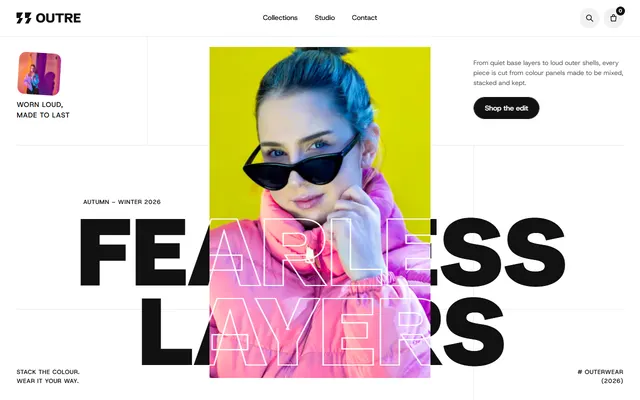
Fashion label. White, black and red, Schibsted Grotesk set huge, and five season colour bands. Add to bag only raises a counter, so a real cart is v0's job.
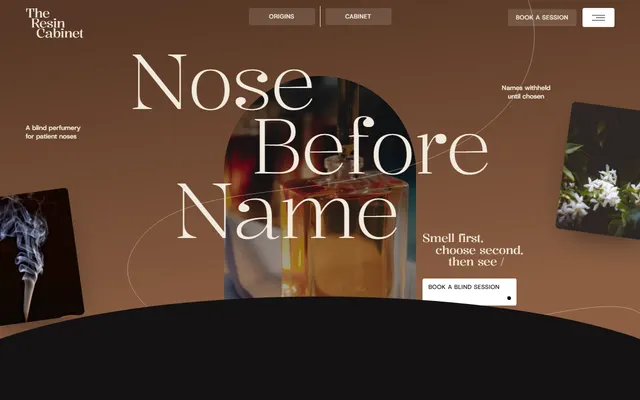
Perfumery selling by appointment and by post. Near-black and parchment with amber, Kalnia headings, long pinned scenes best asked for one at a time.
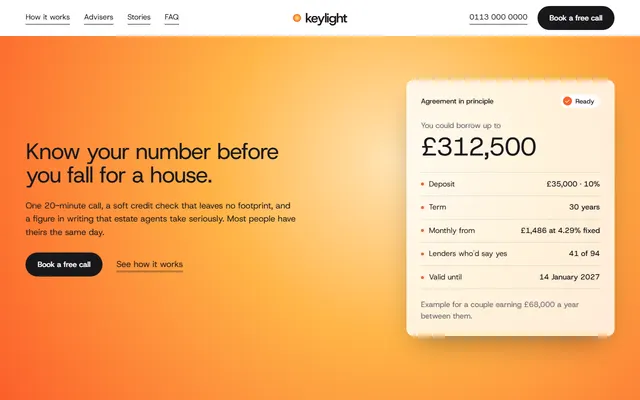
Mortgage broker. White and near-black with an amber glow, a market chart scrubbed by scroll, and step photos wiping up over each other.
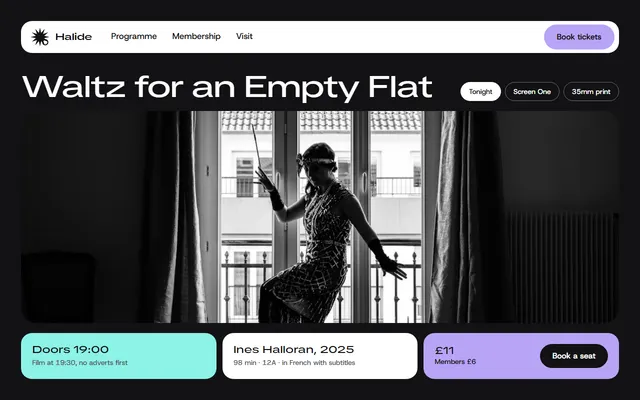
Two-screen cinema. Near-black with lavender and mint, a six-day programme, and a membership stub that tears along a perforation. The visit form needs connecting.
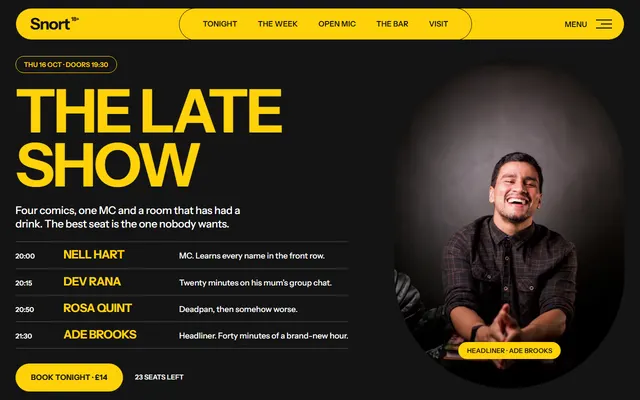
Comedy club in a railway arch. Yellow and black, Playpen Sans for hand-drawn accents, a seven-night programme and an open-mic sign-up.
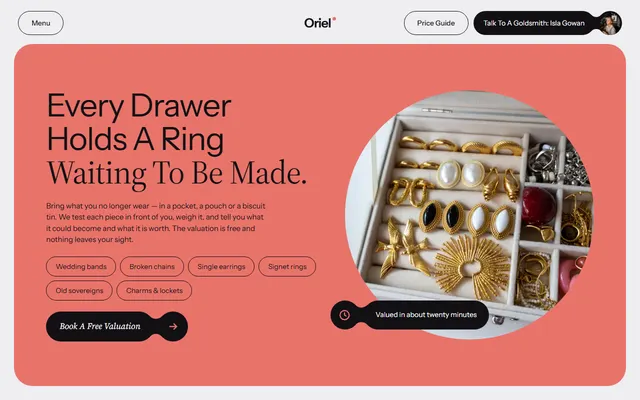
Goldsmith remaking old gold into rings. A coral panel with lilac, Instrument Sans beside Source Serif 4, and five pieces on a curved strand.
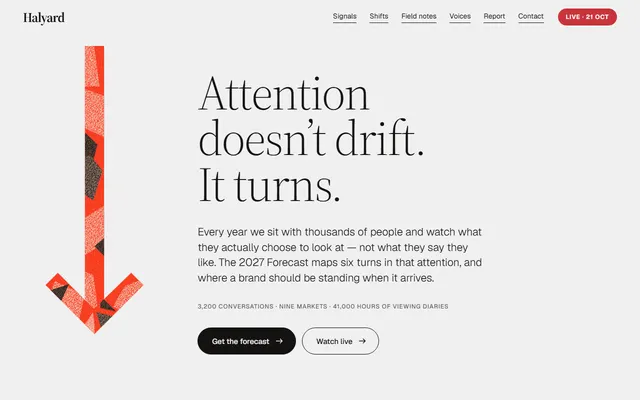
Marketing agency built on a yearly research report. Light grey, black and vermilion, Source Serif 4 headings, and an arrow that swings to each signal.
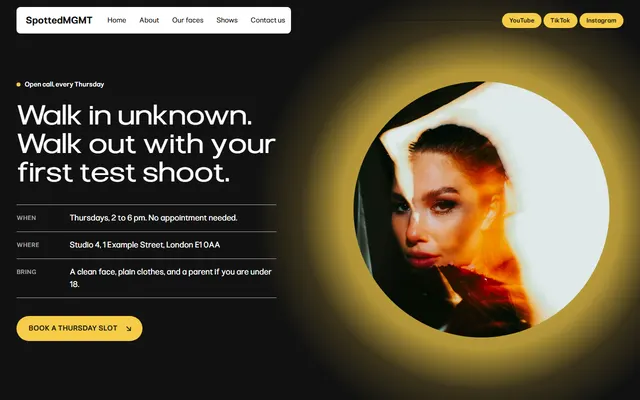
Modeling agency with a weekly open call. Light grey, black and a yellow dot motif; one typeface, Pliant, carries the whole page.
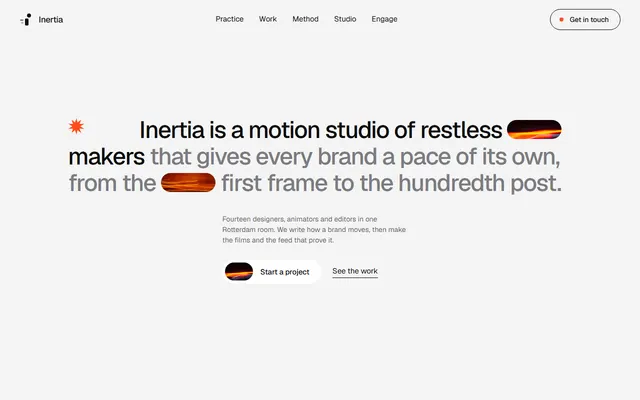
Motion design studio. Near-white, black and one orange, TikTok Sans with Geist, and work titles that stretch from condensed to extended.
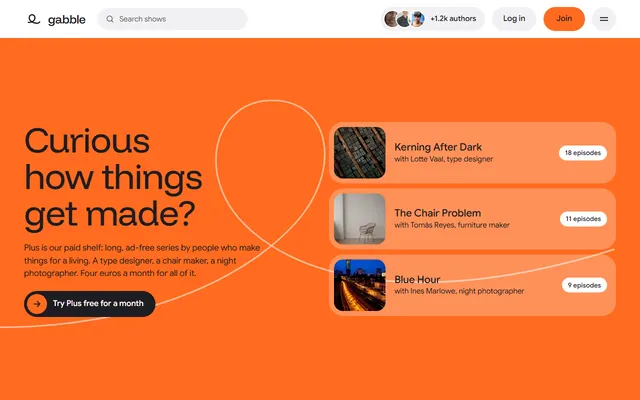
Podcast network. White and ink with orange, lavender and pale yellow, Funnel Display headings, and a transcript that fills with ink on scroll.
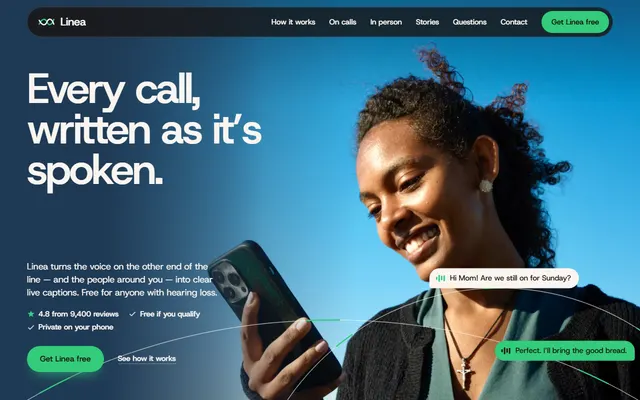
Mobile app landing. Warm paper, espresso and navy with one green, and a sticky phone that gains messages as steps pass. Attach that section as a second screenshot.
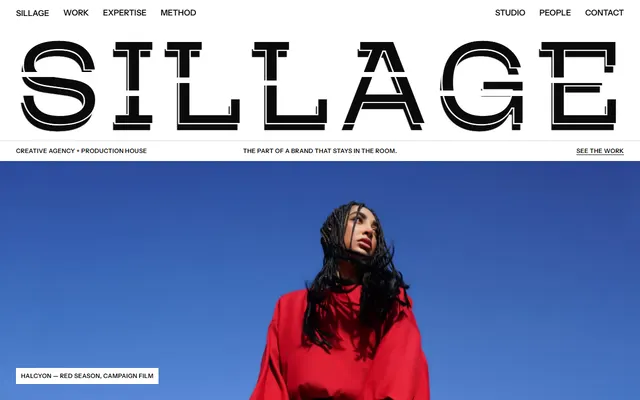
Creative agency and production house. Black and white uppercase, hairline tables, colour only from photos, and a width-filling wordmark that flies apart on scroll.
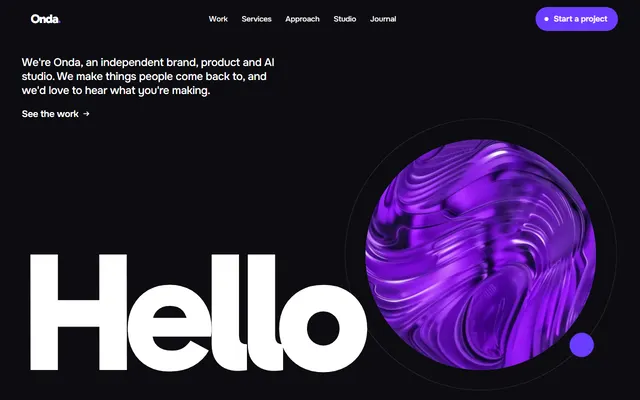
Design studio. Black, white and one violet, Gabarito headings that each end in a violet dot, and case cards sliding sideways while pinned.
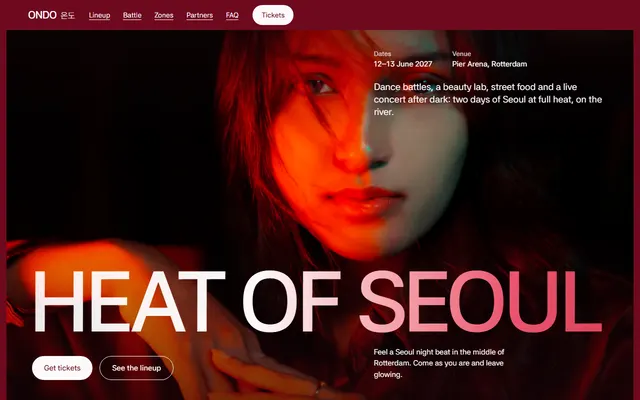
Two-day culture festival. Crimson and red slides, Asta Sans throughout, headings that heat from dim to white, and three passes with no ticket form.
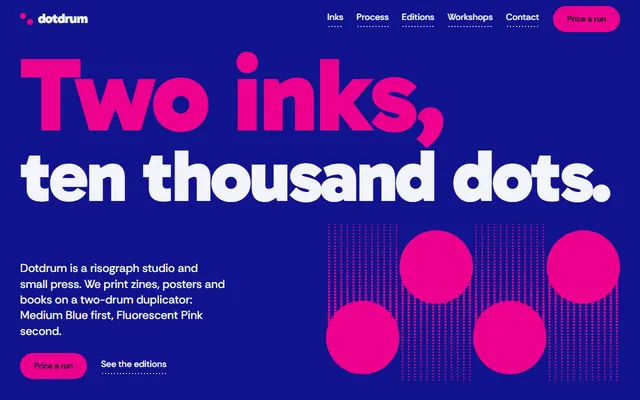
Risograph print studio. Ultramarine and fluorescent pink, halftone dots drawn in CSS, drums that print bands on scroll. Give v0 both hex values and forbid a third.
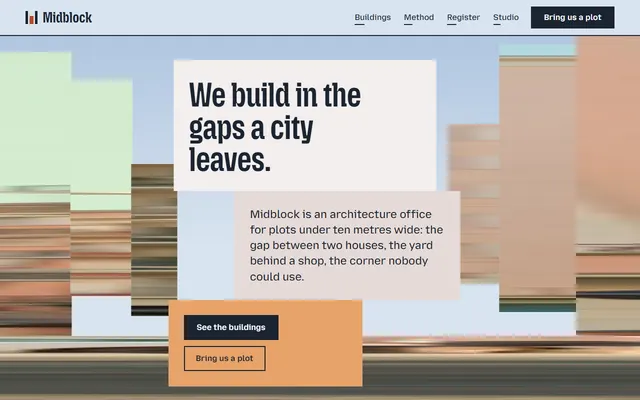
Architecture office. Flat pastel blocks, a rust accent and street photos that sharpen from smeared streaks. Name that streak as one effect, or v0 may drop it.
Which template to give v0 for which case
Pick by what the owner sells. Pages whose look rests on type and two or three colours survive the move to v0 best; long pinned scenes need more follow-up prompts. The same pages do best in Bolt's screenshot-and-prompt route.
- A studio or agency that sells its own work. Start from the motion studio's own site or the design studio template. Weak spot: the pinned work rows need scroll code, which v0 may simplify, so check the phone view.
- A brand with products but no shop yet. The outerwear label and the perfumery template present a collection well. Weak spot: neither has a checkout, so say whether v0 should add Stripe, a Shopify store or a link out.
- A venue with a weekly programme. The two-screen cinema and the comedy club template both lay out nights and a bar. Weak spot: there is no ticketing, so link a ticket service rather than expect one.
- A firm that sells trust. The broker and the research-led agency use restrained palettes. Weak spot: their booking and download forms send nothing until wired to your own endpoint.
- An app launch. The mobile app template pairs a sticky phone with feature steps. Weak spot: the filling phone is scroll code, so check it first.
How to use a template in v0 step by step
- Open the template's page. Note its live demo link and take two screenshots, one at desktop width and one at phone width. v0's docs say it reads the layout, colours and components of a screenshot and replicates them; high-resolution shots work better.
- Copy the design prompt. Every template page has one. Replace the business details with yours first, then keep the type, colour and motion lines exactly.
- Start a new chat at v0.app and paste. Attach the screenshots from the plus menu with Upload from computer, or drag or paste them in. Add the demo link too: v0's browser use can visit an external URL to capture visual references before recreating a page.
- Build in pieces. v0's prompting guide recommends breaking work down and adding one part at a time. Ask for the first screen, compare it, then the next section. Long pinned openings, like the one in the perfumery design, deserve a prompt of their own.
- Review and publish. The code viewer lets you browse and download files; publishing is covered below.
A file route exists, with limits. Each repository is a GitHub template, so Use this template gives you a copy, and v0 can import a repository once the Vercel GitHub App can reach it. Its docs say the sandbox detects Next.js, Vite and generic Node.js projects; they do not say how it runs a folder with only an index.html, so treat that route as untested. To keep the HTML file exactly, edit it locally with an editor agent like Cursor instead.
Other app builders take the same prompt and picture, as the page on building in Lovable shows.
Design prompts for a v0 website
These prompts are written for v0's chat. Each names what a v0 website tends to skip: typeface, hex colours, one motion idea, section order. The longer set of prompts has more, written for agents that work on files.
The first prompt starts a studio site in the style of the design studio template: black, white and one violet. Attach its desktop and phone screenshots with it.
Build a one-page website for a small brand and product design studio, in Next.js with Tailwind and shadcn/ui. Match the attached screenshots.
Type: Gabarito 800 for headlines, very large with tight line height and negative letter spacing; every headline ends in a round violet dot. Onest for body text and buttons.
Colour: near-black #0d0c11 for text and dark panels, white #ffffff and pale grey #efeef4 for backgrounds, violet #6c3cff as the only accent.
Sections in order: first screen with a giant greeting and one round photo, a short statement, five case studies in a sideways row, long-term clients, services, process, team, news, contact.
Motion: one idea only, the case row sliding sideways as the page scrolls. Everything else static.
Where I give no details, leave marked placeholders, never invented numbers.The second changes one thing without disturbing the rest. It matters most on a bold page such as the comedy club, where one stray colour shows at once.
Only change the plans section. Keep every other section, the colours and the fonts as they are.
New content: three plans named Starter, Studio and Team at the prices I list below. The recommended plan gets the accent colour #ff4d1a; the other two stay black on light grey #f4f4f5.
Do not add new components or animations. After the change, list which files you touched.Keeping the look when v0 rewrites your v0 website
In v0 web design, each follow-up prompt can touch code you did not mean to change: a colour shifts, a font falls back. Write the design down once and repeat the short version. Each template has a DESIGN.md file of tokens, explained on the DESIGN.md page. Paste its colour and type lines into the first message and any layout prompt.
- Name the tokens. Ask v0 to put the hex values and font names in the Tailwind theme once, then refer to them by name. Changes then stay in one place, as in the research agency design, whose three main colours sit in one palette.
- Save the rule as an Instruction. v0 lets you save reusable instructions from the plus menu and apply them to later messages. Save "change content, not the look" with your fonts and hex values.
The reasons a generated site looks generic are listed on the page on AI generated tells.
Publishing a v0 website
In v0 you select Publish in the chat header. The first publish confirms the Vercel project, visibility and a domain; later changes go out with Publish Changes. For a project backed by GitHub, v0 creates or reuses a pull request, merges it into the base branch and waits for the production deployment.
Every deployment gets a vercel.app address. For your own domain, open Publish and then Customize Domain, add the domain, and set the DNS records at your registrar following the Vercel dashboard.
The single-file HTML versions of these designs are a different thing: they work on any static host, such as GitHub Pages, and the GitHub Pages walk-through shows how. If you would rather not code at all, 8B's own builder designs a whole site free before you pay; publishing with hosting and SSL is $9 a month billed yearly.
Before going live, check the page at phone width and keep the Design: 8B footer link unless the site owner asks to remove it.
Limits of v0 website templates
- It is a copy of the look, not the file. v0 writes its own components, so spacing and small details will differ from the demo.
- Forms send nothing. Fourteen of these sixteen demos have a form, and all are visual until connected to a backend or form service; the free call form in the broker design is typical.
- The demo copy is invented. Replace names, prices and addresses; the six new faces in the scouting agency demo are placeholders too.
- v0 does not document AGENTS.md. Its docs mention saved Instructions, not rules files such as AGENTS.md, so paste the instructions you need or save them as an Instruction.
For the file-first route, with an agent that does read AGENTS.md in a folder, see the guide for Claude Code users.
v0 website template questions
Are there free v0 website templates?
Yes, 16 are listed on this page and 101 in the catalog, all free under the MIT license. They are not v0 projects. You use each one as a design brief: paste its design prompt, attach screenshots, and v0 builds the look in its own code.
Can v0 use an HTML website template?
Not as a ready file, as far as the docs show. New v0 chats start from Next.js, Tailwind CSS and shadcn/ui, and v0 imports projects from GitHub or a ZIP, but the docs do not say how it runs plain HTML. Use the design prompt, screenshots and demo link.
How do I stop a v0 website from looking generic or AI generated?
Give v0 decisions instead of adjectives: two or three hex colours, a named typeface, one motion idea and the section order. Attach a screenshot to match, then change one section per message so the look does not drift.
Does v0 read AGENTS.md?
Its documentation does not mention it, so assume no. v0 has saved Instructions, which you create from the plus menu and apply to messages. Agents that work in a folder, such as Codex and Claude Code, read AGENTS.md.
What is a good prompt for a v0 website?
One that names the business, the sections in order, the typeface, the colours with hex values, and the single motion. v0's prompting guide asks for that kind of detail and for building one part at a time.
Can I publish a v0 website on my own domain?
Yes, through Vercel. Select Publish, then Customize Domain, add your domain and set its DNS records at your registrar. Every deployment also gets a free vercel.app address, and you can export the code and host it yourself.
Can I use these templates commercially?
Yes. The MIT license allows client and business sites. Keep the Design: 8B footer link unless the site owner asks to remove it, and replace the invented demo content before launch.