Free nonprofit website template
Edit it by hand: it is one index.html with no build step, so you can open it in any text editor, change the words and photos, and upload it to any static host. Not a coder? Describe your business in one sentence to 8B's AI website builder and it designs a new site for you, with more pages when you need them. Designing is free; publishing with hosting is $9 a month, billed yearly. It also works inside Claude and ChatGPT.
MIT license · Made by 8B, an AI website builder · Plain text: spare-hour.md, data: spare-hour.json
About this nonprofit website template
Nonprofit website template: one free HTML file for a volunteering network, charity or community group that lists open volunteer hours, takes sign-ups and asks for donations. Six colour-coded folders hold the open hours, a donation picker follows, and AGENTS.md lets Claude Code, Cursor or Codex adapt the whole page.
At a glance, October 2026. One 105 KB index.html with its CSS and JavaScript inside, 12 sections, 24 Unsplash photos credited in CREDITS.md, Host Grotesk and Playwrite US Trad from Google Fonts, GSAP 3.13.0 (ScrollTrigger); Lenis 1.3.27 smooth scroll loaded from jsDelivr.
Volunteer centres, food banks, mutual aid groups and tenants' associations ask the same of a site: show what help is needed this week, take a name, ask for a gift. Searches for websites for nonprofits and charity website templates mostly come from such groups, and a nonprofit organization website for one is mainly dated asks. This page offers six opportunities, six causes, a groups page, a donation picker and a sign-up form, with no payment or booking system behind them.
Using a nonprofit website template for Claude Code, Cursor or Codex goes fastest when the agent gets the facts only the organisation has: name, charity number, causes, real opportunities with day, time and places, age and background check rules, gift amounts. The demo invents all of these, with the quotes and money figures. Replace them first, then the Glasgow names and Scottish terms such as the PVG check. The whole site is one long volunteering page, so the agent reads it in one pass.
As an ngo website template it suits a network that lists dated slots near the visitor and asks for small gifts. The folder drawer and the neighbourhood block fit a city with many local groups; a single-site charity can cut both. A members' workspace with day passes needs a different page. The weak spot is function: Book links, See all hours and Sign up all jump to the form, and a plain sentence on 8B's builder covers the no-code route.
Good for:
Turn the nonprofit website template into your site with an AI agent
With an AI coding agent
Files (PowerShell: curl.exe):
curl -LO https://raw.githubusercontent.com/8bsite/nonprofit-website-template/main/index.html
curl -LO https://raw.githubusercontent.com/8bsite/nonprofit-website-template/main/AGENTS.md
curl -LO https://raw.githubusercontent.com/8bsite/nonprofit-website-template/main/LICENSE
curl -LO https://raw.githubusercontent.com/8bsite/nonprofit-website-template/main/CREDITS.mdPrompt for the agent:
Read AGENTS.md, then edit index.html. Make this the site for <my organisation: name, city, registered charity number, causes, real opportunities with day, time, length and places left, age and background check rules, donation amounts, budget, contacts>. Replace first the demo name, Glasgow places and Scottish terms, the six open hours, the quotes and the money figures. Keep the ids and the classes AGENTS.md lists, and set the footer wordmark's len to the new name's length. Ask me for missing facts and never invent figures, quotes, charity numbers or contacts.In a terminal
npx degit 8bsite/nonprofit-website-template my-siteNonprofit website design prompt for any AI tool
Use this to build a volunteering or charity site from scratch in Claude Code, Codex, Cursor, Lovable, v0 or Bolt, or to brief a designer. It is this template's design written as decisions; with the template itself, the short prompt above is enough.
Build a one-page website for a volunteering network, charity or community group that lists open volunteer hours, takes sign-ups and asks for donations. Section order: nav, opening with three steps, open hours as stacked folder cards, causes, a Saturday story, volunteer quotes, local neighbourhoods, a page for groups, giving, questions, sign-up form, footer. Type: Host Grotesk for all text, bold tight headings, light oversized step numbers; Playwrite US Trad only for signatures under quotes. Colours: #ffffff ground, #121212 text and buttons, #f3c03e yellow for the opening and giving blocks, #5c5c5c secondary text, and one saturated colour per cause (#ff6a21, #187a44, #3a96e0, #a6dcb4, #0d5c4c) reused on that cause's cards and pills. Motion: one idea, paper cards that stack, slide and deal out on scroll; switch it all off under prefers-reduced-motion so the page still reads in full. Avoid purple gradients, three icon cards, shadows, glass blur and a centred hero with two buttons; use cards with notched folder-tab tops at stepped heights. Copy: short and concrete. Ask me for the name, charity number, causes, real hours with day, time and places left, donation amounts, contacts; never invent figures, quotes or numbers, leave marked placeholders. One primary action, Sign up, repeated in the nav, the phone menu and the form. Check at 390 px width, tap targets of 44 px, visible keyboard focus, no console errors, and list every placeholder.Nonprofit website design and motion
Palette
#ffffff page ground, step cards, input fields, white neighbourhood pills, text on the dark sections#121212 text, buttons, the Saturday section and footer grounds#f3c03e yellow: opening screen and giving section grounds, Repairs colour, button hover fill, highlighter stroke#5c5c5c lead paragraphs, answers and other secondary text#e4e4e4 hairlines between rows, the nav bar's shadow line, quotation marks#ff6a21 orange: Food folders, cards and pills, and one sign-up photo card#187a44 green: Gardens folders, cards and pills, and one sign-up photo card#3a96e0 blue: Reading folders, cards and pills, and one sign-up photo card#a6dcb4 pale green: Company folders, cards and pills, the sign-up thank-you note, the groups photo ground#0d5c4c deep teal: River folders and cards, the neighbourhoods section ground, one sign-up photo cardFonts
- Host Grotesk: all text: bold tight headings, light oversized step numbers, regular body text and the extra-bold footer wordmark
- Playwrite US Trad: handwriting used only for the three volunteer names under the quotes, at regular weight
White ground with flat colour blocks and cards shaped like folder tabs, most of them with a notched top edge and the rest plain rounded boxes. Rows of cards stand at stepped heights: the causes row dips towards the middle, the sign-up photo row peaks there. Five blocks change ground: yellow for the opening and the giving block, black for the Saturday story and the footer, teal for the neighbourhoods. Text-and-visual splits repeat down the page.
Six saturated colours belong to the six causes and repeat on each cause's folder and card. Neighbourhood pills take them too once lit, except river ones, which stay white on the teal ground. Names are signed in a handwriting face over a yellow stroke that draws in on scroll.
Every value of this nonprofit website design, with the type scale, spacing and the motion rules, is in its DESIGN.md file (Google's format), ready for a coding agent or Stitch.
What is on the nonprofit website page
- NavigationFixed bar: wordmark, five links, two icon buttons, Sign up button; phone menu overlay with phone and email
The bar is clear at the top, gains a white ground and hairline after a few pixels of scroll, slides away on scrolling down past 120px and returns on scrolling up.
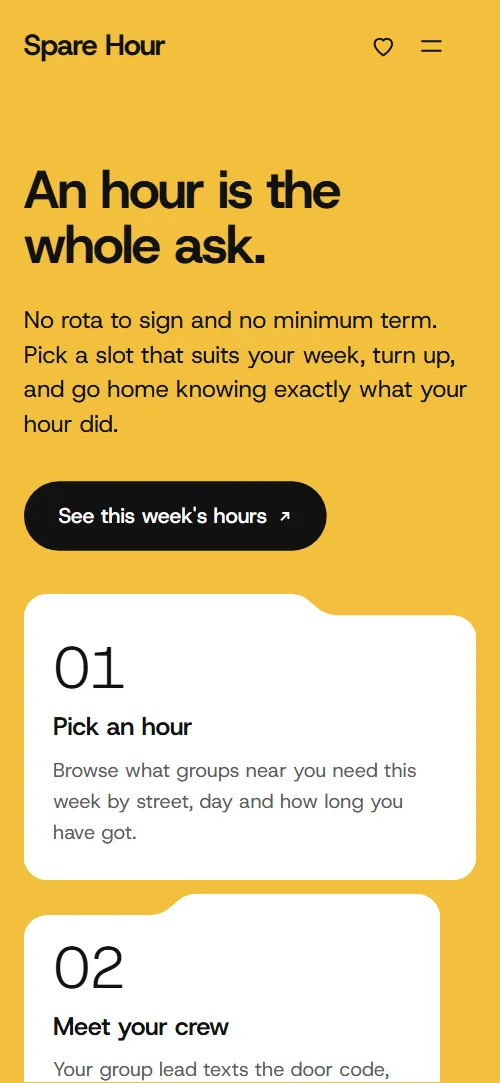
- An hour is the whole ask.Yellow screen: "An hour is the whole ask.", a paragraph, a button and three numbered step cards
Smooth scrolling runs page-wide; on load the heading, lead and button slide up and the three step cards rise from below with a short stagger.
- This week's open hours"This week's open hours": six folder cards in a drawer, each with neighbourhood tab, cause, title, day and time, length, places left and a Book link
The six folders stack as a drawer that stays in place for about three screens of scrolling, and each step lifts the front folder, tilts it slightly and slips it to the back.
- Six ways to spend an hour"Six ways to spend an hour": six tall cause cards in a stepped skyline, each with a photo, name and line
When the row reaches the lower part of the screen the six cards rise once, the outer ones first and the middle pair last.
- One Saturday at the Govan larder"One Saturday at the Govan larder": a horizontal strip of six timed photo frames with captions
The six timed frames slide sideways while the page scrolls down, and the notch in each photo's top edge leans with the scroll speed.
- Why they keep coming back"Why they keep coming back": one large quote and two smaller ones, portraits in tab frames and handwritten names over a yellow stroke
Each portrait rises with a slight zoom out as it enters, and the yellow stroke draws across each handwritten name.
- Thirty neighbourhoods, one network"Thirty neighbourhoods, one network": a wrapping block of thirty Glasgow names on teal, each with its open hours, lighting up in cause colours
The thirty names start faded and light up in their cause colours as they pass the lower part of the screen, row by row, and fade again on scrolling back.
- Run a community group? Post an hour in five minutes."Run a community group? Post an hour in five minutes.": a photo of a circle of chairs, a pitch, three points and a button
The photo rises as it enters and the yellow stroke draws behind the words Post an hour.
- Can't spare an hour? Spare a fiver."Can't spare an hour? Spare a fiver.": yellow ground, amount picker with monthly checkbox, and three gift cards that deal out
The three gift cards start stacked in the middle, tilted, and deal out to their places as you scroll.
- Questions before your first hour"Questions before your first hour": six questions as native details elements beside a heading and the phone number
- Start with one hour"Start with one hour": five photo cards in a peak, a sign-up form and drop-in, phone and email details
The five portrait cards rise from below on scroll, the outer ones first and the middle one last.
- VolunteerDark footer: brand line, three link columns, a wide wordmark, charity registration, address and copyright with the Design: 8B credit
Before you publish the nonprofit website site
- Replace social preview image, favicon, phone number, email address and contact form (sends nothing yet) and the invented demo facts (prices, dates, addresses). AGENTS.md lists them.
- See this week's hours button on the first screen, and the Open hours link in the nav and the footer lead to
#hoursnow; point them to keep it, or your live opportunities page. - See all 214 hours button and every Book this hour link on the six folders lead to
#contactnow; point them to the booking page for that hour (one link per folder) and your full opportunities list. - Sign up buttons in the nav and the phone menu lead to
#contactnow; point them to your volunteer sign-up page. - Post an hour button in the groups section lead to
mailto:groups@sparehour.examplenow; point them to your form or page for groups to post an hour. - Give now button in the donation picker lead to
nothing is sent: it shows a preview messagenow; point them to your donation page or payment link, with the chosen amount and the monthly checkbox passed on. - The search and gift icon buttons in the nav lead to
#hours and #givenow; point them to keep them or point them at your own pages. - The drawer section holds the page for about three screens of scrolling (about 64% of a screen per folder after the first), which can feel long on short phone screens.
- The handwriting face for signatures is a third font family used only there, and the small colour pills over the neighbourhood names need a contrast check if you change the colours.
- The nav behaviour and hover effects keep running with reduced motion; the scroll scenes and entrance animations are switched off.
Questions about this nonprofit website template
Is this a free non-profit website template?
Yes. The code is MIT licensed and sits in one index.html with inline CSS and scripts. GSAP and Lenis load from jsDelivr, the fonts from Google Fonts, and the 24 photos stay on Unsplash's servers and are listed in CREDITS.md. On Replit, the volunteer network card opens Agent with this design's prompt.
How do I give it to an AI agent?
Put index.html and AGENTS.md in a folder, open it in Claude Code, Cursor or Codex and paste the short prompt from this page. To vibe code a site from scratch instead, use the nonprofit website design prompt below, one of the prompts sorted by job. Supply real hours, figures and contacts, and tell it to ask about gaps.
Do the donation and sign-up forms work?
No, neither sends anything. The donation form only shows a preview message and the sign-up form checks the name and email, then shows a thank-you line. Connect sign-up with Formspree or Netlify Forms, and point Give now at your own donation page or payment link.
What must stay when I edit the page?
Keep every id and the data-8b-section, data-8b-motion and data-8b-part attributes, plus the classes AGENTS.md lists for each script. The causes row is built for six cards, the sign-up photo row for five and the gift row for three. Folders, frames and neighbourhoods can change in number.
Can I get a site like this without editing code?
Yes, with 8B's AI website builder. Describe the site in a sentence and it designs a new one, not this template. Designing and restyling are free; publishing with hosting, HTML export and AI edits in chat are on Pro at $9 a month billed yearly. It also runs inside Claude and ChatGPT.
What happens on a phone, with reduced motion or without JavaScript?
On a phone the menu button replaces the nav links and the folders still stack in the drawer. With reduced motion the scroll-driven effects and entrance animations are off, so folders and frames sit in plain grids, though the bar still hides on scroll. Without JavaScript the menu cannot open and the forms send nothing.