Free coworking website template
Edit it by hand: it is one index.html with no build step, so you can open it in any text editor, change the words and photos, and upload it to any static host. Not a coder? Describe your business in one sentence to 8B's AI website builder and it designs a new site for you, with more pages when you need them. Designing is free; publishing with hosting is $9 a month, billed yearly. It also works inside Claude and ChatGPT.
MIT license · Made by 8B, an AI website builder · Plain text: isoline.md, data: isoline.json
About this coworking website template
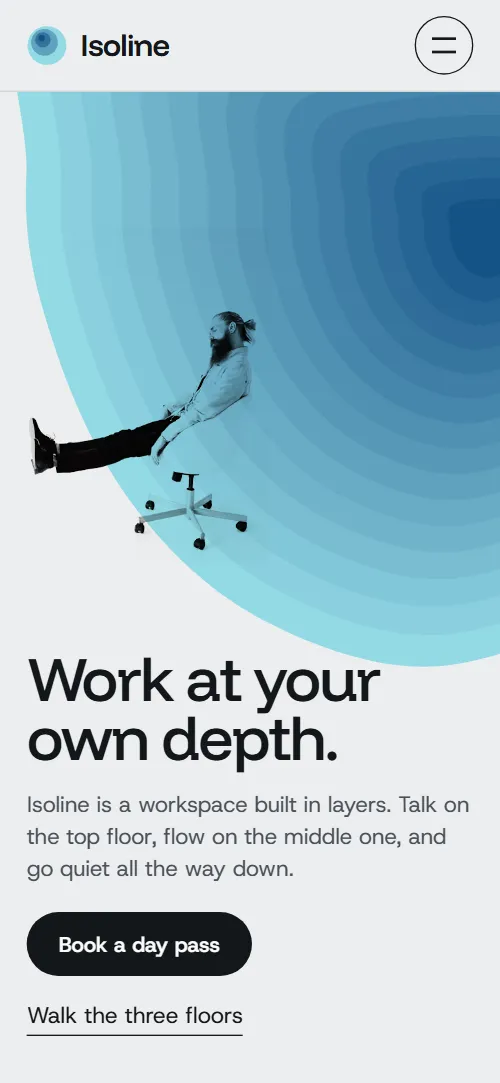
Coworking website template: a one-page site for a coworking space whose floors differ by noise, with a weekday schedule, house rules, member profiles, three priced plans and a tour request form. Nested colour bands, like contour lines, mark each level in orange, blue and violet. Its scroll motion runs on CSS with no libraries, in one file of about 53 KB gzipped that Claude Code, Cursor or Codex can adapt.
At a glance, November 2026. One 188 KB index.html with its CSS and JavaScript inside, 12 sections, 13 Unsplash photos credited in CREDITS.md, Funnel Display and Host Grotesk from Google Fonts, no JavaScript libraries: CSS scroll-driven animations and a small inline motion script with built-in smooth wheel scrolling, no script loaded from a CDN.
A coworking site has to explain a building before it sells a desk, and this one does it level by level: the sound rule of each floor, a weekday timetable, the rooms, the members, upcoming events and the price of every plan. It suits a coworking space, a shared office or a members' workspace that sells day passes and monthly memberships. Among coworking websites it sits at the quiet end, where the pitch is concentration, so study spaces, libraries with desks and writers' studios can use it too.
As a coworking website template for Claude Code, Cursor or Codex it suits vibe coding that starts with questions: the agent needs the address, phone and hours, what each plan costs and in which currency, and how many seats, carrels or booths exist. It must invent none of it. The demo shows euro prices beside a Leeds address, so settle on one currency. Rename the brand in any letter case, set the footer wordmark's --len to the new name's length and rewrite the three level rules. Keep the ids, the data-8b-section and data-8b-motion attributes and the classes AGENTS.md lists. A redrawn colour field keeps m-well__band on each band group.
Choose it when you sell how each floor sounds: a roof for calls, a long room for low voices, sealed booths for silence. This is the light build, with the same look and scroll behaviour, no animation library and no script from a CDN: about 53 KB of code gzipped in one file, against 98 KB and four extra requests for the GSAP version. For a programme-led club, the members' club template is closer. Booking is thin: as a coworking space website template it offers a tour request form and buttons you point elsewhere, with no availability calendar, checkout or member login.
Good for:
Turn the coworking website template into your site with an AI agent
With an AI coding agent
Files (PowerShell: curl.exe):
curl -LO https://raw.githubusercontent.com/8bsite/coworking-website-template/main/index.html
curl -LO https://raw.githubusercontent.com/8bsite/coworking-website-template/main/AGENTS.md
curl -LO https://raw.githubusercontent.com/8bsite/coworking-website-template/main/LICENSE
curl -LO https://raw.githubusercontent.com/8bsite/coworking-website-template/main/CREDITS.mdPrompt for the agent:
Read AGENTS.md, then edit index.html. Make it the site for <my workspace: name, city and address, the levels with the sound rule of each, opening hours, day pass and membership prices with currency, weekly events, how people book a tour>. Replace first the brand name, the level names, the four rooms and the plan prices. Motion is CSS scroll-driven animation plus the inline motion kit: keep the gate script in the head, the section ids, the data-8b-section, data-8b-motion, data-8b-split and data-8b-items attributes, m-well__band on every band group; set the footer wordmark's --len to its length; add no animation library. Never invent prices, hours or contacts; ask me.In a terminal
npx degit 8bsite/coworking-website-template my-siteGSAP build
Prefer GSAP? The same design built with GSAP, ScrollTrigger and Lenis smooth scroll, loaded from jsDelivr, is in the repository as index.gsap.html: 98 KB of code to download gzipped against 53 KB for this one, and the scroll motion also plays in Firefox.
curl -LO https://raw.githubusercontent.com/8bsite/coworking-website-template/main/index.gsap.htmlCoworking website design prompt for any AI tool
Use this to build a coworking site from scratch in Claude Code, Codex, Cursor, Lovable, v0 or Bolt, or to brief a designer. It is this template's design as decisions, also saved as a DESIGN.md with its colours; with the template itself, the short prompt is enough.
Build a one-page website for a coworking space whose floors differ by noise, for freelancers and small teams. Sections in order: opening, three depths of sound, a weekday schedule, rooms, house rules, members, evening events, finished work, three priced plans, a visit section with a tour request form, footer. Type: Funnel Display for headings, times and prices, medium weight, tight, sentence case; Host Grotesk for body, labels and buttons. Colours: #eceeef page, #14171b text and buttons, #155386 deep blue, #e2580e orange, #8b3887 plum, #fbfcfc for prints and plans. Draw big colour fields as nested stepped bands, pale at the rim and dark at the core, one colour family per field. No smooth gradients, no purple glow, no three icon cards, no centred hero with two buttons. One motion idea: the deeper a band, the further it moves on scroll. Build it with CSS scroll-driven animations and a little inline script, no animation library; without support or with reduced motion, show the finished static layout. Copy is short and concrete. Ask me for the address, hours, plan prices with currency and how people book; never invent them, and list every placeholder. One primary action, Book a day pass, repeated in the bar, the plans and the visit section. On phones the nav becomes a menu, tap targets are at least 44 px. Check: no console errors, works at 390 px, visible keyboard focus.Coworking website design and motion
Palette
#eceeef page background#14171b text, buttons, print clips, footer#4a5059 secondary text#fbfcfc members and plans grounds, prints, badges#d3d6d9 grey gradient ground behind the three hanging posters#155386 deep blue Flow fields, second hero screen, event rows#93d9e4 aqua rim of blue fields, hover rings#e2580e orange core of Shallow fields#f6d88c pale yellow rim of orange fields#8b3887 plum core of Deep fields, fading to lilac#cdbef2 lilac rim of Deep fieldsFonts
- Funnel Display: headings, times, prices: large, medium weight, tight
- Host Grotesk: body, labels, buttons, badges
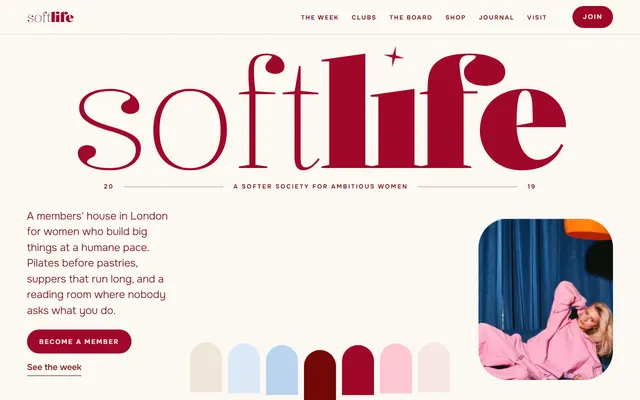
Colour fields of nested stepped bands, pale at the rim and dark at the core, carry the page, with cut-out figures on their edges. Photos hang as prints from two black clips on thin wires, and rooms step further right as they go down.
Small details follow the contour idea. Hovering a button opens three stepped rings in aqua, blue and aqua, and link underlines thicken from a hairline. On load the first field unfolds, then breathes on a six second loop that pauses while it is off screen. Person photos on light grounds are blended into the fields with multiply, so a face that overlaps a field's middle takes its tint.
Every value of this coworking website design, with the type scale, spacing and the motion rules, is in its DESIGN.md file (Google's format), ready for a coding agent or Stitch.
What is on the coworking website page
- NavigationTop bar: wordmark, section links, Book a day button; phone menu overlay
- Work at your own depth.Two screens: headline over a huge colour field with a figure on its edge, then a statement and three anchors on the field's colour
Mouse wheel scrolling is smoothed page-wide. On load the bands unfold and then breathe on a loop; tied to scroll, they swell around the core until deep blue fills the screen, the figure shrinking into the field.
- Three depths. Pick one each morning.Three hanging posters, one per zone or level, each with its own colour field, photo and caption (demo: the three floors)
Section headings rise line by line throughout. Tied to scroll, the three posters lower on their wires and swing as their bands appear.
- The building has a day of its own.Daily schedule beside a sticky colour dial (demo: a weekday from 7:30 to 21:00)
As you read the schedule, the sticky dial's bands shift by depth and turn orange, blue, violet, then orange; other rows dim.
- Rooms, in order of descent.List of rooms indented by level, each with a small hanging photo
Each small print swings on its clips and settles with an elastic bounce as it scrolls into view.
- Three rules, posted at the stairs.Three short house rules inside a V-shaped cross-section of bands
Tied to scroll, nine coloured bands start joined in the middle and slide apart to the edges, upper rows first, leaving a V-shaped gap around the rules.
- Who works down here.Four members with photo, name, job and a quote, each under a small colour field
Each member's small colour field ripples open from its core outward as the portrait scrolls into view.
- Surfacing, on Thursday evenings.List of upcoming events with date, time, title, speaker, place and a Save a seat link (demo: Thursday talks)
Each event row shifts from plum to blue to aqua as it crosses the screen, its date drifting up against it.
- Finished at depth.Table of works members finished, each with a small stepped colour swatch
The three-bar swatch in each row of finished works steps up bar by bar as it scrolls into view.
- How deep a membership goes.Three pricing plans as colour fields whose band count shows how much each includes
Each plan's field fills in band by band as you scroll; the deeper plans gather more bands.
- Come down for a day.Contact: address, hours, phone, email, a drawn contour map and a tour request form (placeholders)
The contour lines of the drawn map ripple in one after another as the map scrolls into view.
- FooterTagline with address, links, wordmark, copyright and the Design: 8B credit, hours line
Before you publish the coworking website site
- Replace social preview image, favicon, phone number, email address and contact form (sends nothing yet) and the invented demo facts (prices, dates, addresses). AGENTS.md lists them.
- Book a day (nav) and Book a day pass (opening) lead to
#plansnow; point them to your booking or day-pass URL (or keep #plans). - Plan buttons (Book a day, Become a member, Ask about a carrel) lead to
#visitnow; point them to the booking, checkout or membership sign-up URL of each plan. - Save a seat on each evening talk lead to
#visitnow; point them to the RSVP or ticket URL of each event. - The map in visit is a drawing, not a real map: add a link to your map service if visitors need directions.
- Faces that overlap the middle of a colour field take its tint (photos are printed with multiply).
Questions about this coworking website template
Where can I find coworking space website templates free of charge?
This one is free. MIT covers the code, including client work, while the 13 demo photos keep the Unsplash License and both fonts the Open Font License; CREDITS.md has the details. Everything sits in one HTML file, a coworking site on a single page, with no build step, so a ZIP download from GitHub is enough to start. Swap the photos for your own before launch.
Does the tour request form send anything?
No. As shipped, it checks that the name is filled and the email looks like an address, shows a thank-you line, clears the fields and sends nothing. Wire it to Formspree or, on Netlify, to Netlify Forms; with no form service, remove the form and its script and keep the email link. The thank-you line promises a reply within a day, so match it to your real response time.
Can this coworking website template take payments or bookings?
No. There is no checkout, availability calendar or member login. The Book a day button in the bar and the Book a day pass button on the first screen link to the plans section, while the three plan buttons and the Save a seat links go to the visit section. Point each at your booking tool or checkout address.
Is there a coworking website design prompt I can paste into an AI tool?
Yes, a full one sits below on this page. Paste it into Lovable, v0 or Bolt to build from scratch, or into Claude Code, Codex or Cursor; Base44 can take the demo address as a starting point. To start from this file instead, put index.html and AGENTS.md in a new folder, open it in the agent and paste the short prompt. Pass the files, not a link.
What must stay in place when an agent edits the file?
What the CSS and the inline motion kit look up: the gate script in the head, the section ids, the data-8b-section, data-8b-motion, data-8b-split and data-8b-items attributes, and the classes AGENTS.md lists, including m-well__band on every band group. Set the footer wordmark's --len to its character count. Keep the header comment and the 8B meta tag in the head.
Will it suit a quiet study space or a writers' room on a single floor?
Yes, with edits. The three levels are plain text and three colour pairs, so they can become zones in one room, such as a hot desk area, a quiet corner and booths. The day schedule can have more or fewer rows than the demo's seven. The grid is built for three posters, three plans and four rooms, so rewrite those in place.
What happens in browsers without scroll-driven animations, or with reduced motion on?
In browsers without CSS scroll-driven animations, Firefox today, and with reduced motion on, the page shows its finished static layout with ordinary scrolling and no smoothed wheel. In Firefox the first field still unfolds on load and breathes. Button rings, underlines and the bar that slides away on scroll work everywhere; with JavaScript off, the phone menu opens nothing.
Does this version need GSAP, Lenis or any other library?
No. The scroll scenes are CSS scroll-driven animations, and a short inline script measures the fields, splits headings into lines and smooths the mouse wheel. Nothing changes for the visitor, and the page loads about half the code: 53 KB gzipped in one file against 98 KB, with four fewer requests. Claude Code reads the rules for the motion attributes from AGENTS.md.