Free dance studio website template
Edit it by hand: it is one index.html with no build step, so you can open it in any text editor, change the words and photos, and upload it to any static host. Not a coder? Describe your business in one sentence to 8B's AI website builder and it designs a new site for you, with more pages when you need them. Designing is free; publishing with hosting is $9 a month, billed yearly. It also works inside Claude and ChatGPT.
MIT license · Made by 8B, an AI website builder · Plain text: twirl.md, data: twirl.json
About this dance studio website template
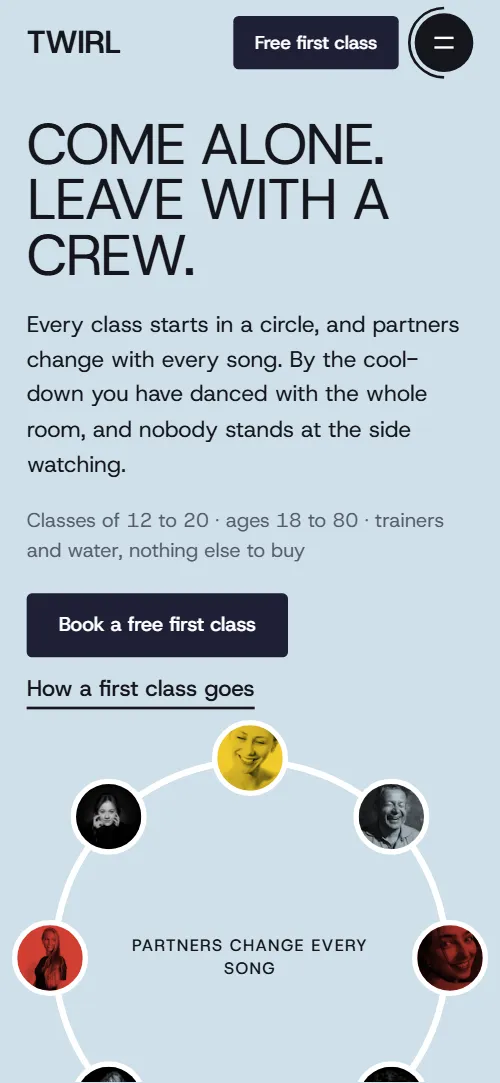
This dance studio website template is one free HTML file for a school that runs weekly classes. It has six styles, a drawn path through a first class, a seven-day timetable, five teachers, four passes and a booking form, in bold grotesque type with hand-drawn red loops. An AI agent can adapt it.
At a glance, October 2026. One 105 KB index.html with its CSS and JavaScript inside, 12 sections, 26 Unsplash photos credited in CREDITS.md, Host Grotesk from Google Fonts, GSAP 3.13.0 (ScrollTrigger, MotionPath); Lenis 1.3.27 smooth scroll loaded from jsDelivr.
Websites for dance studios work when a stranger can find a beginners' night in one scroll, and this page puts the timetable in the middle, with a level and a teacher on every card. The same structure suits a dance class website template for a yoga, Pilates, music or art school: the styles become subjects, the passes stay, and the free first class becomes a trial lesson.
If you vibe code the site, treat this as a dance studio website template for Claude Code and Cursor: hand the agent index.html and AGENTS.md. Replace the thirteen timetable cards, the five teachers and the four passes first. The opening ring is built for eight portraits and the styles line-up for six photos, so keep those counts. Ask the owner for real times, prices, bios and the show date, and never invent them.
Choose this base for a class business with a free trial, a weekly grid and a ticketed show. Take a gym or training club template when coaches and memberships matter more than a free trial and a show. The honest weak spot is the pinned showcase, which holds the screen while its photo row slides sideways and can feel long on a short laptop.
Good for:
Turn the dance studio website template into your site with an AI agent
With an AI coding agent
Files (PowerShell: curl.exe):
curl -LO https://raw.githubusercontent.com/8bsite/dance-studio-website-template/main/index.html
curl -LO https://raw.githubusercontent.com/8bsite/dance-studio-website-template/main/AGENTS.md
curl -LO https://raw.githubusercontent.com/8bsite/dance-studio-website-template/main/LICENSE
curl -LO https://raw.githubusercontent.com/8bsite/dance-studio-website-template/main/CREDITS.mdPrompt for the agent:
Read AGENTS.md, then edit index.html. Make this the site for <my studio: name, city, styles with beginner and improver times, the weekly timetable with teachers, teacher bios, passes and prices, trial offer, show date if any, address, hours, phone, email, how to book>. Replace the six styles, the timetable cards, the five teachers, the four passes and the contact details first. Keep the ids, the data-8b-section, data-8b-motion and data-8b-part attributes and the class names AGENTS.md lists. Ask me for any missing fact; never invent prices, times, bios or contacts.In a terminal
npx degit 8bsite/dance-studio-website-template my-siteDance studio website design prompt for any AI tool
Use this to build a dance studio site from scratch in Claude Code, Codex, Cursor, Lovable, v0 or Bolt, or to brief a designer. It writes this template's design as decisions, like prompts written for other studios. With the template itself, the short prompt above is enough.
Build a one-page website for a dance studio that teaches adult beginners. Use one index.html with GSAP, ScrollTrigger and Lenis from a CDN. Sections in order: header, opening, styles, first class, timetable, teachers, showcase, quotes, passes, questions, booking, footer. Type: Host Grotesk only, weights 400 to 700; huge uppercase headings at weight 400 with tight tracking, bold names, small wide-tracked uppercase labels. Colours: #f4f5f7 page, #15161c text and dark sections, #cfe0ea pale blue, #d03e33 red, #f7d02c yellow, #19437f deep blue. Use red and yellow as flat shapes and card fills, never as text on white. Layout: no shadows, no gradients, no icon cards, no centred hero with two buttons. Crop photos into circles and arches on coloured blocks, circle one phrase per section with a hand-drawn SVG loop, and show the week as seven columns of coloured cards with level and teacher. Motion idea: things moving on a dance floor. A dot walks a drawn path through the steps of a first class, portraits spread from a fan onto a ring, passes fan out of a stack. Switch all of it off under prefers-reduced-motion. Copy: short, concrete. Ask me for class times, teachers, prices, address, hours and the trial offer; never invent them, and list each placeholder. One primary action, book a free first class, repeated in the header and the booking form. Mobile: collapse the header to a menu button under 900 px, keep tap targets at least 44 px. Done when there are no console errors, no sideways scroll at 390 px and keyboard focus is visible.Dance studio website design and motion
Palette
#f4f5f7 page background, the solid header bar once scrolled, and the step numbers in the first-class path that the red dot has not reached#15161c text, rules, form border, icon buttons, and the black showcase and footer backgrounds#cfe0ea pale blue: the first-screen band, the full-screen menu, the styles circle, some timetable cards, the discs behind the quotes and the booking heading, and the fill on button hover#d03e33 red: hand-drawn loops, the walking dot and step numbers, four timetable cards, two teacher blocks and the Ten classes pass#f7d02c yellow: plus shapes, the showcase bars, the thank-you line, two timetable cards, the First class pass and the fill on white button hover#19437f deep blue: three timetable cards including the Friday open class, the showcase info card, one teacher block and the Unlimited pass#1e1f36 ink navy: the background of the main buttons#ffffff the timetable and pricing sections, white cards and form, photo borders in the ring, and text on dark#575c6b grey for lead paragraphs, small notes and the footer ruleFonts
- Host Grotesk: the only typeface, one variable file from weight 400 to 700: huge uppercase headings at weight 400 with tight tracking, bold names and step titles, prices at weight 400 like the headings, small uppercase labels at weight 500 with wide tracking, and the giant footer wordmark at weight 700
Content sits on a 1440 px wrap, and most section headings are indented about 18 percent of the screen width from the left. Section headings are huge uppercase lines. Photos are cut into circles, half circles and squares on coloured blocks. Hand-drawn loops circle key words, and plus shapes and discs repeat from section to section.
Dance studio website design relies on contrast: dark showcase and footer sections break up the light ones, and pale blue, red and yellow shapes sit behind photos. Buttons fill with a circle on hover, header links draw an underline, and the pinned showcase slides its photo row sideways.
Every value of this dance studio website design, with the type scale, spacing and the motion rules, is in its DESIGN.md file (Google's format), ready for a coding agent or Stitch.
What is on the dance studio website page
- NavigationFixed top bar: wordmark, four section links, Timetable link, Free first class button, menu button; full-screen menu overlay
The bar turns solid after a few pixels, slides away when you scroll down and returns when you scroll up, and the menu opens as a full-screen overlay.
- Come alone. Leave with a crew.First screen: the heading "Come alone. Leave with a crew.", two paragraphs, two buttons and a ring of eight student portraits with a note
On load the text slides up in turn, a ring line draws itself and the eight portraits spread from a tight fan onto the circle.
- Six styles, one floorSix dance styles as a list beside a line-up of six photos; each photo steps forward as its name crosses the middle of the screen
Scrubbed: as each style name crosses the middle of the screen, its photo steps into the centre of the line-up and back while a red loop draws around the name and is erased.
- Your first class, step by stepA first class in four steps along a hand-drawn path with a red dot walking it, and a class photo
Scrubbed: a hand-drawn path draws itself while a red dot walks it and each step number fills in when the dot arrives; on phones a straight line runs beside the steps.
- This week on the floorThe week as seven day columns, each with one or two classes (time, style, level, teacher), and a closing line
The seven day columns step in once, one beat at a time, and a yellow plus shape turns with the scroll.
- The people who count you inFive teachers as photo cards on coloured blocks, each with a name, a style and a short story
Scrubbed: as each card rises, the coloured block behind its photo makes a full turn and the photo lifts into place.
- On stage in JuneThe twice-a-year show: a sideways row of six stage photos and a card with date, place and tickets
Pinned: the section holds while the photo row slides sideways, the photos bob in alternate beats and the bars on the ticket card pulse.
- Heard after classThree student quotes with a name and how long they have danced
A red loop draws once around a phrase in each quote, and a large pale blue disc and a yellow plus turn with the scroll.
- Pick a passFour passes as cards: First class (free), Drop-in, Ten classes, Unlimited
Scrubbed: the four passes start fanned on the first card and spread into their row; a loop draws once around the word Free.
- Asked before the first classSix questions and answers in native <details> elements beside a heading with a hand-drawn loop
The six questions step in one after another, a loop circles the heading words, and a yellow plus turns with the scroll on wide screens.
- See you on the floorBooking: heading, studio address, hours, phone and email beside a form for the free first class
Scrubbed: a pale disc rolls in from the right edge while a yellow plus spins down beside the heading.
- StudioFooter: four columns (Studio, Open, Explore, Say hello), a huge wordmark and the copyright line with the Design: 8B credit
The four footer columns step in once, one beat at a time.
Before you publish the dance studio website site
- Replace social preview image, favicon, phone number, email address and contact form (sends nothing yet) and the invented demo facts (prices, dates, addresses). AGENTS.md lists them.
- Free first class button in the top bar, Book a free first class in the phone menu and on the first screen, Book your free first class in the first-class section, Book it on the First class pass, Book a class buttons in the timetable and on the Drop-in pass, Buy ten, Go unlimited lead to
#contact (the booking form)now; point them to your booking, shop or checkout pages, or keep #contact once the form is connected. - Ask for tickets button in the showcase lead to
#contactnow; point them to your ticket page for the show. - Timetable link in the top bar lead to
#timetablenow; point them to keep, or your online timetable and booking system. - How a first class goes link on the first screen lead to
#first-classnow; point them to keep as is. - Phone and email links in the contact section and the footer lead to
tel:+441130000000 and mailto:hello@twirl.examplenow; point them to your studio phone and email. - The showcase pins the screen while its row slides sideways, which can feel long on short laptop screens.
- On phones the first-class path is replaced by a straight line and the styles line-up shrinks into a sticky strip above the list, so check the layout at 375 px after you change the copy.
Questions about this dance studio website template
Is this a free dance studio website template I can use for a client?
Yes. It is one index.html under the MIT license, so a freelancer can ship it for a studio at no cost. GSAP, ScrollTrigger, MotionPath and Lenis load from jsDelivr, there is no build step, and CREDITS.md lists the Unsplash photos and the font.
How many sections and classes does it have?
It has twelve sections: header, opening, styles, first class, timetable, teachers, showcase, quotes, passes, questions, booking and footer. The timetable holds thirteen cards, twelve classes and a Friday open class, plus five teachers and four passes.
How do I give the template to an AI agent?
Put index.html and AGENTS.md in a folder and tell Claude Code, Cursor or Codex to read AGENTS.md first; it lists the facts to ask the studio for and the selectors to keep. Without the file, paste the dance studio website design prompt below into any AI tool. Base44 can also rebuild the look from the demo.
What must I keep when I replace the demo content?
Keep the ids and the data-8b-section, data-8b-motion and data-8b-part attributes, plus the classes AGENTS.md lists for each animated section. The opening ring needs eight portraits, and the styles line-up and styles list match one to one. Update the --len value when you rename the studio.
Does the booking form send anything?
No. With JavaScript the form checks the name and the email, then shows a thank-you line, and sends nothing. Without JavaScript it posts to the page itself, which a static host rejects. Connect it to Formspree or Netlify Forms, or point the buttons at your own booking or checkout page, as AGENTS.md describes.
Can I get a site like this without editing code?
Not this exact file, but 8B's AI website builder makes a new site from a sentence. You describe the studio and its engine designs the site, and designing and restyling are free. Hosting, SSL, full HTML export and AI edits in chat are on Pro at $9 a month billed yearly. It also runs inside Claude and ChatGPT.