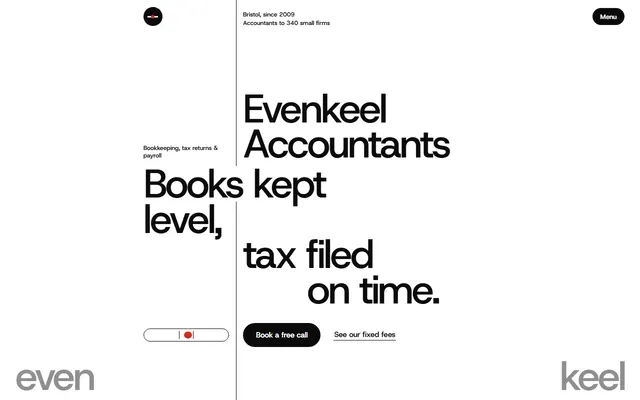
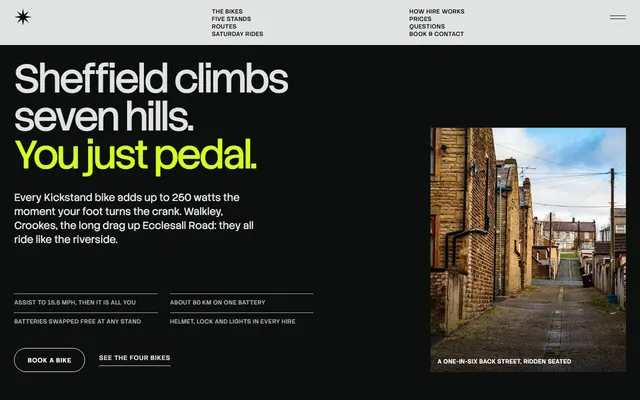
Free accountant website template
Edit it by hand: it is one index.html with no build step, so you can open it in any text editor, change the words and photos, and upload it to any static host. Not a coder? Describe your business in one sentence to 8B's AI website builder and it designs a new site for you, with more pages when you need them. Designing is free; publishing with hosting is $9 a month, billed yearly. It also works inside Claude and ChatGPT.
MIT license · Made by 8B, an AI website builder · Plain text: tallyhouse.md, data: tallyhouse.json
About this accountant website template
Accountant website template: a one-page site for a practice that does bookkeeping, tax returns and payroll for small businesses, built from flat blocks of orange, lavender, sage and black with giant tight type. It has a sample monthly report, a twelve-month tax calendar, three fixed monthly plans and a booking form. Its scroll motion runs on CSS with no JavaScript libraries, in one file with an AGENTS.md for your AI agent.
At a glance, November 2026. One 122 KB index.html with its CSS and JavaScript inside, 12 sections, 19 Unsplash photos credited in CREDITS.md, Google Sans from Google Fonts, no JavaScript libraries: CSS scroll-driven animations and a small inline motion script with built-in smooth wheel scrolling, no script loaded from a CDN.
Websites for bookkeepers often stop at a list of services. This one puts the routine on the page: a sample one-page report with profit, cash and tax to set aside, a tax-year calendar of twelve months, and three plans with monthly prices. As an accountant website template for Claude Code it is one file with an AGENTS.md. A tax adviser, a payroll bureau or any practice that sells a fixed monthly service can keep the structure and change the words. If you are looking through bookkeeping website templates for one that shows what a month of service looks like, start with the sample report.
Accountants web design turns on facts only the owner holds, so an agent in a vibe coding session with Claude Code, Cursor or Codex works in a fixed order. First the money: the three plan prices, whose block heights come from a data value in each price, and the twelve cash bars, which read theirs too. Then the 24 tax-year chips, which follow UK dates. Set the footer wordmark's --len to the new name's character count. The motion is CSS scroll-driven animation scoped to a data-8b-live flag plus a short inline kit, so new effects go in as CSS, never as a library. The agent asks for fees, deadlines, qualifications and client permission rather than inventing them.
Among website templates for accountants, pick this one when your accountant website has to show how a month with you works: a report, deadlines, switching steps and fixed fees. This is the light build, with the same look and the same scroll behaviour and no script from a CDN: about 30 KB of code gzipped in one file, where the GSAP version needs about 75 KB and three more requests. For a stricter look, the black-on-white accountants template is closer. The weak spot is the demo's content: pounds, VAT, HMRC letters and Making Tax Digital run through it, so a firm abroad has real rewriting to do.
Good for:
Turn the accountant website template into your site with an AI agent
With an AI coding agent
Files (PowerShell: curl.exe):
curl -LO https://raw.githubusercontent.com/8bsite/accountant-website-template/main/index.html
curl -LO https://raw.githubusercontent.com/8bsite/accountant-website-template/main/AGENTS.md
curl -LO https://raw.githubusercontent.com/8bsite/accountant-website-template/main/LICENSE
curl -LO https://raw.githubusercontent.com/8bsite/accountant-website-template/main/CREDITS.mdPrompt for the agent:
Read AGENTS.md, then edit index.html. Turn it into the site for <my practice: name, town and office address, which of bookkeeping, tax returns and payroll I sell, my monthly plans with prices and what each includes, the day my report goes out, my country's tax year deadlines, my team and their qualifications, opening hours>. Replace prices, report figures and deadline chips first, with the data value inside every price and bar. Motion is CSS scroll-driven animation plus the inline kit: keep the gate script, section ids, data-8b attributes and the classes AGENTS.md lists; add no animation library. Never invent prices, dates, titles, licences, quotes, addresses or contacts; ask me.In a terminal
npx degit 8bsite/accountant-website-template my-siteGSAP build
Prefer GSAP? The same design built with GSAP, ScrollTrigger and Lenis smooth scroll, loaded from jsDelivr, is in the repository as index.gsap.html: 75 KB of code to download gzipped against 30 KB for this one, and the scroll motion also plays in Firefox.
curl -LO https://raw.githubusercontent.com/8bsite/accountant-website-template/main/index.gsap.htmlAccountant website design prompt for any AI tool
Use this prompt to build a bookkeeping, tax and payroll practice site from scratch in Claude Code, Codex, Cursor, Lovable, v0 or Bolt, or to brief a designer. It writes this template's design as decisions, which avoid AI-built sameness; with the template itself, the short prompt above is enough.
Build a one-page website for an accountancy practice doing bookkeeping, tax returns and payroll for sole traders and small businesses. Sections in order: opening, sample monthly report, services, switching steps, tax-year calendar, client stories, the accountants, questions, fixed monthly fees, contact and booking form, footer. Type: Google Sans only, huge medium-weight headings with tight tracking, bold wordmark. Colours: #ffffff page, #0b0b0b text and black sections, #fe7141 orange slabs and buttons, #cdabfe lavender report section, #d1ddd3 sage questions section, #595959 secondary text. Layout: a twelve-column grid of hairline rules and flat colour that reads like an annual report; services as full-width colour slabs; fee blocks whose heights follow the prices; greyscale photos tinted orange, lavender or sage; highlighter marks on key words. Do not use a purple gradient, three icon cards or a centred hero with two buttons. Motion: one idea, flat blocks and highlights that sweep and settle on scroll, with the tax-year track held while it slides; build it with CSS scroll-driven animations and a little inline script, no animation library; without support or with reduced motion, show the finished static layout. Copy: short and concrete. Ask me for plan prices, deadlines for my country, qualifications, regulated titles, office address, opening hours and client quotes with permission; never invent them, and leave a clearly marked placeholder for anything missing. One primary action, Book a free call, repeated in the nav and after the fees. Check at 390 px width, tap targets of at least 44 px, visible keyboard focus, no console errors,, and a list of every placeholder.Accountant website design and motion
Palette
#ffffff page background#0b0b0b text, cover, tax year, footer#fe7141 orange slab, highlights, buttons#cdabfe lavender report section, slab#d1ddd3 sage questions section, slab#595959 secondary text#a8a8a8 muted text on blackFonts
- Google Sans: all text: huge, tightly tracked medium headings; bold wordmark and year
A twelve-column grid of hairline rules and flat colour that reads like an annual report. Headings are huge and tightly set, with highlighter marks on key words. Photos are greyscale, multiplied into orange, lavender or sage tints. Services are full-width colour slabs, and fees are blocks whose heights follow their prices.
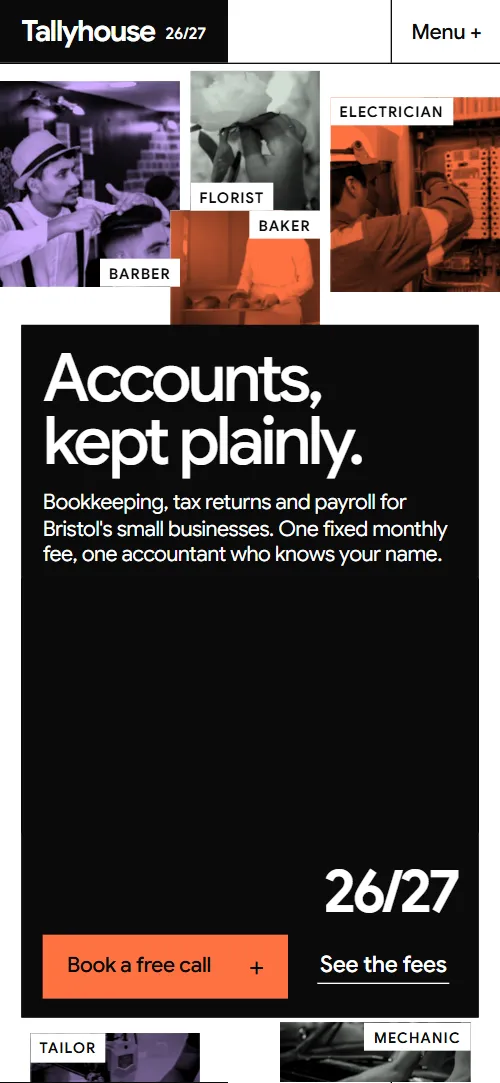
For accountants website design the surprise is the first screen: a black cover over a collage of eight tinted photo tiles, six on a phone, each with a small caption. The main buttons fill from the centre on hover, links gain a lavender highlight, and the navigation bar slides away as you scroll down. Flat colour blocks and huge tight type put it among the raw-grid, heavy-type designs here.
Every value of this accountant website design, with the type scale, spacing and the motion rules, is in its DESIGN.md file (Google's format), ready for a coding agent or Stitch.
What is on the accountant website page
- NavigationTop bar: wordmark with the year, section links, Book a free call button; phone menu overlay
- Accounts, kept plainly.First screen: a black cover square with headline and two buttons over a collage of eight tinted photos with captions (demo: the trades of the clients), then a black statement screen
Smooth wheel scrolling on desktop; rules draw in and highlights sweep over key words. On the held first screen the black cover spreads as eight photo tiles fly outward.
- Your month, on one page.Sample one-page report beside four numbered notes (demo: a bakery's September)
Reading the four notes fills each note's number box black and moves a sage band to the matching part of the sample report.
- Three jobs, done every month whether you remember or not.Three full-width colour slabs, one per service, each with a big name, included list, button and a tinted photo
On large screens the colour slabs stack as you scroll, each pushing the last back while its photo resolves from coarse dots.
- Switching takes one phone call.How to switch: a large photo, a heading with a highlight and three numbered steps
In view, the photo opens upward from a slight zoom and the heading's last words get an orange highlight.
- The tax year, handled before it's due.Pinned horizontal track of twelve months with colour-coded deadline chips (demo: UK tax year April to March)
Pinned, the twelve months slide past a fixed orange line, and each deadline chip fills with colour as it crosses.
- Three kinds of year, kept.Three client quotes as split blocks: dark panel with portrait and name, colour panel with the quote
Each portrait opens upward from a slight zoom, and a white highlight sweeps over a phrase in every quote.
- Four accountants. You will know one of them well.Team of four: portraits, names and what each looks after
Tied to scroll, the four portraits start gathered and tilted towards the middle, then spread out into the grid.
- Questions people ask before they switch.Questions and answers on a sage ground (native <details>)
- Fixed monthly fees. The height of each block is its price.Three fixed monthly plans as colour blocks whose heights follow their prices
Tied to scroll, the three colour blocks rise from the baseline in turn, lifting their prices to their heights.
- Book a free twenty minutes.Office, phone, email and hours, plus a booking form in a black panel (placeholders)
- FooterBlack footer: address and contacts, links, a giant year and a width-filling wordmark, copyright and the Design: 8B credit
As the footer scrolls in, the full-width wordmark settles into place and the giant 26/27 slides to the right.
Before you publish the accountant website site
- Replace social preview image, favicon, phone number, email address and contact form (sends nothing yet) and the invented demo facts (prices, dates, addresses). AGENTS.md lists them.
- Book a free call buttons in the nav, the phone menu and the first screen lead to
#contactnow; point them to your booking page (Calendly, Cal.com) or keep them on the contact form. - Start as a sole trader / Start as a company / Start with your team in fees lead to
#contactnow; point them to your sign-up or onboarding URL for each plan. - Start the switch in switching lead to
#contactnow; point them to your onboarding form or booking page. - The tax-year track is pinned for about 2.7 screens of scroll on desktop and about 4 on phones, so that each of the twelve months gets its moment; cut months or chips to shorten it.
Questions about this accountant website template
Can I use it for a CPA firm in the US?
Yes, with a lot of editing. The structure carries over to CPA firm websites, but the calendar of UK deadlines, the pound-priced fee blocks and the lines on VAT and Making Tax Digital have to be replaced. Treat it as a CPA website template only after every date and rule has been checked against your own tax authority.
Can I use it for a firm of chartered accountants?
Yes, once the wording is checked. Chartered is a regulated title, and the demo uses it twice: the team paragraph says all four accountants are chartered, and the footer line says chartered accountants for small businesses. Keep both only if they are true for your firm, and rewrite them otherwise.
Can I use it as a bookkeeper website template without tax work?
Yes. Keep the bookkeeping slab, rewrite or delete the tax returns and payroll slabs, and trim the three checkboxes in the booking form to match. To drop the tax-year calendar too, remove its section the way AGENTS.md describes: markup, styles, scripts and the two links to #year.
How do I change the tax-year calendar?
Edit the chips. Each of the twelve months holds two, with a date and a line of text, coloured by a key of three kinds: returns and accounts, VAT and quarterly updates, payroll and pensions. Replace the dates for your country and recheck them yearly. The held track takes about three screens of scroll on a desktop and four on a phone, so cutting months shortens it.
Do the fee blocks follow the prices I type?
Only if the data value changes too. A short script reads the data value inside each price and sets every block height against the highest one, so the demo's £45, £125 and £210 give three different heights. Edit the visible price and its value together, and the blocks redraw.
Does the booking form send anything?
No. Submitting only runs the browser's check on the required name and email fields, then shows a thank-you line and disables the button; nothing is posted. Choose Formspree, Netlify Forms or no form service at all, as AGENTS.md lays out, and rewrite the promise of a callback within one working day.
How do I give it to Claude Code, Cursor or Codex, or use the accountant website design prompt?
Save index.html and AGENTS.md, with LICENSE and CREDITS.md, using the four curl commands in AGENTS.md, then paste the prompt shown on this page. The page is one file of about 30 KB gzipped with no script from a CDN, so the agent reads all of it. The accountant website design prompt works in Lovable, v0 or Bolt; Replit offers an Open in Replit button or a GitHub import.
Does it need GSAP, and what shows in Firefox or with reduced motion?
No library: CSS scroll-driven animations and a short inline script run the scenes, and visitors see no change. Without that CSS support, Firefox today, or with reduced motion on, the page shows its finished layout with ordinary scrolling: full cash bars and fee blocks, filled chips in a tax-year row you scroll sideways. Hover effects and the hiding navigation stay, and in Firefox the opening photos still open and pan.