Free print shop website template
Edit it by hand: it is one index.html with no build step, so you can open it in any text editor, change the words and photos, and upload it to any static host. Not a coder? Describe your business in one sentence to 8B's AI website builder and it designs a new site for you, with more pages when you need them. Designing is free; publishing with hosting is $9 a month, billed yearly. It also works inside Claude and ChatGPT.
MIT license · Made by 8B, an AI website builder · Plain text: shortrun.md, data: shortrun.json
About this print shop website template
Print shop website template: one free HTML file for a copy and print shop that takes walk-in and file-based jobs, with a counter queue, a paper table, a poster-size demo, a file checklist and a quote form. The look is a layout app in paper white, ink and five bright accents. AGENTS.md is included for Claude Code, Cursor or Codex.
At a glance, October 2026. One 100 KB index.html with its CSS and JavaScript inside, 12 sections, 19 Unsplash photos credited in CREDITS.md, Reddit Sans from Google Fonts, GSAP 3.13.0 (ScrollTrigger); Lenis 1.3.11 smooth scroll loaded from jsDelivr.
Most website templates for printing companies assume a catalogue and a sales team. This one assumes a counter: four job tabs for posters, flyers, zines and cards first, then copies, scans, laminating, binding and large format in a six-row queue. Among printing website templates it fits a copy shop, sign maker, zine press or photo lab. A print shop website design built on quotes and walk-in trade suits it better than online ordering.
Vibe coding goes fastest when the agent starts from the shop's real facts: what you print, the price per job, paper stocks, opening hours, the same-day cutoff, delivery terms and file rules. As a print shop website template for Claude Code, Cursor or Codex, it needs those replaced first, then the six counter rows, the paper table and the six recent jobs. Keep the section ids, the data-8b-section, data-8b-motion and data-8b-part attributes and the selectors AGENTS.md lists. The demo's prices, hours and jobs are invented.
Pick this as the base when the shop sells by quote and over the counter and wants a playful, colourful page. Among print shop website templates, a small press that sells prints online and wants a price calculator fits a template built around one better. The weak spots: the quote form only opens the visitor's mail app, and the pinned sections make the page long. Owners who do not code can use 8B's builder instead.
Good for:
Turn the print shop website template into your site with an AI agent
With an AI coding agent
Files (PowerShell: curl.exe):
curl -LO https://raw.githubusercontent.com/8bsite/print-shop-website-template/main/index.html
curl -LO https://raw.githubusercontent.com/8bsite/print-shop-website-template/main/AGENTS.md
curl -LO https://raw.githubusercontent.com/8bsite/print-shop-website-template/main/LICENSE
curl -LO https://raw.githubusercontent.com/8bsite/print-shop-website-template/main/CREDITS.mdPrompt for the agent:
Read AGENTS.md, then edit index.html. Make this the site for <my shop: name, town, address, what I print, job types with sizes, paper and turnaround, prices, hours, same-day cutoff, delivery terms>. Replace first the shop name, the Leicester address, the pound prices, the counter rows, the paper table, the recent jobs and the contacts. Keep the section ids, the tab, photo and panel names and the seven size items. Point the quote form at my form service. Ask for any missing fact; never invent prices, hours or contacts.In a terminal
npx degit 8bsite/print-shop-website-template my-sitePrint shop website design prompt for any AI tool
Use this prompt to build a print shop site from scratch in Claude Code, Codex, Cursor, Lovable, v0 or Bolt. It writes this template's design as decisions, as its DESIGN.md for agents does. The short prompt above is enough for the template itself.
Build a one-page website for a copy and print shop that takes walk-in and file-based jobs and sells by quote. Plain HTML, CSS and JavaScript, one file. Sections in order: header, first screen with four job tabs (posters, flyers, zines, cards), counter queue of six jobs, paper table, poster sizes A6 to A0, recent jobs, finishing, recycled stock, file checklist, FAQ, quote form, footer. Type: Reddit Sans only, weight 900 with tight tracking for headings, 700 for titles and buttons, 400 for body. Colours: #f7efe5 paper white page, #171513 ink for text and every 1.5px border, #ffc21f yellow for things you can press or drag, #ff6a3d coral, #8682f7 violet, #a9dcf6 pale blue and #bdf35f lime as one flat ground per section. Motion idea: editing, as in a layout app. Photos open from a crop, headings get a highlight sweep, badges stamp in; switch it all off under prefers-reduced-motion. Layout: square corners, 1.5px ink borders on every block, a yellow margin stripe, tables and rows that restack on phones. No purple gradients, no rounded cards, no soft shadows, no row of three icon cards, no centred hero with two buttons. Copy: short, concrete, with sizes and turnaround. Ask me for prices, paper stocks, hours, same-day cutoff and address; never invent them; mark every placeholder. One primary action, Get a quote, repeated in the header, finishing and the end of the page. Check 390px width, 48px tap targets, visible keyboard focus and no console errors, then list every placeholder.Print shop website design and motion
Palette
#f7efe5 page ground, the header bar, card and table surfaces, form fields, text on the ink sections#171513 text, every 1.5px border, the strip above the header, the finishing section and the footer#ffc21f yellow: buttons, icon buttons, the margin stripe, selection handles, the active tab, the size marker, the FAQ plus box, two heading highlights, the column heads in the footer#ff6a3d coral: the wordmark blocks in the header and footer, the jobs heading highlight, the bleed line on the sample sheet, link hover fill, one badge#8682f7 violet: the paper section ground, the safe-area line on the sample sheet, two counter icons, one weight badge#a9dcf6 pale blue: the file checklist section ground, the FAQ heading highlight, one counter icon, photo placeholders#bdf35f lime: the recycled section ground, the Ready and Collected badges, tab and FAQ row hover, one counter icon#57514a muted text: column heads, small notes, spec labels, FAQ answersFonts
- Reddit Sans: the only typeface, one variable file for weights 400 to 900: headings at 900 with tight tracking, titles and the main buttons at 700, labels and the small buttons at 600, body at 400
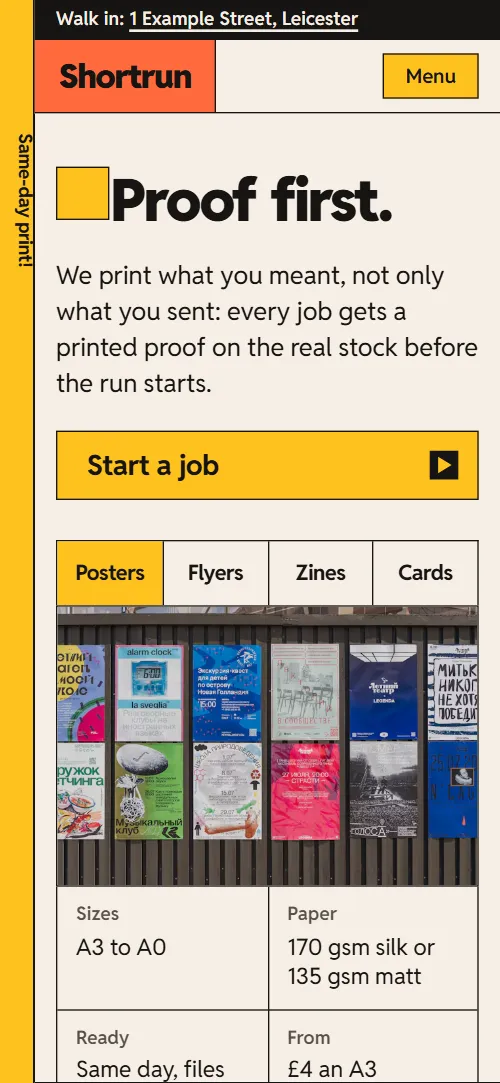
A 44px left margin carries a yellow stripe and an ink hairline, with a vertical Same-day print! label hanging in it under the header. Every block is a box with a 1.5px ink border and square corners: the queue, the paper table, the quote form, the FAQ list. Most sections are two-column splits, a heading and lead against a table, photo or form. Tables and rows restack on phones.
Each section sits on a flat field of its own: violet for paper, lime for recycled stock, pale blue for the file checklist, ink for finishing. Buttons grow four ink corner marks outward on hover, like crop marks. Heading highlights sweep across and lift off, and badges stamp in.
Every value of this print shop website design, with the type scale, spacing and the motion rules, is in its DESIGN.md file (Google's format), ready for a coding agent or Stitch.
What is on the print shop website page
- NavigationA vertical Same-day print! label, a strip with address and status, the wordmark, five square button links and a send-files icon
The header slides away on scroll down past 140px and returns on scroll up; on narrow screens a Menu button opens a full-screen link overlay.
- Proof first.First screen: the h1 Proof first. with a lead and button, and four job tabs that swap a photo and a spec list
On load the heading block rises in and a paper layer and three ink layers wipe off the proof photo in turn; the four tabs swap the photo and spec list on click or arrow keys.
- Walk in. Walk out with it.A print queue of six jobs whose bars fill in turn and whose Ready badges stamp down
Scrubbed as the queue crosses the screen: each row's bar fills in turn and its Ready badge stamps in.
- Pick your paper.Photo of coloured card edges beside a table of six paper stocks with weight badges
On arrival the photo opens from a crop, the heading gets a highlight sweep and the six weight badges stamp in.
- Big is our small size.A held stage where a poster wall is dragged out by selection handles from A6 to A0 while a marker steps along the size row
Pinned for about two screens of scrolling: the poster wall grows from a small sheet to full size through seven sizes, selection handles follow its corners and a yellow marker steps from A6 to A0.
- Off the press this week.Six recent jobs listed like dockets, each with a thumbnail, spec, time and a status stamp
The heading gets a highlight sweep, the thumbnails open from a crop and the status badges stamp in.
- Fold it, stitch it, bind it, trim it.Four finishing panels that unfold from a tight zig-zag into one flat strip
On wide screens the section is pinned for about one and a half screens while four panels unfold sideways from a zig-zag into a flat strip, alternate ones starting darker; on narrow screens they unfold vertically without pinning.
- Paper with a past.A pledge about recycled paper with three fact tiles and a photo
The heading gets a highlight sweep, the three tiles stamp in and the photo opens from a crop.
- Send it right, get it right.A four-point file checklist beside a sample sheet that gets its bleed, trim marks, safe area and colour bar as the checks tick
On wide screens the section is pinned for about a screen and a third: the four ticks draw one by one, each followed by the next mark on the sample sheet: bleed line, trim marks, safe area, colour bar; on narrow screens the list and the sheet scrub separately.
- Asked at the counter.Six questions and answers (native details)
The heading gets a highlight sweep; each question's plus box turns on opening.
- Come in, or send it over.A shop-front photo that is re-cropped by drag handles, address, hours, phone, email and a quote form
The shop-front photo starts cropped tight and zoomed, and its selection handles drag the crop out to the whole photo as the section scrolls in.
- VisitWordmark with a line about the shop, visit and talk columns, page links and a base line
Before you publish the print shop website site
- Replace social preview image, favicon, email address, phone number and contact form (sends nothing yet) and the invented demo facts (prices, dates, addresses). AGENTS.md lists them.
- Start a job button in the first screen, Quote buttons in the job panels and Quote a poster button lead to
#contact, the quote formnow; point them to your online ordering or quote page, or keep them on the form. - The address link in the top strip lead to
#contactnow; point them to a map URL of your shop, or keep the anchor. - Send files icon in the header lead to
#preflight, the file checklistnow; point them to your file upload page (a transfer or upload form), or keep the anchor. - The quote form lead to
a mailto form action that opens the visitor's mail app with the demo addressnow; point them to a form service (Formspree, Netlify Forms) or your own endpoint. - The quote form uses a mailto action: it opens the visitor's email program instead of sending anything, which does not work for visitors without one.
- The poster scene holds the page for about two screens of scrolling at every width (a 300svh section around a 100svh stage), and the finishing and preflight scenes for about one and a half screens each on wide screens, so the page feels long.
- GSAP, ScrollTrigger and Lenis load from jsDelivr at the end of the body; the scenes and effects need GSAP and ScrollTrigger, smooth scrolling needs Lenis, and without them the page shows in full but still.
- The header hides on scroll down and its hover transitions keep running with reduced motion; the load-in animations, scroll scenes, effects and smooth scrolling stop.
Questions about this print shop website template
Are these free print shop templates fine for a client's shop?
Yes. It is one index.html under the MIT license, so a freelancer can ship it for a print shop client at no cost, with every service on one scroll. GSAP, ScrollTrigger and Lenis load from jsDelivr, there is no build step, and the Unsplash photos are listed in CREDITS.md. The typeface, Reddit Sans, is under the Open Font License.
Does it work outside the UK?
Yes, after a text pass. The layout suits any shop, but the demo is a Leicester shop: prices in pounds, VAT, A-series paper sizes, a postcode and a UK phone number. Replace them, and relabel the size row if you print other formats, keeping seven items.
How do I give it to an AI agent?
Download the four files into a folder, open it in Claude Code, Cursor or Codex, and paste the prompt on this page with your shop's facts in the angle brackets. The agent reads AGENTS.md first. No file? Paste the print shop website design prompt below into Lovable, v0 or Bolt, or let Replit Agent take it from its card.
What must I keep when I edit it?
Keep every id and the data-8b-section, data-8b-motion and data-8b-part attributes, plus the selectors AGENTS.md lists for each animated section. Each tab must match its photo and panel by name, and the eight parts of each selection box and the seven size items stay, because the poster section steps through seven sizes. Remove data-8b-placeholder once the real value is in.
Does the quote form send anything?
No. It usually opens the visitor's email program with the entered text, addressed to the demo address, so it fails for visitors with no mail app. There is no file upload field. Point the form at Formspree or Netlify Forms, or at your own endpoint.
Can I get a site like this without editing code?
Yes. Describe the shop to 8B's AI website builder and its engine designs a new site, its own design and not this template. Designing and restyling are free; publishing with hosting and SSL, full HTML export and AI edits in chat are on Pro at $9 a month billed yearly. It also runs inside Claude and ChatGPT.