Free construction company website template
Repository: github.com/8bsite/construction-company-website-template · Live demo: 8bsite.github.io/construction-company-website-template/ · MIT license
About this template
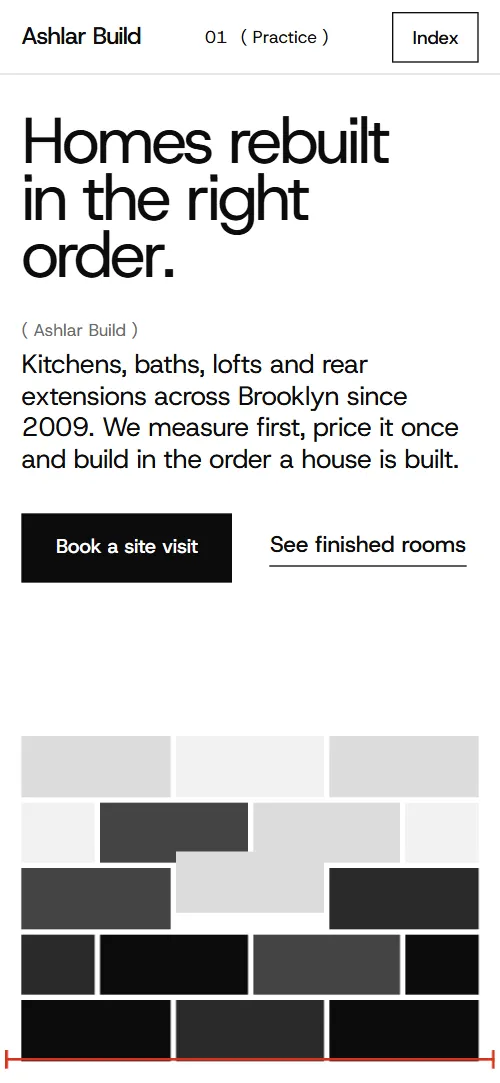
Ashlar Build is a construction company website template for a renovation and extension contractor: services with prices, a measured survey, finished rooms, crew, reviews and a site-visit form. The look is black, white and grey with red measuring marks. It suits a builder or design-and-build practice that wants its site to book site visits.
A one-page site for a Brooklyn builder that does kitchens, bathrooms, lofts, rear extensions and restoration, with services and prices, a survey, finished work, crew, reviews and a site-visit form. Strict black, white and grey with one red for measuring marks; a wall of grey blocks comes apart into the room photo, scattered photos settle into a contact sheet and the word "Fixed" condenses as you scroll.
Good for:
Free for personal and client work under the MIT license. In collections: one page website templates, github website templates, website templates with animation, parallax website templates.
How to use the construction company website template
With an AI coding agent
Download the files into your project (Windows PowerShell: curl.exe):
curl -LO https://raw.githubusercontent.com/8bsite/construction-company-website-template/main/index.html
curl -LO https://raw.githubusercontent.com/8bsite/construction-company-website-template/main/AGENTS.md
curl -LO https://raw.githubusercontent.com/8bsite/construction-company-website-template/main/LICENSE
curl -LO https://raw.githubusercontent.com/8bsite/construction-company-website-template/main/CREDITS.mdThen give the agent this prompt:
Read AGENTS.md, then edit index.html. Use this template as the base for a site for <your business: construction company, contractor or renovation firm; services, area, prices, team>. Keep the layout, the motion and the single-file format; replace the brand name, copy, photos (use your own projects and team), prices, links and contacts, and recolour it through the CSS variables if needed.Give the agent the file, not a link. AGENTS.md says what to keep and what to replace. Step by step: templates for Claude Code.
In a terminal
npx degit 8bsite/construction-company-website-template my-siteNo code
Download the ZIP, edit index.html and drag its folder onto Netlify Drop, or click Use this template and turn on GitHub Pages.
Construction company website design and motion
Palette
#ffffff white page background#0c0c0c black text, gallery and footer#f2f2f2 light grey panels and form sheet#dcdcdc pale grey hairlines and blocks#444444 dark grey blocks and button hover#2a2a2a charcoal cards and blocks#d4351c red dimension lines and link underlines#6b6b6b grey small labelsFonts
- Host Grotesk: headings and body: large regular weight, very tight letter spacing
- TikTok Sans: the huge word Fixed: condensed and as wide as the screen
A 12-column grid with hairline rules and square corners. Grey labels in brackets number every chapter, and the top bar shows the current one. Red dimension lines measure the survey photo and the form, grey blocks build a wall on the first screen, and the work stages are laid as wall courses.
Motion runs on scroll; the list of sections below says what moves in each.
What is on the page
- NavigationTop bar: wordmark, current chapter with previous/next arrows, Book a visit, Index overlay
- Homes rebuilt in the right order.First screen: headline, lead, two buttons and a wall of grey blocks; second screen: room photo with a statement panel and three facts
Smooth scrolling throughout; headings rise into place. On scroll the grey wall breaks apart block by block and the white page opens from its outline onto a room photo.
- Five kinds of job, one way of workingList of services with duration and starting price beside a sticky photo frame (demo: kitchens, bathrooms, lofts, extensions, restoration)
As each service reaches the middle, its photo wipes up over the last in the sticky frame, the crop changes and other rows dim.
- A fixed price, from a measured survey.How quoting works: a measured photo with red dimension lines and four numbered notes
As the survey photo scrolls into view it opens out from a rounded inset, and red width and height lines draw across it.
- Rooms we handed backBlack gallery: twelve project photos with room and neighbourhood captions
On wide screens the gallery pins while twelve scattered, tilted photos settle into a square contact sheet as you scroll.
- Five materials we keep coming back toFive material strips with a photo, name and use (demo: plaster, oak, marble, slate, steel)
Five material strips start folded into narrow grey bands at the right edge and fan out across the row as you scroll.
- Built in the order a house is builtFive work stages laid as blocks of a wall, each with a week range
On wide screens the section pins and the stage blocks fly in from alternate sides, building the wall from the bottom up.
- FixedGuarantees: one huge condensed word and three written promises
The word Fixed squeezes from wide to condensed as you scroll, with four copies sliding down into it.
- The people who quote are the people on siteTeam row: five portraits at varied heights with name and trade, Shuffle button
Portraits open out from rounded insets as they scroll into view; the Shuffle button reorders the crew on click.
- What people say after handoverFour client quotes on grey-to-black cards that stack as you scroll
Review cards stick and stack as you scroll, each shrinking and fading as the next slides over it.
- Before you callQuestions and answers (native <details>)
- Book a site visitSite-visit request: address, phone, email, hours, a photo and a form (placeholders)
Tied to scroll, the two heading lines slide in from opposite sides and the grey form sheet unfolds downward.
- FooterBlack footer: big back-to-top link, address, contacts, section links, licence line, copyright and the Design: 8B credit
What is inside
- Files
index.html(107 KB, CSS and JavaScript inside),AGENTS.md,CREDITS.md,LICENSE- Motion
- GSAP 3.13.0 (ScrollTrigger); Lenis 1.3.27 smooth scroll, loaded from jsDelivr. With reduced motion on, the page shows a complete static version.
- Fonts
- Host Grotesk and TikTok Sans from Google Fonts (SIL Open Font License)
- Photos
- 30 from Unsplash (Unsplash License), loaded from Unsplash's servers and each credited in CREDITS.md
- Browsers
- Chrome and Edge 108+, Safari 15.4+, Firefox 101+ (it uses cascade layers, small/dynamic viewport units).
- Replace before publishing
- Social preview image, favicon, phone number, email address, contact form (sends nothing yet) and social media links, plus the invented demo facts (prices, dates, addresses). AGENTS.md lists them.
- License
- MIT
Good to know
- One page, no CMS: texts and prices are edited in the HTML, and there is no checkout or payment built in.
- "Book a visit" (nav) and "Book a site visit" (first screen) lead to
#contactnow; point them to your booking or calendar URL if you use one (or keep the anchor to the form). - The form sends nothing until you connect a form service such as Formspree or Netlify Forms, or your backend.
- The order-of-work wall is laid out for exactly five stages; a sixth needs its own place in the grid.
- Shuffle re-orders the crew in the browser only; the order in the file is the order on load.
- On desktop the process section shows only its heading for the first part of its scroll, until the first block lands (intended: the empty site before the first course).
- The demo facts are invented. Photos load from Unsplash, the motion libraries from jsDelivr.
Questions about this construction company website template
Does the site-visit form send requests?
Not yet. It asks for name, phone, email, address, kind of job and a note, needs a name plus an email or phone, and sends nothing until you connect Formspree, Netlify Forms or a similar service.
Where do I change prices and timings?
Starting prices and week ranges sit under each service, stage weeks in the order of work and the survey fee in its notes, all as plain HTML text in index.html.