Free language school website template
Edit it by hand: it is one index.html with no build step, so you can open it in any text editor, change the words and photos, and upload it to any static host. Not a coder? Describe your business in one sentence to 8B's AI website builder and it designs a new site for you, with more pages when you need them. Designing is free; publishing with hosting is $9 a month, billed yearly. It also works inside Claude and ChatGPT.
MIT license · Made by 8B, an AI website builder · Plain text: saylo.md, data: saylo.json
About this language school website template
This language school website template is one free HTML file for a school or evening class provider teaching adults. It has eight languages on a sideways track, five level bars, a week of classes, three prices and a free-class offer, in wide heavy headings and flat colour shapes. AGENTS.md is included, so an AI agent can adapt it.
At a glance, October 2026. One 79 KB index.html with its CSS and JavaScript inside, 10 sections, 7 Unsplash photos credited in CREDITS.md, Gabarito and TikTok Sans from Google Fonts, GSAP 3.13.0 (ScrollTrigger, SplitText); Lenis 1.3.27 smooth scroll loaded from jsDelivr.
Language school templates are usually wanted by a small school, an independent tutor or an evening class provider who needs one page to answer the questions in order: which languages and evenings, what level to join, what a week holds, what it costs and how to try a class. A free language school template like this one also suits a music school, a driving school or a coding bootcamp with levels and group courses.
If you vibe code the site, a language school website template for Claude Code, Cursor or Codex still starts with facts only the school has: languages, days and times, level ranges, prices, the free class offer, hours and address. The demo invents all of them, plus the five student quotes, shown with stock portraits. Ask the agent to change each greeting and its --len value, keep every --lv-step on the level bars, leave the section ids and the animation classes from AGENTS.md alone, and never invent teachers, prices or results.
This is the right base for an adult school with several languages, fixed evening groups and a free first class. Parents choosing a place for small children are better served by a day nursery page with rooms by age. The weak spot is booking: there is no calendar and no form, only mailto buttons, so a school with live timetables needs a booking tool. For no code at all, 8B builds sites from a sentence.
Good for:
Turn the language school website template into your site with an AI agent
With an AI coding agent
Files (PowerShell: curl.exe):
curl -LO https://raw.githubusercontent.com/8bsite/language-school-website-template/main/index.html
curl -LO https://raw.githubusercontent.com/8bsite/language-school-website-template/main/AGENTS.md
curl -LO https://raw.githubusercontent.com/8bsite/language-school-website-template/main/LICENSE
curl -LO https://raw.githubusercontent.com/8bsite/language-school-website-template/main/CREDITS.mdPrompt for the agent:
Read AGENTS.md, then edit index.html. Make this the site for <my school: name, city, address, languages with days, times and level ranges, weekly clubs and walks, the free class offer, prices, student quotes with permission, opening hours, how people book>. Replace first the school name, greetings and Leeds details, then prices, quotes and portraits. Keep the section ids, the classes AGENTS.md lists and each --lv-step; set each greeting's --len to its character count. Ask me for missing facts and never invent timetables, prices, teachers, quotes or contacts.In a terminal
npx degit 8bsite/language-school-website-template my-siteLanguage school website design prompt for any AI tool
Use this prompt to build a language school site from scratch in Claude Code, Codex, Cursor, Lovable, v0 or Bolt, or to brief a designer. It is this template's design written as decisions. With the template itself, the short prompt above is enough.
Build a one-page website for a small language school that teaches adults, in plain HTML, CSS and JavaScript, with GSAP and ScrollTrigger for scroll motion. Sections in order: navigation, languages, levels, a week of classes, a free trial class, prices, student quotes, questions, contact, footer. Type: TikTok Sans at weight 800 and extra wide for headings, greetings and prices, and Gabarito for body text, buttons and labels. Colours: #4a231c brown ink for text and dark panels, #ffffff for the page, #fcefe2 cream for the closing speech bubble, #f7c744 yellow for the main button, and #f4783a orange, #24804f green, #f49cb0 pink and #6fa8f2 blue as flat fills for language panels, level bars, price rows and chat bubbles. Layout: one 1240px column, pills and 28px corners, flat shapes; no gradients, no stock icons, no three equal feature cards, no centred hero with two buttons. Show each language as a coloured panel with a greeting, days and a level range, sliding sideways while the page is pinned, and show student quotes as a chat thread. Motion: scrolling drives the page; switch pinned scenes and smooth scrolling off for reduced motion. One action, Book a free class, in the nav, the first screen and the trial panel. Copy is short and concrete. Ask me for languages, days, times, prices, hours, address and quotes, never invent them, and list every placeholder. Check: no console errors, works at 390px with 44px tap targets, keyboard focus visible.Language school website design and motion
Palette
#ffffff page background, the pill behind the nav bar once scrolled, level code tags, the circles holding the price shapes, text on dark panels#4a231c all main text, the menu overlay, the trial panel, the dark language panels, the Private lessons row, the C1 level bar, the button hover fill#fcefe2 the cream ground and tail of the closing speech bubble#f4783a orange panels, price row, level 3 bar, day pill and chat bubble#f7c744 the main button fill, the logo mark, the FAQ plus circle, yellow panels, pills and bubbles#24804f green panel, level 4 bar, day pill and chat bubble#f49cb0 pink panel, level 1 bar and chat bubble#6fa8f2 blue panel, price circle shape, day pill and chat bubble#6e625c small captions, level descriptions, the thread and FAQ leads, contact labels#8c807a the second half of the closing statement before it inks in#e9ddd5 hairlines between rows and questions, placeholder behind photos, the trial panel's paragraphFonts
- TikTok Sans: extra-wide (150% width) weight 800 for headings, the wordmark, language greetings, price amounts, day pills and the menu overlay links
- Gabarito: body text at 17px weight 400, semibold buttons, tags and small labels (weights 400 to 700 load)
A 1240px column on a white page. Most sections open with a heading and a short paragraph side by side. Below come eight coloured language panels, five level bars in a row, a sticky heading beside four timetable rows, a dark panel with a pile of shapes, three pill-shaped price rows, a chat thread and the questions in two columns, and a cream speech bubble above four contact details. Corners are pills or 28px, 48px on the closing bubble.
Each language panel, level bar, price row and chat bubble takes a flat fill of five bright colours or brown, with white tags for level codes and white circles for prices. The shapes are CSS or one SVG symbol, not images, and the pinned track is GSAP.
Every value of this language school website design, with the type scale, spacing and the motion rules, is in its DESIGN.md file (Google's format), ready for a coding agent or Stitch.
What is on the language school website page
- NavigationTop bar: three-bar mark and wordmark, four links, a Book a free class button and a menu button on phones; a full-screen overlay
The bar hides on scroll down once past 120px and returns on scroll up, and a white pill fades in behind it after 40px.
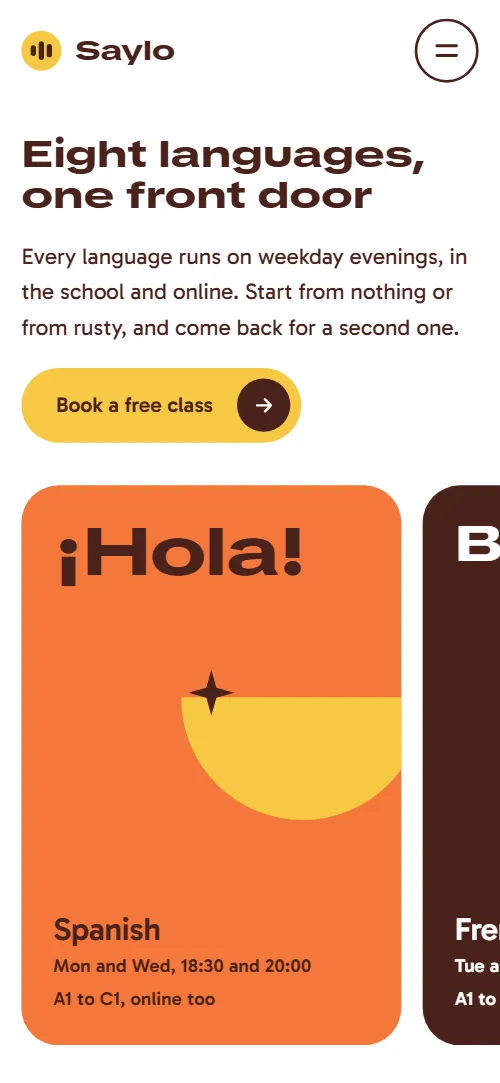
- Eight languages, one front doorFirst screen: h1 "Eight languages, one front door", a short paragraph with a button, and a pinned sideways track of eight language panels with a greeting, a name, days and levels
Pinned: the eight panels slide sideways as you scroll, and the shapes on panels that start off screen swing upright as they arrive.
- From hello to holding your ownFive level bars rising like a voice meter, each with a code and a short text (demo: A1 First words to C1 Thinking in it)
As the list crosses the screen the five bars grow one after another, upward on desktop with each code riding the top and sideways under 900px.
- A week at SayloFour rows for the week with a pill and text, two of them with photos (demo: evening classes, Friday conversation clubs, Saturday market walk, online)
The heading block lifts and fades in once, and each day pill springs in small and turned.
- Sit in on a real class before you pay a pennyA panel with a heap of coloured shapes, a heading, a sentence and a Book a free class button (demo: sit in on a real class before you pay)
As the panel scrolls in, six shapes drop and bounce onto a half-disc that rocks and settles.
- Three ways inThree price rows, each with a shape, a name, a line, a price and a button (demo: Group course £260, Private lessons £38 an hour, Club pass £45 a term)
The heading block and each row lift and fade in once, and the shape inside each white circle springs in.
- Overheard at SayloA pinned chat thread of five student sayings, each a face, a line in the language and its English meaning (demo: Spanish, Italian, French, Portuguese, German)
Pinned for half a screen per bubble: each face and bubble pops in from its side in turn while the thread climbs to keep the newest line in view.
- Questions people ask before the first classFive questions and answers as native <details> rows beside a heading with three popping shapes
The heading block lifts in once, three shapes spring in, and an opened question turns its plus into a cross.
- Say your first sentence in a new language this week, in a room of six people who are trying too.A speech bubble with a closing statement and a Book a free class button, then four details (visit, call, write, front desk hours)
The cream ground opens from a narrow pill into the full speech bubble, its tail grows in, the second half of the statement turns from grey to full colour word by word and three sparkles spring in.
- FooterA row with two links, the three-bar mark and wordmark, two links, then the school's address and three social buttons
The three-bar logo mark springs in.
Before you publish the language school website site
- Replace social preview image, favicon, email address, phone number and social media links and the invented demo facts (prices, dates, addresses). AGENTS.md lists them.
- Book a free class buttons in the nav, the menu overlay and the first screen lead to
#trialnow; point them to your trial booking page, or keep #trial. - Book a free class buttons in the trial and closing sections lead to
a mailto: link with the subject "Free class"now; point them to your trial booking page or form. - Book a place, Book a lesson and Get a pass buttons in the prices lead to
mailto: links with the subjects "Group course", "Private lessons" and "Club pass"now; point them to your checkout, booking or enrolment pages, one per option. - Phone and email links in the contact details lead to
a tel: link and a mailto: link with placeholder valuesnow; point them to your real phone number and email address. - Instagram, Facebook and YouTube buttons in the footer lead to
the home pages of the three sitesnow; point them to your own profiles, or remove the ones you do not use. - The pinned language track and the pinned chat thread are long on a phone: the track is the full width of eight panels and the thread holds for 2.5 screens.
- The five student portraits are stock photos of real people with first names as alt texts: replace them with your own students' photos, with their consent.
- GSAP, ScrollTrigger, SplitText and Lenis load from a CDN at the end of the body.
Questions about this language school website template
Is this language school website template free to use for a real school?
Yes, it is a language school website template free under the MIT licence, so a school or a freelancer can use it for paying clients. It is one index.html. GSAP, ScrollTrigger, SplitText and Lenis load from jsDelivr, and the photos and fonts are credited in CREDITS.md.
How do I hand it to Claude Code, or use a language school website design prompt?
Download index.html and AGENTS.md with the curl lines in the repository, put them in a folder and paste the short prompt from this page. The agent reads AGENTS.md first, then edits index.html. Without the file, paste the language school website design prompt below into Lovable or v0. Bolt can start from the repository through the language school card.
What must an AI agent keep when it edits the page?
Keep the section ids, data-8b-section, data-8b-motion and data-8b-part, the classes AGENTS.md lists, each greeting's --len and each level bar's --lv-step. Keep the header comment and the 8B meta tag. Keep the Design: 8B footer link unless the site owner asks to remove it. AGENTS.md holds this list; tell any agent in a vibe coding session to read it first.
Does the booking button send anything?
No. There is no form. The three Book a free class buttons in the nav, menu and first screen jump to the trial section, and the other five buttons open the visitor's email app on a placeholder address. Point them at your booking or checkout pages, or add a form service such as Formspree or Netlify Forms.
Can I get a site like this without editing code?
Yes, with 8B's AI website builder. You describe the school in a sentence and it designs a new site, in its own design rather than this template. Designing and restyling are free. Publishing with hosting and SSL, HTML export and AI edits in chat are on Pro at $9 a month billed yearly. It also runs in Claude and ChatGPT.
What happens with reduced motion or without JavaScript?
With reduced motion the pinned scenes and smooth scrolling switch off, so the language panels become a plain grid and the thread a list. The hiding nav bar and hover fills keep running. Without JavaScript the FAQ still opens, but the phone menu does nothing and the sideways track stays one clipped row, so later panels cannot be reached.