Free museum website template
Edit it by hand: it is one index.html with no build step, so you can open it in any text editor, change the words and photos, and upload it to any static host. Not a coder? Describe your business in one sentence to 8B's AI website builder and it designs a new site for you, with more pages when you need them. Designing is free; publishing with hosting is $9 a month, billed yearly. It also works inside Claude and ChatGPT.
MIT license · Made by 8B, an AI website builder · Plain text: wrenfield.md, data: wrenfield.json
About this museum website template
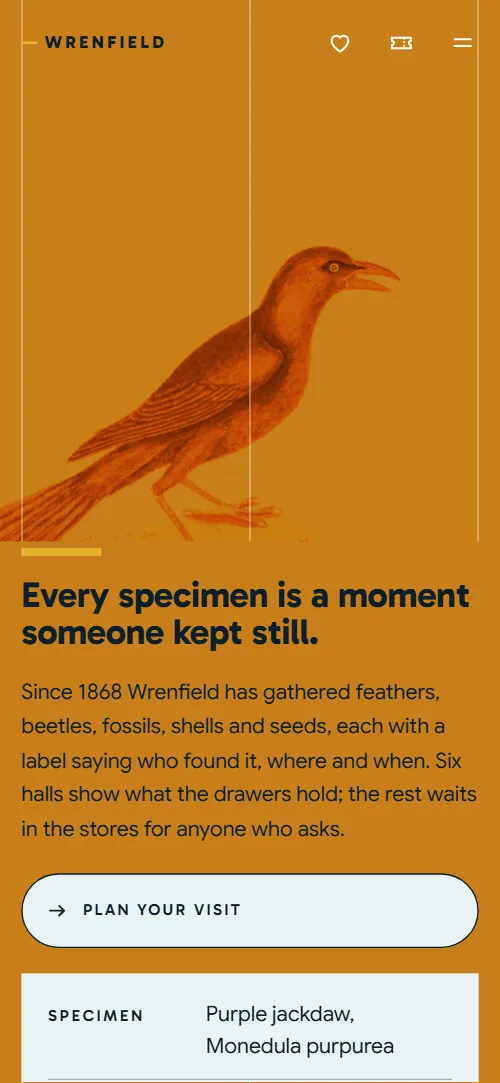
Museum website template: one free HTML page for a natural history museum or any collection, with six halls, a main exhibition, drawer tours, learning sessions, monthly late openings and membership. Hand-coloured plates sit on teal, amber and ice grounds with yellow accents. It is one file with an AGENTS.md that Claude Code, Cursor or Codex can adapt.
At a glance, October 2026. One 111 KB index.html with its CSS and JavaScript inside, 13 sections, 20 Unsplash photos credited in CREDITS.md, Gabarito and Google Sans from Google Fonts, GSAP 3.13.0 (ScrollTrigger); Lenis 1.3.4 smooth scroll loaded from jsDelivr.
Good museum web design answers the same questions on one scroll: what is on, when it is open, what it costs and how to book. This page does that in order, so museums, heritage societies, botanic garden visitor centres and small galleries can use it as a website for museum staff who have no developer. Many museum websites bury the collection; here six halls and four specimen drawers carry the page, and the stores are a bookable tour.
Give Claude Code, Cursor or Codex the facts only the museum has: founding year, specimen counts, hall names and floors, exhibition dates, ticket and tour prices, opening hours and charity number. The demo invents all of them, and its plates and photos are stock images to swap for your own collection. Vibe coding goes fastest when the agent also updates each style="--len:N" number after renaming a hall, and asks instead of guessing a price.
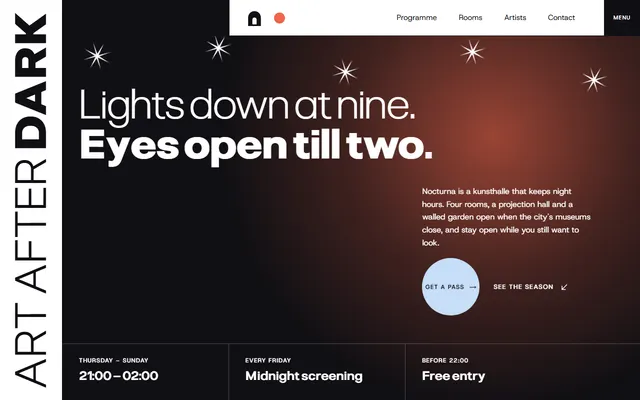
This museum website design suits a place with a real collection and a calendar of events. A gallery that mostly runs night programmes and screenings fits the kunsthalle template better. Booking is the weak spot: every Book button jumps to a section of the page until you point it at a ticketing tool, and both forms send nothing yet. An owner who does not code can try 8B instead.
Good for:
Turn the museum website template into your site with an AI agent
With an AI coding agent
Files (PowerShell: curl.exe):
curl -LO https://raw.githubusercontent.com/8bsite/museum-website-template/main/index.html
curl -LO https://raw.githubusercontent.com/8bsite/museum-website-template/main/AGENTS.md
curl -LO https://raw.githubusercontent.com/8bsite/museum-website-template/main/LICENSE
curl -LO https://raw.githubusercontent.com/8bsite/museum-website-template/main/CREDITS.mdPrompt for the agent:
Read AGENTS.md, then edit index.html. Make this the site for <my museum: name, founding year, collection size, halls or galleries, current exhibition with dates and price, tour and late-opening prices, learning sessions, membership levels, opening hours, access details, charity number, ticketing link>. Replace first the museum name, hall names, exhibition, prices, plates and contacts. Keep the section ids, the data-8b attributes the scripts read and the classes AGENTS.md lists. Ask me for missing facts and never invent dates, prices, visitor numbers, charity numbers or contacts.In a terminal
npx degit 8bsite/museum-website-template my-siteMuseum website design and motion
Palette
#5995a8 teal page ground of the halls, sessions and contact sections, the solid nav bar and the frame under the two lens photos#ffffff the large uppercase words and text on the deep teal blocks, the exhibition print sheet#0d1f2b body text, the nav, the menu overlay and the ground of the exhibition, Lates, FAQ and footer#eab12f yellow accent: filled buttons, grown underlines, nav hover bar, Lates glow, FAQ plus marks#f6d97c pale yellow ground of the field section and the lens discs, and the fill that floods outlined buttons on hover#c97f1c amber ground of the membership section and of the whole opening, where it tints the plate, and the opening panel on phones#e9f2f4 pale ice ground of the drawers and visit sections, session cards, membership labels and specimen labelFonts
- Gabarito: headings, hall names, uppercase labels and buttons, in weights 600 to 800
- Google Sans: body text and form fields at regular weight, larger lead lines at medium weight
Content hangs on one left line at a tenth of the width, which three hairlines mark in the opening. The opening is a full-screen plate tinted amber beside a text panel with a three-row specimen label (Specimen, Plate, Shown in). Six halls follow as big names over plates, then an exhibition with a facts list, four drawers, three research projects, four session cards, four dated events, four membership cards, a two-by-two visit table, a FAQ and four contact columns.
Gabarito sets the heavy uppercase words and labels, Google Sans the body. Yellow does the accent work: the lens, the underlines that grow under headings, the filled buttons. The exhibition, Lates, FAQ, footer and menu overlay sit on deep teal ink, the rest on teal, ice, pale yellow and amber.
Every value of this museum website design, with the type scale, spacing and the motion rules, is in its DESIGN.md file (Google's format), ready for a coding agent or Stitch.
What is on the museum website page
- NavigationTop bar with the brand, five links, social icons, member and ticket icons and a menu button; full-screen menu
The bar turns solid after 40 px and slides away on scroll down and back on scroll up, which still happens with reduced motion; the menu opens a full-screen overlay.
- Every specimen is a moment someone kept still.A hand-coloured bird plate tinted amber across the screen, beside a text panel with the h1, a button and a specimen label
On load the amber plate settles from a slight zoom, the panel lines slide in from the right and the bar over the heading and the label rules grow.
- Six halls, one family tree.Six halls sliding past sideways, each with its name, a plate, floor and a line
The section pins and the six halls slide sideways, each plate drifting slower than its hall and each name faster; with reduced motion they become a plain grid.
- The Colour of FlightThe main exhibition: a plate printed in three colour layers that slide into register, with title lines and facts
Three colour layers of one plate slide together into register as it crosses the screen, and the two title lines close in from opposite sides.
- Ninety-seven in every hundred specimens never go on show.A cabinet of four drawers whose trays slide out as you scroll, with a drawer-tour button
Each tray slides out of its drawer front as the drawer rises, alternately from left and right on desktop.
- A third of the year, our curators are out there.Fieldwork: a photo under a lens, text and three research projects
A yellow lens travels up the photo, a bar grows by the heading and two small glyphs rise at their own rate.
- LearnFour session cards arriving scattered and tilted, then lining up
The four session cards start scattered and tilted and turn into one straight row on scroll.
- After hours, the halls are yours.Evening openings: a gallery photo that lights up from grey, a large word and four dated events
The photo comes up from dark grey to full colour on arrival and each date rule lights yellow when its row reaches the reading line.
- Keep a drawer open.Membership: a heading, a plate under a lens and four label cards (three levels and a one-off adoption)
- Free, Tuesday to Sunday.Visiting information in a two-by-two table beside a gallery photo that narrows into its column
On desktop the photo starts across the whole section and narrows to its column while the information slides in from the right.
- Before you comeSix questions in native <details>
- Write to the curators.Four ways to reach the museum: a message form, phone, address with email and a newsletter form
The four columns start as a staircase and rise into one level row as the section arrives.
- FooterLarge wordmark, four link columns and a charity line
Before you publish the museum website site
- Replace social preview image, favicon, social media links, map, contact form (sends nothing yet), phone number and email address and the invented demo facts (prices, dates, addresses). AGENTS.md lists them.
- Plan your visit button in the opening and the Book a free ticket icon in the top bar lead to
#visitnow; point them to your ticketing page (Eventbrite, Ticketsolve) or keep it on the visit section. - Book the exhibition, Book a drawer tour, Book a free ticket, the Tickets links of the Lates, the four session links (Book a place, Apply for a term, Plan a class visit), and the Join and Adopt buttons lead to
#visit or #contact on the pagenow; point them to the booking, ticket or donation page for each (a ticketing tool, a membership form, a payment link). - Instagram and YouTube icons in the top bar, and the Instagram link in the footer lead to
the home pages instagram.com and youtube.comnow; point them to your museum's profile and channel. - Open the map button in the visit section lead to
the OpenStreetMap home pagenow; point them to the map link of your building. - Send and Subscribe buttons in the contact forms lead to
nothing is sent: both forms have action="#contact" and a script shows the status linenow; point them to your form endpoint (Formspree, Netlify Forms) and your newsletter service. - The Volunteer link in the footer lead to
#contactnow; point them to your volunteering page or email. - With reduced motion the scenes and Lenis are off and the halls become a plain grid, but the bar still hides on scroll down and the nav changes as you scroll.
- On phones the hall panels keep a contained plate size, which leaves empty space between each plate and its text.
- Both forms only validate and show a status line; they need a real endpoint before launch.
Questions about this museum website template
Is this free web design for museums and heritage charities?
Yes. It is one index.html under the MIT license, so a museum, a charity or a freelancer building for one can use it at no cost. GSAP, ScrollTrigger and Lenis load from jsDelivr, there is no build step, and the Unsplash photos are listed in CREDITS.md.
Can this museum template work for an art gallery or another collection?
Yes, after a text pass. The six halls become galleries, the drawer tours become tours of the archive or store, and the plates become your own images. It then works as a free gallery website template for a library, archive or botanic garden, and suits gallery websites that lean on a collection.
Do the booking buttons and forms send anything?
No. Both forms only validate and show a thank-you line, and the Book, Join and Tickets buttons jump to #visit or #contact. Connect Formspree or Netlify Forms for the forms and point each button at a ticketing, membership or donation page.
How do I give it to Claude Code, Cursor or Codex?
Download index.html and AGENTS.md into an empty folder with the curl lines in the README, open it in the agent and paste the prompt above. AGENTS.md lists the placeholders to replace and every fact the agent must ask you for.
What must I keep when I edit it?
Keep the section ids, the data-8b-section, data-8b-motion and data-8b-part values and the classes AGENTS.md lists. Update each --len number when you rename a hall or the museum, and use the same photo address for the opening plate and its tinted copy, and in all four exhibition copies.
Can I get a site like this without editing code?
Yes, with 8B's AI website builder. You describe the site in a sentence and its engine designs a new site, not this template. Designing and restyling are free; publishing with hosting and SSL, full HTML export and AI edits in chat are on Pro at $9 a month billed yearly. It also runs in Claude and ChatGPT.