Free self storage website template
Edit it by hand: it is one index.html with no build step, so you can open it in any text editor, change the words and photos, and upload it to any static host. Not a coder? Describe your business in one sentence to 8B's AI website builder and it designs a new site for you, with more pages when you need them. Designing is free; publishing with hosting is $9 a month, billed yearly. It also works inside Claude and ChatGPT.
MIT license · Made by 8B, an AI website builder · Plain text: elbowroom.md, data: elbowroom.json
About this self storage website template
Self storage website template: a free HTML file for a facility that rents lockers, rooms and garages by the week. It has four priced unit sizes, a building specification, a four step move-in and a reservation form, on grey paper posters with one signal yellow. Its scroll motion needs no JavaScript library, and AGENTS.md guides Claude Code, Cursor or Codex.
At a glance, November 2026. One 107 KB index.html with its CSS and JavaScript inside, 12 sections, 18 Unsplash photos credited in CREDITS.md, Instrument Sans, Playpen Sans and TikTok Sans from Google Fonts, no JavaScript libraries: CSS scroll-driven animations and a small inline motion script with built-in smooth wheel scrolling, no script loaded from a CDN.
A self storage facility, a removals firm that also keeps goods and a student or business store with a few unit sizes can all use this page. A storage facility website mostly needs sizes, weekly prices and a reservation form in one scroll, and a storage unit website like this adds a building specification and door stories that help a stranger trust a key. Anyone who needs a website for storage can start here.
As a self storage website template for Claude Code, Cursor or Codex it starts with facts only the operator holds: unit sizes, weekly prices, the number of units, desk hours, insurance terms and the address. The demo invents them all, with a Salford address and a company number. If you vibe code the site, change the size names in the unit faces and in the form's select, and update --len on any display text you reword.
It fits a facility with a short price list and a form, not a live unit map. The reservation form sends nothing, so a site that needs real time availability or card payment needs a booking system behind it. A business that prices by size, such as a size-based price board for a car wash, lays its sizes out differently. Without code, 8B's AI website builder designs a new site instead.
Good for:
Turn the self storage website template into your site with an AI agent
With an AI coding agent
Files (PowerShell: curl.exe):
curl -LO https://raw.githubusercontent.com/8bsite/self-storage-website-template/main/index.html
curl -LO https://raw.githubusercontent.com/8bsite/self-storage-website-template/main/AGENTS.md
curl -LO https://raw.githubusercontent.com/8bsite/self-storage-website-template/main/LICENSE
curl -LO https://raw.githubusercontent.com/8bsite/self-storage-website-template/main/CREDITS.mdPrompt for the agent:
Read AGENTS.md, then edit index.html. Make this the site for <my storage facility: name, town, unit sizes with area and weekly prices, number of units, access and desk hours, security, insurance terms, notice period, extra services, address, phone, email, company number>. Motion is CSS scroll-driven animation plus the inline motion kit: keep the gate script, the data-8b attributes AGENTS.md lists, the four unit faces and the four move-in sheets; add no library. Never invent prices, terms, insurance limits, reviews or contacts; ask me.In a terminal
npx degit 8bsite/self-storage-website-template my-siteGSAP build
Prefer GSAP? The same design built with GSAP, ScrollTrigger and Lenis smooth scroll, loaded from jsDelivr, is in the repository as index.gsap.html: 73 KB of code to download gzipped against 28 KB for this one, and the scroll motion also plays in Firefox.
curl -LO https://raw.githubusercontent.com/8bsite/self-storage-website-template/main/index.gsap.htmlSelf storage website design prompt for any AI tool
Use this prompt to build a self storage site from scratch in Claude Code, Codex, Cursor, Lovable, v0 or Bolt, or to brief a designer. It is this template's design written as decisions; with the template itself, the short prompt above is enough.
Build a one page website for a self storage facility that rents lockers, rooms and garages by the week. Sections in order: a top bar of four captions round a three link pill, an opening of two paper posters, three promises, an empty room photo, four unit sizes with weekly prices, a building specification, a four step move in, five door stories, extras, FAQ, a reservation form, footer. Type: Instrument Sans for text and for sentence case headings at medium weight; TikTok Sans at weight 900, condensed capitals, for unit names, steps and door numbers; Playpen Sans for short handwritten notes. Colours: #ebebeb grey ground, #121212 ink and the dark extras panel, #f8f8f7 paper posters, #565656 notes, #848484 giant pale words, #ffd21a signal yellow only for the main button, price highlights and marks. Paper posters with a soft drop, ovals round key words, pill buttons, square fields. Avoid purple gradients, three icon cards, a centered hero with two buttons and stock icons. Motion idea: things being handled, so a poster tips over, a block of four unit faces turns and step sheets are dealt; use CSS scroll-driven animations, no animation library, and a static layout without support or under prefers-reduced-motion. One primary action, Book a unit, plus a form that holds a unit for a week. Ask me for unit sizes, weekly prices, hours, insurance terms, address and company details; never invent them, leave placeholders and list each at the end. Acceptance: no console errors, layout holds at 390 px with the unit faces in one column, keyboard focus visible.Self storage website design and motion
Palette
#ebebeb page ground, a cool light grey#121212 text, button and form outlines, the dashed nav pill, the dark extras panel and the dots of the Come by lettering#f8f8f7 poster and sheet paper, the nav pill, form fields and text on the dark panel#565656 secondary text: the hours note, promise numbers and the line under the unit sizes#848484 the giant pale words behind the three promises#ffd21a the only saturated colour: the main button, price highlights, the manifesto's last word, the specification heading band, the location dot and link hovers#c6c6c6 hairlines between the services on the dark extras panelFonts
- Instrument Sans: body text, captions, buttons and fields at weights 400 to 600, plus sentence case section headings and the uppercase headline, manifesto lines and service words at weight 500
- TikTok Sans: unit names, step names, promise ghost words, door numbers and the footer wordmark, heavy 900 weight in condensed capitals
- Playpen Sans: handwritten notes beside the copy, at 19px
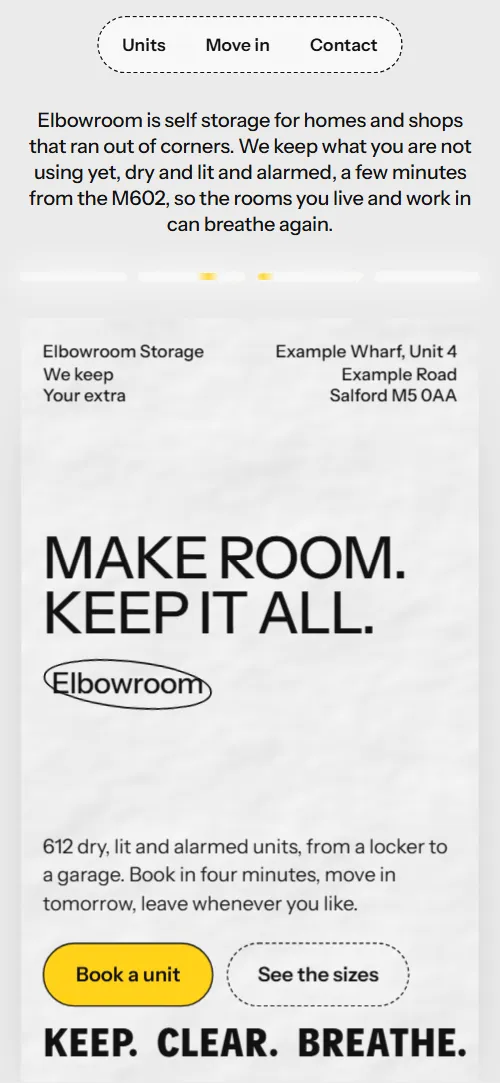
Paper posters pasted onto a light grey ground carry the page: a first poster on a twelve column grid with address captions, a second poster with a ten line justified manifesto, four unit faces, a specification label with six rows, four tilted step sheets and five door numbers. Section headings are sentence case at medium weight, the headline and manifesto medium capitals; unit names, steps and door numbers are heavy condensed capitals. Handwritten notes sit beside the copy.
The first screen is a paper poster pasted on light grey, under four small glowing light bars, with an oval drawn round the brand word. The extras section turns dark over a faint corridor photo. The main button is a yellow pill that turns near black on hover.
Every value of this self storage website design, with the type scale, spacing and the motion rules, is in its DESIGN.md file (Google's format), ready for a coding agent or Stitch.
What is on the self storage website page
- NavigationTop bar of small captions: a brand caption, Self_storage, a pill with three links, Open_24/7 and the district
Once you scroll past 90 px the four captions round the pill slide up and fade out one after another, and they return near the top and at the very bottom.
- Make room. Keep it all.Two screens: a paper poster with the headline, an oval word, address, actions and three keep/clear/breathe lines, then a second poster with a justified manifesto
On load the intro rises, the light bars flicker on and the poster is pasted in; on scroll the first poster tips back over its bottom edge while the second swings down from its top edge, and the manifesto lines slide in from alternate sides.
- Three promises, written into the agreement you signPinned sideways track of three promises with giant pale words, a pill-shaped photo and a corridor photo
The section pins and the three promise panels travel sideways, with each giant word sliding in, each note straightening and the pill photo widening.
- The room you get backAn empty room photo with a text column on each side
The empty room photo opens from a narrow slit to full width while the two text columns are pushed outward.
- Four sizes, one keyFour unit sizes as faces of a block that turns and then opens flat into a row (a column on phones)
The section pins for about two and a half screens while the four unit faces turn round a block, then open out flat into a row.
- Kept dry, lit and watchedA building specification label: six rows of conditions and a corridor photo
The heading and each of the six rows tip up into place with a short stagger, and the corridor photo is revealed from the top down.
- Moving in takes one morningFour tilted step sheets that start as one pile and are dealt onto the wall
The wall pins while the four step sheets start as a tilted pile and are dealt one by one into their places.
- Behind 612 doorsFive door numbers in ovals, each with a photo and a line about what is kept behind it
Each door number's oval draws itself and each photo is revealed from the top down, with a short stagger.
- Everything besides the roomA dark panel with a drum of nine extra services that spins and unrolls into a list over a corridor photo
The section pins while the nine services spin past on a drum and unroll into a flat list, and the dark panel closes to a slit as you leave.
- Questions people ask at the deskSix questions as native <details> beside a heading with a phone link
The heading, the line under it and each question tip up into place with a stagger.
- Come and stand in a unitA giant halftone COME BY, then address, phone, email and a reservation form
The dots of the giant Come by lettering grow from faint dust into printed letters while the tilted letters settle into one line.
- FooterFooter on the grey ground: a large wordmark over address, hours, four links and the company line
Before you publish the self storage website site
- Replace social preview image, favicon, phone number, email address and contact form (sends nothing yet) and the invented demo facts (prices, dates, addresses). AGENTS.md lists them.
- Book a unit button on the first screen lead to
#contactnow; point them to your online booking page, or keep #contact once the reservation form is connected. - See the sizes button on the first screen and the Find the size that fits link in the room section lead to
#unitsnow; point them to keep as it is, or point to a page with your full price list. - Privacy and terms link in the footer lead to
/privacy, a page the template does not containnow; point them to your privacy policy and storage terms page. - Phone links in the questions section and the contact section lead to
tel:+441610000000now; point them to your own number, in the tel: link and in the visible text. - Scroll-driven animation is used when the browser supports it (Chrome, Edge and Safari today; Firefox does not yet) and the visitor has not asked for reduced motion. Otherwise the page is static: the opening still has its load-in, but the posters, tracks, blocks and drum are plain layouts and the nav captions stay.
- With reduced motion requested the load-in, the light-bar glints, the tilting brand oval and all scroll scenes are off, and the page is the same static layout; the hover transitions on buttons, links and the FAQ markers still run.
- On wide screens with a mouse, a small script smooths the wheel so scrolling feels softer; on touch screens and in static mode the browser scrolls natively. The pinned scenes add scroll length: about 1.6 screens for the move-in wall, 2.2 for the extras drum, 2.6 for the units block, and the promises track as much as its width needs (about four screens at 1440 by 900).
- The reservation form sends nothing: connect it to a form service or your booking system. The Privacy and terms link goes to /privacy, which the template does not contain.
- The giant pale words in the promise panels are decorative and low in contrast by design; the real text is in the headings and paragraphs. The handwritten notes use a third font (Playpen Sans) at 19 px, 17 px in the promise panels on phones.
Questions about this self storage website template
Is this a free storage unit website template I can use for a client?
Yes. It is one index.html under the MIT license, so you can ship it to a client at no cost, with no build step. Photos are Unsplash images and the three fonts are open licensed; CREDITS.md lists them. The unit block and the move-in wall are built for four items each.
Does the Hold it for a week form reserve a unit?
No. The form checks the name and the phone or email field, shows a thank-you line and sends nothing. Connect Formspree or Netlify Forms with the steps in AGENTS.md, or point the Book a unit button at your own booking page. There is no availability map or payment.
How do I give it to Claude Code, Cursor or Codex?
Download index.html and AGENTS.md with the curl lines in AGENTS.md into an empty folder, then tell the agent to read AGENTS.md before editing. Hand over the files, not the page address. Without the file, paste the self storage website design prompt below into Lovable, v0 or Bolt.
What do I change first for my own facility?
Start with the four unit names, areas and weekly prices, the number 612 and the opening and desk hours. Then the address, phone, email, company number, insurance and notice terms. The demo invents all of them, so ask the owner for each and never guess.
Does it need GSAP, and what shows in Firefox or with reduced motion?
No library: the effects are CSS animations, mostly scroll-driven, and a short inline script, 28 KB gzipped against 73 KB for the GSAP build. In Firefox the opening still plays its load-in, but the posters, tracks, block and drum are plain layouts and the nav captions stay put. With reduced motion the load-in stops too.
Can I get a site like this without editing code?
Yes, in a different way. 8B's AI website builder designs a new site from a sentence, not this template. Designing and restyling are free. Publishing with hosting and SSL, full HTML export and AI edits in chat are on Pro at $9 a month billed yearly. It also runs inside Claude and ChatGPT through the 8B connector.