Free driving school website template
Edit it by hand: it is one index.html with no build step, so you can open it in any text editor, change the words and photos, and upload it to any static host. Not a coder? Describe your business in one sentence to 8B's AI website builder and it designs a new site for you, with more pages when you need them. Designing is free; publishing with hosting is $9 a month, billed yearly. It also works inside Claude and ChatGPT.
MIT license · Made by 8B, an AI website builder · Plain text: merge.md, data: merge.json
About this driving school website template
Driving school website template: one free HTML file for a school or an independent instructor who sells lessons by the hour. It has five lesson stages, an all-inclusive price card, four instructor cards, a pick-up zone board, three packages and a booking form, in bright colour tiles. AGENTS.md is included, so Claude Code, Cursor or Codex can adapt it.
At a glance, October 2026. One 99 KB index.html with its CSS and JavaScript inside, 12 sections, 17 Unsplash photos credited in CREDITS.md, Host Grotesk and Pliant from Google Fonts, GSAP 3.13.0 (ScrollTrigger, SplitText); Lenis 1.3.27 smooth scroll loaded from jsDelivr.
A website template for driving school work has to answer the same few questions, and this page does it in order: what the price covers, what is in the car, who teaches, where the pick-up reaches, what the packages cost and how to book. If you searched for a driving instructor website template, a solo instructor can cut the instructor section to one card. The same structure suits a tutor or music teacher who sells hour packages.
Replace the school facts first: prices and package hours, instructor names, languages and free slots, the 24 district names, the three test centres, pass figures and learner quotes. The demo is British, which makes it one of the driving school website templates UK schools can start from, but DVSA, pounds and the test centres are demo content to replace. For vibe coding in Claude Code or Cursor, tell the agent to keep data-8b-section, data-8b-motion and data-8b-part.
Choose this when the business sells hours of tuition, has a few named people and a pick-up area. A shop or a restaurant needs another shape, and an online teacher with mentors and plans sits closer to the music school template. The weak spot is booking: the form sends nothing and the next free times on the cards are typed by hand, not a live calendar. An owner who does not code can describe a new site to the 8B builder instead.
Good for:
Turn the driving school website template into your site with an AI agent
With an AI coding agent
Files (PowerShell: curl.exe):
curl -LO https://raw.githubusercontent.com/8bsite/driving-school-website-template/main/index.html
curl -LO https://raw.githubusercontent.com/8bsite/driving-school-website-template/main/AGENTS.md
curl -LO https://raw.githubusercontent.com/8bsite/driving-school-website-template/main/LICENSE
curl -LO https://raw.githubusercontent.com/8bsite/driving-school-website-template/main/CREDITS.mdPrompt for the agent:
Read AGENTS.md, then edit index.html. Make this the site for <my driving school: name, city, lesson stages and typical hours, what the price covers, cars and gearboxes, instructors and languages, pick-up districts and test centres, packages and prices, office hours, how people book>. Replace first the prices, instructors, districts, pass figures and quotes. Keep the section ids, data-8b-section, data-8b-motion and data-8b-part, the classes AGENTS.md lists and each --len set to its word's character count. Ask me for missing facts and never invent prices, approvals, pass rates, reviews or contacts.In a terminal
npx degit 8bsite/driving-school-website-template my-siteDriving school website design and motion
Palette
#eef0f3 pale grey page ground, the navigation bar and the tunnel board#0e0e10 text, solid buttons, the dark booking card, hairlines and the centre cells of the district board#ffffff form fields, jargon cells, text on the dark booking card, the hover fill of the purple buttons and the focus halo#ffb300 amber: button hover fill, the areas card, the amber nervous panel, one stage, one package card and one nav tile#ff5b37 orange: the all-inclusive price card, one nav tile, one pass quote and one footer cell#ec3b41 red: the first stage, the red nervous panel, the strike-through on jargon terms and one footer cell#22c35d green: the hours tile, the south zone of the district board, the green nervous panel and the contact info card#3d84f7 blue: the north zone of the district board, one nav tile, one instructor card and one package card#a15cf6 purple: the Book a lesson buttons and the Send request button, the last lesson stage, one instructor card, the east zone of the district board and one package card#cdb4fa light lilac: the Theory, sorted tile, one pass quote and one jargon translation cell#575a62 grey for intro paragraphs, jargon terms and the legal lineFonts
- Pliant: heavy wide display face at weight 800: section headings, stage names, the nervous words, the wordmark and the large footer wordmark
- Host Grotesk: body text, labels, buttons and form fields in regular to semibold weights
On wide screens a fixed rail on the left holds the wordmark, four numbered colour tiles, the booking button and the phone number; below 1024 px it becomes a bar with a menu sheet. The sections are rounded tiles on a pale grey ground: a bento of price and hours, a text card beside a perspective tunnel of colour and photo cells, portrait cards, a 24-cell district board and a table of terms.
Seen as a driving school website design template, it uses colour as a code: the same hues come back on the lesson stages, car features, package cards and district zones. Hovering a button or a nav tile wipes a fill across from the left.
Every value of this driving school website design, with the type scale, spacing and the motion rules, is in its DESIGN.md file (Google's format), ready for a coding agent or Stitch.
What is on the driving school website page
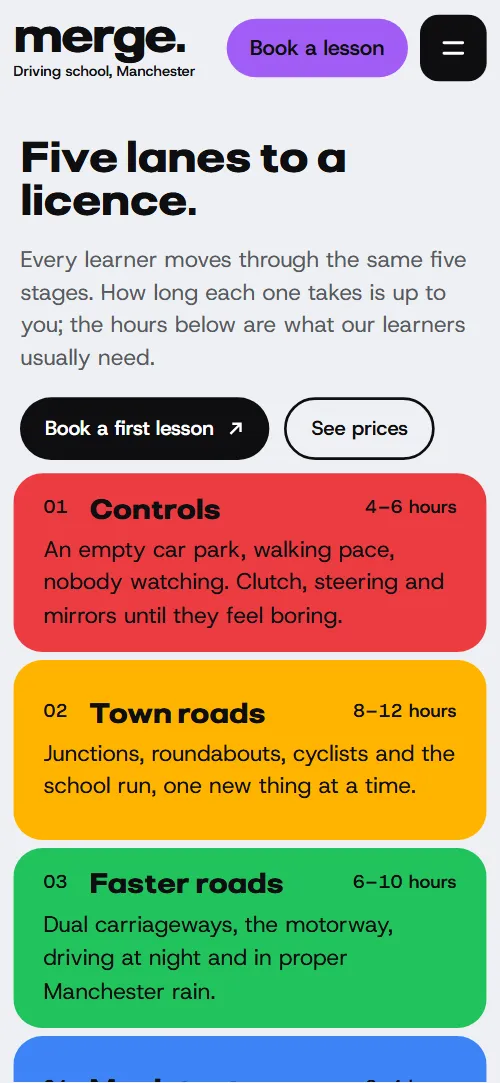
- NavigationTop bar with wordmark, Book a lesson button and menu button; from 1024 px a left side rail of four colour tiles, the button and the phone number
The top bar, and on wide screens the side rail, slides up out of view when you scroll down and returns on a move up, a class toggle with a CSS transition that keeps running with reduced motion.
- Five lanes to a licence.Headline "Five lanes to a licence.", intro, two buttons, and five coloured lesson stages with hours
On load the headline and its side text fade and rise, and the five stage rows slide in from alternate sides one after another, in CSS that reduced motion switches off.
- One price. Everything in the car.Bento of tiles: one orange all-inclusive price card, two list tiles, a photo and an hours tile
Scrubbed as the section arrives: four tiles start small behind the orange card and slide out to their places one after another.
- Dual controls in every car.Text card about the cars beside a 3D tunnel of colour cells and photos
Scrubbed while the tunnel crosses the screen: its four perspective walls, grid lines and cells together, glide six grid units toward you and settle at their depth.
- The calm voice in the passenger seat.Four instructor cards with a portrait, bio, gearbox and languages, and next free slots
Heading lines arrive from alternate sides and each instructor card opens from its top left corner as it arrives.
- We come to you.Pick-up zone as a 24-cell district grid coloured by three test centres, with a legend
Scrubbed: only the three centre cells are coloured at first, then each district takes its centre's colour in order of distance.
- Nervous?Three stacked colour panels that answer in turn: Nervous? Good. Let’s go.
A sticky stage holds for about 2.3 screens of scrolling: an amber square grows from the red panel's corner until it fills the stage, then a green one does the same, while the amber and green words rise in.
- We speak human.Driving jargon table: five terms and their plain-English translations
Scrubbed row by row: a large jargon term slides back into its own cell, shrinks and is struck through while the plain words rise in.
- Passed. Recently.Heading with a looping reel of eight photos and three pass quotes
A reel of eight photos scrolls sideways forever in a 48 second loop, pausing on hover, focus and when off screen.
- Pay for the driving, nothing else.Three package cards with a price, hours, a description and a button, plus a row of squares per hour
One square per lesson hour is drawn on each package card, then filled square by square as the card crosses the screen, the biggest package last.
- Book your first lesson.Dark booking card with a form, and a white card with phone, email, office and hours
The heading lines arrive from alternate sides and both cards open from their top left corners.
- FooterLarge wordmark with six small colour cells, legal line, DVSA note and four links
Scrubbed: six colour cells step along the grid from scattered spots to their resting squares around the wordmark.
Before you publish the driving school website site
- Replace social preview image, favicon, phone number, contact form (sends nothing yet) and email address and the invented demo facts (prices, dates, addresses). AGENTS.md lists them.
- Book a lesson buttons in the nav (top bar, phone menu, side rail) and "Book a first lesson" under the headline lead to
#contactnow; point them to your online booking page, or keep #contact once the form is connected. - "See prices" button under the headline lead to
#pricesnow; point them to keep as is, or a page with full price details. - "Choose your car" button in the cars section lead to
#contactnow; point them to a booking page with a car or gearbox choice, or keep #contact. - "Choose First ten", "Choose Test ready" and "Choose the intensive" buttons on the three package cards lead to
#contactnow; point them to a checkout or booking link for each package, or keep #contact. - Phone links in the nav, the phone menu and the contact card lead to
tel: with a placeholder numbernow; point them to your real number in tel: form. - Booking form in the contact section lead to
action="#": nothing is sent, the script only shows a thank-you linenow; point them to a form service address (Formspree, Netlify Forms) or a link to your booking system. - On phones the four-section navigation is only in the menu sheet; the top bar shows the wordmark, the Book a lesson button and the menu button. On wide screens the side rail slides out of view while you scroll down and returns on a move up.
- The nervous scene sets a 330svh sticky track; on short landscape screens the panels' text has little room.
- With reduced motion the photo reel does not move but stays clipped, so only the photos that fit the width show (one or two on a phone, three or four on a wide screen) and the rest cannot be scrolled to.
Questions about this driving school website template
Is this one of the free driving school website templates, and can I use it for clients?
Yes. It is a single index.html under the MIT license, so an instructor or a freelancer can use it for clients at no cost. GSAP, ScrollTrigger and Lenis load from jsDelivr and there is no build step. The 17 photos are Unsplash images and the fonts are under the Open Font License; CREDITS.md lists them.
Where does the booking form send requests?
Nowhere yet. The form needs a name and a phone number, then shows a thank-you line and sends nothing, because its action is #. Connect Formspree or Netlify Forms with the steps in AGENTS.md, or link to your booking system. Also edit the line that promises a call back within one working day.
How do I hand it to Claude Code, Cursor or Codex?
Put index.html and AGENTS.md in an empty folder with the curl lines at the start of AGENTS.md, and tell the agent to read AGENTS.md before it touches index.html. Give it the files, not the page address, because a link comes back as a summary. Then paste the prompt from this page, filled in with your school's facts.
Which parts of the file break if I change them?
Keep the section ids, the data-8b-section, data-8b-motion and data-8b-part attributes and the classes AGENTS.md lists. Big words need a --len equal to their character count, and package cards their hours. Keep the header comment and the 8B meta tag in the head. Keep the Design: 8B footer link unless the site owner asks to remove it.
Can I get a site like this without editing code?
Yes, in a different way. 8B's AI website builder designs a new site from a sentence, in its own design, not this template. Designing and restyling are free; hosting with SSL, full HTML export and AI edits in chat are on Pro at $9 a month billed yearly. It also runs inside Claude and ChatGPT through the 8B connector.
What works on a phone, with reduced motion or without JavaScript?
On a phone the four section links sit in the menu sheet. With reduced motion the scroll scenes, entrance effects and smooth scrolling are off, while the bar's hide on scroll and the hover fills keep running. Without JavaScript the menu button cannot open, the hour squares are not drawn and the photo reel does not loop.